What Is A Virtual Machine?
A Virtual Machine (VM) is a software-based computer that allows multiple operating systems to run on a single physical machine, each in an isolated environment.
Types Of Virtual Machine:
- System Virtual Machine: Runs a full operating system on virtualized hardware
- Process Virtual Machine: Runs a single application or process
- Cloud Virtual Machine: Deployed and managed in a cloud environment
Before learning what is virtual machine, checkout this guide to understand what is VPS hosting.
What is a Virtual Machine?
Definition of Virtual Machine
A Virtual Machine (VM) is used to run multiple operating systems, such as Windows, Linux, macOS, etc., all together on a single physical machine (host machine). However, each VM runs in an isolated manner, and every VM can run its own set of software and configurations.
How Does a Virtual Machine Work?
VMs use virtualization technology to create an isolated virtual version (VM) of a physical machine (host). Each virtual version is called a Guest and uses the host’s resources such as CPU, memory, and storage.

Well, a Hypervisor is used for resource allocation tasks. Also, the VM runs in an isolated environment with its own operating system and applications like a computer.
There are two types of Hypervisors:
Type 1 Hypervisor
Type 1 Hypervisor (Bare-Metal Hypervisor) runs directly on the physical hardware. Also, the resource allocation does not need a host operating system. KVM and Xen are the type 1 examples.
Type 2 Hypervisor
Type 2 Hypervisor (Hosted) runs on top of a host operating system. VMware Workstation and Oracle VirtualBox are examples.
What are the Types of Virtual Machines?
Different types of virtual machines serve various purposes. They are discussed below –
Process Virtual Machine (Application VM)
When a VM is used to run just one application or process and exists only while it is running, it is called a process VM or application VM. So, it is destroyed once the application closes. This way, applications can run on different platforms and become platform-independent.
System Virtual Machine
A system VM is a common virtual machine types. It is to run multiple VMs on a single machine. Every VM can run its own operating system.
Cloud VM
This is a modern virtual machine types that is deployed and managed in a cloud environment. Businesses use Cloud provider platforms like AWS, Azure, and Google Cloud to create and run VMs on their infrastructure.
Read more about what is VDS and how it powers modern hosting.
What are the Advantages of Virtual Machines?
Let us know the benefits of virtual machines:
- Multiple VMs running on a single physical machine eliminates the need for additional hardware. This saves you various costs for hardware, maintenance, etc. This is one of the top advantages of VM.
- Multiple OS on one machine also minimizes the physical footprint. Therefore, companies can run various services from a limited number of physical machines.
- The VM provisioning is fast as it can be quickly deployed and replicated. You can set up a new environment in no time effortlessly. Resultantly, software testing, development, and other processes speed up.
- Isolation boosts reliability. The failure of one VM does not affect others’ operation.
- Add more VMs and easily scale up to distribute load for the best performance of your increased workload.
- Strong isolation of VMs also ensures security. A virus or malware in one VM does not affect others. Moreover, they are highly used in security testing. Also, its controlled environment is the best for sandboxing applications.
- You can move VMs to a different host or even a cloud due to its easy portability. There won’t be any compatibility issues too.
Explore the complete guide on virtual machine advantages and disadvantages to learn more.
What are the Disadvantages of Virtual Machines?
VMs have some drawbacks that are discussed below:
- Multiple VMs can degrade the performance of a single host. Thus, the host machine needs to be powerful enough.
- VMs boot slower than containers as they need to load the entire operating system.
- The resource usage for each VM is significant. This can cause issues if resources are limited.
- VM set-up and management with different OS and configurations can be complex.
Explore the difference between physical and virtual server in detail here.
What is Virtualization?
Virtualization technology is used to create virtual versions that share physical resources (CPU, storage, networks, etc). It enables you to maximize resource usage through a hardware layer abstraction using a hypervisor to run multiple environments on a single host machine. Read more about what is virtualization.
Types of Virtualization
Hardware Virtualization – To virtualise physical servers and create virtual machines using a hypervisor. Multiple operating systems can run on a physical machine.
Software Virtualization – To create virtual environments for OS and applications. Example – Running an Android OS on a Windows machine
Storage Virtualization – Multiple storage devices combined into one virtualized storage pool. This type enables better resource management and higher performance. Also, you can easily handle data backups, disaster recovery, and more.
Network Virtualization – Virtualisation of physical network resources to create multiple virtual networks. Each of these VMs will have dedicated bandwidth. So, this setup enables more efficient data traffic management and better security.
Desktop Virtualization – To access their virtual desktop from any device. The complete desktop environment is hosted on a remote server. It is separated from the physical device to make it easier to manage, update, and secure.
Curious about how virtualization powers cloud computing? Dive into our detailed guide on Types of Virtualization in Cloud Computing to explore its impact!
What is the Difference Between Container and Virtual Machine?
Containers and virtual machines run applications in isolation. They provide the same function but their working is different.
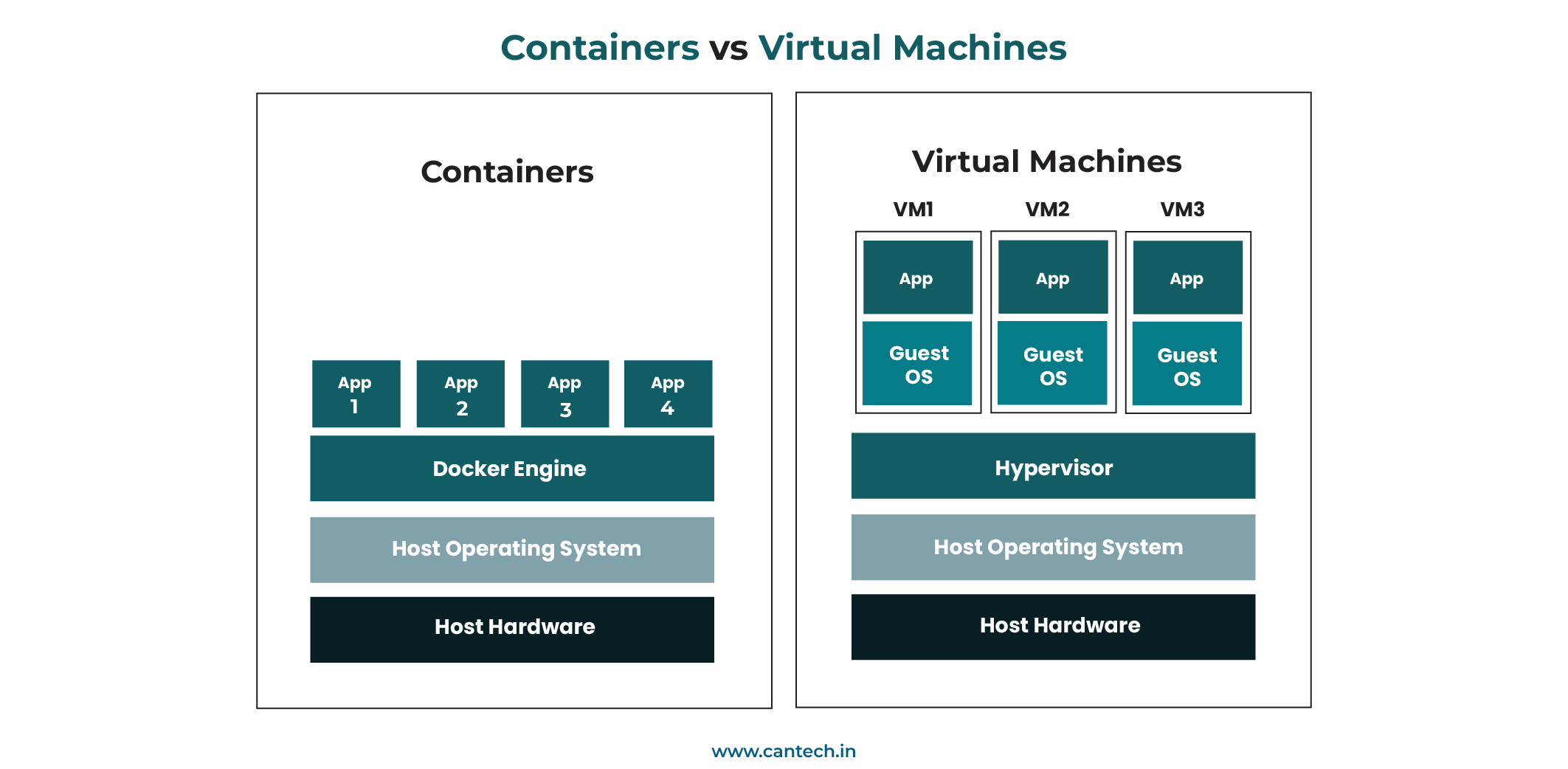
Let us have an overview on Virtual Machines versus Containers –
| Containers | VMs | |
| Visualisation | Virtualize the application and its dependencies | Virtualize the complete hardware layer and run independent operating systems |
| Resources | They share the host OS kernel so more lightweight | Separate operating systems are required so this makes them more resource-intensive |
| Boot Time | Faster to boot | They need to boot an entire operating system so slower |
| Use-Cases | Microservices, cloud-native applications, and modern app development | Running multiple full-fledged operating systems, legacy applications, and isolating environments |
For a modern comparison of VM-based architecture and containers, explore containerization vs virtualization.
How to Set Up a Virtual Machine?
Setting up a virtual machine includes the below basic steps. However, they may differ based on the technology you use –
- Choosing and installing a hypervisor such as KVM, VMware, VirtualBox, etc.
- Using the hypervisor to manage your virtual machine and allocate resources.
- Installation of operating systems on the virtual machine such as Linux, Windows, etc.
- Network configurations are set up so that the VM can communicate with other local or remote machines over the internet.
- Start using the VMs
Cantech’s Windows and Linux VPS Hosting
Cantech offers reliable and efficient VPS Hosting India. Our affordable and flexible plans offer dedicated virtual resources and advanced features that deliver high performance and full control. We use state-of-the-art KVM virtualisation technology, making our KVM VPS server a powerful and secure solution for your hosting needs.
Our Windows virtual machines are optimized for running Windows OS with pre-configured setups to make deployment easy and quick. Whereas, Linux Virtual machines support a wide range of Linux distributions such as Ubuntu, CentOS, Fedora, etc.
Conclusion
This blog explains ‘What is a Virtual machine?’ Well, it is an isolated and dedicated environment that provides the flexibility to run various operating systems. If you are looking for VDS server hosting resources, get in touch with Cantech experts and discuss your requirements!
FAQs
What is the Difference Between Virtualization and a Virtual Machine?
Virtualization is the technology that makes virtual machines possible; it is the process of dividing a physical machine’s resources into multiple isolated environments. A virtual machine is the result of that process; a software-based computer that runs its own operating system and applications inside one of those isolated environments. In simple terms, virtualization is the method, and a virtual machine is what you get when you apply that method.
What is an Operating System?
An operating system (OS) is a software. It manages a computer’s hardware and software and helps you interact with the system, run applications, and manage files. Windows, macOS, and Linux are the operating systems.
Why Virtual Machine is Used?
The VM runs on a layer created by system virtualisation that separates it from the host machine. Therefore, a virtual machine is mainly used when someone needs to run different operating systems on the same physical device without any risk to the main system.
Also, many people use a virtual machine for personal use, to test software, learn Linux, or isolate tasks without changing their real OS. Thus, the virtualisation process helps to create a safe and controlled space through machine virtualisation using the latest technologies like KVM.
What is Virtual Machine in Operating System?
A virtual machine in OS means a software-based system that behaves like a separate computer inside the host machine. Well, the virtual machine is created using system virtualisation, where the OS sees it as a real device.
Further, users can install any guest operating system as if it were running on a physical device. This type of virtual machine in OS plays an important role in development, testing, running sites/apps, etc.