What is a VPS Snapshot?
A VPS snapshot is a copy of the current disk state of a virtual server. Think of it like a restore point for your virtual server. Restore points are useful for rewinding changes to the system after a failed software update or change. You can think of a restore point like a backup, but restore points should not be used in replacement of backups. Anything changed after a restore point is taken may not be recoverable.
Introduction
A single configuration change or update can sometimes make a server very difficult to restore. Various types of software can conflict with one another, resulting in an unsuccessful deployment or an unexpected error. Operating system or application updates can break a critical service or even cause a service to be left in an unstartable state. Often, it would be very beneficial to revert a server back to a previously working state. A snapshot of a VPS allows you to save the state of a server at a point in time. You can revert to that state to roll back to a working configuration when a change needs to be reversed.
What is a VPS Snapshot & How Does It Work?
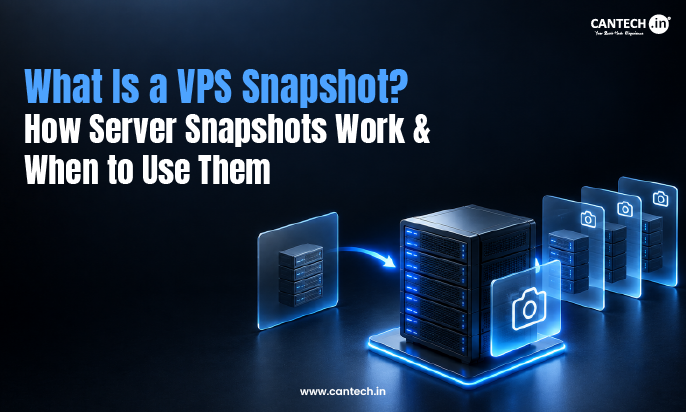
A VPS (Virtual Private Server) snapshot is a picture of the entire state of the virtual server. It is similar to taking a picture of the server’s state at a point in time, including the operating system (OS), applications, data, and configuration.
The management interface of a VPS allows you to take a snapshot. The physical storage of the VPS may make a separate copy of the state or use a technology called copy-on-write. In this case, instead of maintaining a true copy of the state of the VPS, changes to the state are logged.
What Does a VPS Snapshot Capture?
A snapshot may have:
- Operating system files and configuration
- Software and packages
- Configuration files of a server
- Files of web applications
- Data of applications and other stored data
- Files of other applications
The contents of a snapshot differ between VPS services. A snapshot is a point-in-time copy of a server and is not a full server backup. Data can be modified on the server after a snapshot and, if necessary, restored; however, modified data can not be restored.
Is a VPS Snapshot the Same as a Backup?
A VPS snapshot captures a VPS at a given point in time and is used to revert to that point in time. Data backups are used for data protection for extended periods of time. Thus, a backup can exist outside of a VPS.
| VPS Snapshot | Backup |
| Captures a point-in-time server state | Keeps a recoverable copy of data |
| Useful for quick rollback | Suitable for long-term recovery |
| Helpful before updates or configuration changes | Useful when data needs to be recovered later |
| Usually tied to the VPS platform | Can be stored separately |
When Should You Take a VPS Snapshot?
A VPS snapshot is taken when changes will be made to the server, which may cause the server state to worsen. With a snapshot, the admin has a restore point that they can easily access instead of relying on their ability to recover the server if changes made cause the server state to worsen.
Before a Major OS Update
A snapshot captures the current state of a server. Take a snapshot when making major changes to the state of a server. Snapshots can be thought of as saved states. Before upgrading the OS on a server, a snapshot can be taken. In the case of a change affecting the server adversely, e.g., package conflicts, the state of the server can be reverted to the snapshot.
Before Installing Server Software
Installing control panels, web servers, and databases may affect the existing services. A snapshot can be used to revert to a backup if needed before the installation.
Before Changing Server Configuration
Modifying any of those settings in general can result in unpredictable outcomes. It’s a good idea to take a snapshot when you want to perform tests to alter settings that cannot easily be reverted.
Before a Major Application Deployment
A snapshot allows the team to go back to the server state prior to application release, in case the newly released version of the application causes any issues.
Before Risky Troubleshooting
When you make configuration changes as part of your troubleshooting process, capturing a snapshot makes a configuration change that might impact another area of the system reversible.
How Do You Restore a VPS From a Snapshot?
Restoring a VPS snapshot is usually pretty simple. While the process may vary by provider, the general steps will be the same. You will start by selecting your VPS. You will then select the snapshot section or recovery section. You will then select the snapshot you want to restore from. Make sure the settings are correct. Once you have checked all the settings, you will click Restore. It’s a good practice to check your applications to ensure there are no issues after a snapshot restoration.
What Happens When You Restore a VPS Snapshot?
Restoring a snapshot restores every change after that point in time. Restoring the 10 AM snapshot, for example, would undo anything done to the website files or the database at 2 PM. To prevent data loss, keep any changes made after the snapshot that can’t be repeated or reproduced.
What Are the Limitations of VPS Snapshots?
VPS snapshots do have their limitations. For a true backup, the snapshot would need to be created and stored separately from the infrastructure the VPS resides on. Also, when a snapshot is created and the VPS is later updated, the updates will be lost if the snapshot is restored. Recently entered data can be lost.
Storage space can be consumed by snapshots. The speed of snapshot creation can also vary by provider. So can the recovery process and restoration times. For databases and applications where data is constantly changing, there is also the consideration of data consistency. A provider infrastructure failure can also impact snapshots stored in that environment. Retention can also vary by provider, and snapshots may be automatically purged by a provider after a defined period of time.
Conclusion
Snapshots let VPS users restore the state of their server to an earlier time. There are many factors that affect the usefulness of snapshots. These factors include how busy the server is, how big the disk is, how long snapshots are kept, how easily a server can be restored, etc. For Cantech VPS users, planning snapshots around important events such as deployments, updates, and configurations can allow users to restore their VPS to an important saved state.
FAQs
Is a VPS Snapshot the Same as a Backup?
A snapshot is a digital copy of the data on your VPS storage drives. A backup is used to restore the data of the server, mainly if data is lost or deleted.
What Does a VPS Snapshot Include?
A server snapshot consists of everything that is installed on the server, including the configuration files, the disk, and the OS. The data depends upon the resources offered by the VPS provider.
Can I Restore a VPS From a Snapshot?
Yes, VPSs can be restored. However, only VPSs that provide the restoration of snapshots can be restored. Restoration of snapshots returns the server to the state it was in when the snapshot was created, and so all of the changes made after that will be lost.
Will Restoring a VPS Snapshot Delete New Data?
Yes, new data can be lost. Restoring a snapshot can bring the VPS back to how it was before. Records you saved on the VPS can be lost if you restore a snapshot.