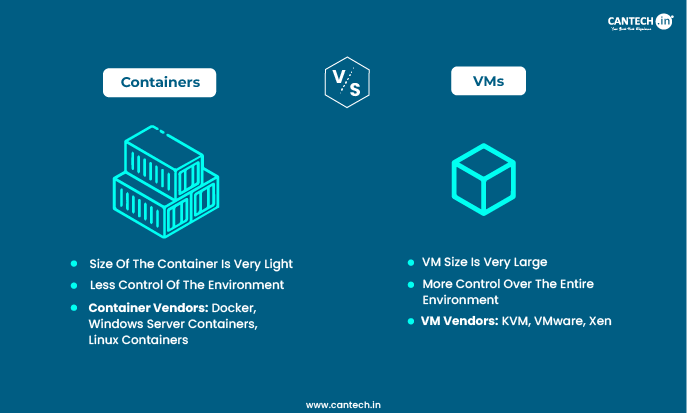
Containers and Virtual Machines (VMs) are two different approaches to packaging and isolating computing environments. Containers share the host OS kernel, making them lightweight, fast, and highly portable for cloud and microservices workloads. VMs run a complete guest operating system on a hypervisor, providing stronger isolation and full OS-level flexibility, ideal for legacy applications and regulated industries.
What is a Container?
A container contains everything required to run software, including code, runtime, system tools, libraries, and configurations, in a lightweight, standalone executable package. Containers isolate programs from their host environment which promises consistency across several computing environments. Containers share the host’s OS kernel making them more resource efficient. This approach offers quick application deployment, scalability, and administration, which is especially valuable in microservices designs and cloud computing. Docker, which debuted in 2013, helped promote the use of containers in software development and deployment.
Containers have become industry leaders and surpass virtual machines for many modern applications. A recent report by statista indicated that over 96% of businesses use containers in every environment, including production and development. Also, another report by Gartner projected global revenue from container management services of $944 million till date. Read our full article covering What is a Container?
What are the Advantages of Containers?
Here are some the unique advantages of Container:
Continuous Integration and Deployment (CI/CD)
Containers helps in simplifying development workflows by allowing for more frequent updates, testing, and deployment. Docker images, for example, may be version managed and added to CI/CD workflows.
Simplified Management
Container orchestration solutions such as Kubernetes make it easier to manage large numbers of containers which includes load balancing, scaling, and self-healing applications.
Development and Testing
Containers provides a stable environment for developers and testers, eliminating “it works on my machine” concerns and shortening the development cycle.
Application Modernization
Containers can assist in modernizing legacy applications by packaging them in a more manageable, portable format that does not require major reworking.
Cost Efficiency
Containers may significantly reduce infrastructure expenses by reducing resource utilization and allowing for more flexible deployment options.
What are the Common Use Cases for Containers?
Some of the use cases for containers in terms of applications are as follows:
Microservices Architecture
Containers are ideal for microservices, which are applications created as a collection of small services. Each service may operate its own container, allowing for autonomous deployment and scalability.
DevOps Practices
Containers enable DevOps by allowing developers and operators to work in the same environment from development to production, which reduces disputes and improves teamwork.
Data Processing/Big Data
Containers can be used for distributed computing frameworks like Hadoop or Spark, where each node of data processing can be containerized for scalability and consistency.
Cloud and Hybrid Cloud Deployments
Containers are inherently suited for cloud environments due to their portability. They work well in hybrid cloud setups where applications need to run across on-premises and cloud infrastructures.
Batch Processing
For scheduled or batch jobs, containers can be launched to perform specific tasks at scale, then shut down to free up resources.
What is a Virtual Machine?
A virtual machine (VM) is a software-based computing environment that emulates a complete computer system. It functions as an isolated instance within a physical computer by utilizing host’s processing power, memory, and storage. This technology enables users to run multiple operating systems simultaneously on a single device. VMs are very helpful in enterprise environments for testing software, maintaining legacy applications, and ensuring system security through isolation. The virtualization technology efficiently manages hardware resources while providing the flexibility to create and delete virtual environments as needed.
VMs remain important for many IT infrastructures, there’s a noted shift towards hybrid and multi-cloud architectures. Virtual machines continue to be popular in sectors like banking and financial services (BFSI), healthcare, telecommunications, government, manufacturing, retail, and media at this point. Explore our detailed blog on What is a Virtual Machine?
What are the Advantages of Virtual Machines?
Here are some of the unique advantages of virtual machine:
Hardware utilization and management: Virtual machines facilitate hardware consolidation and resource allocation by optimizing the use of physical servers.
Development and Testing: Virtual machines help in replicating the environment to test various software configurations and also offer snapshot and rollback options for development safety
Operating System Support: Virtual machines allow various operating systems including legacy operating systems to operate on contemporary hardware by providing flexibility for IT and education purposes.
Disaster Recovery: Virtual machines assist to improve disaster recovery by offering faster restoration and the ability to test plans for recovery without interrupting production settings.
Cost Efficiency: Virtual machines save procurement, maintenance, and energy expenses by eliminating the need for physical hardware, and they can also offer savings on software licensing
Simplified Management: VMs unify control through management software, making it easier to administer and automate VM-related operations.
What are the Common Use Cases for Virtual Machines?
Some of the use cases for virtual machines in terms of applications are as follows:
Cloud Computing
Virtual machines (VMs) play a significant part in services like Infrastructure as a Service (IaaS), which allow users to build, manage, and scale computing resources in real time. Learn more in our blog: What is Cloud Computing?
Education and Training
Educational institutions can employ virtual machines (VMs) to provide students with access to various operating systems, software, or network configurations to aid in their learning without the need for substantial physical infrastructure.
Sandboxing
Virtual machines (VMs) allow security experts to securely examine malware and execute potentially risky applications. This isolation keeps malware from infecting the host machine or network.
Virtual Desktop Infrastructure (VDI)
Enterprises may implement centralized virtual desktops using VMs, offering users with a consistent desktop experience from any device, hence improving security and simplifying management.
Network Simulation
Network administrators enable simulating in different network topologies or conditions in VMs to test network behavior, security measures or performance under various scenarios.
Key Difference between Virtual Machines and Containers
Understanding the difference between virtual machines and containers is key to choosing the right deployment approach. The diagram below offers a clear view of how they differ in architecture and resource usage.
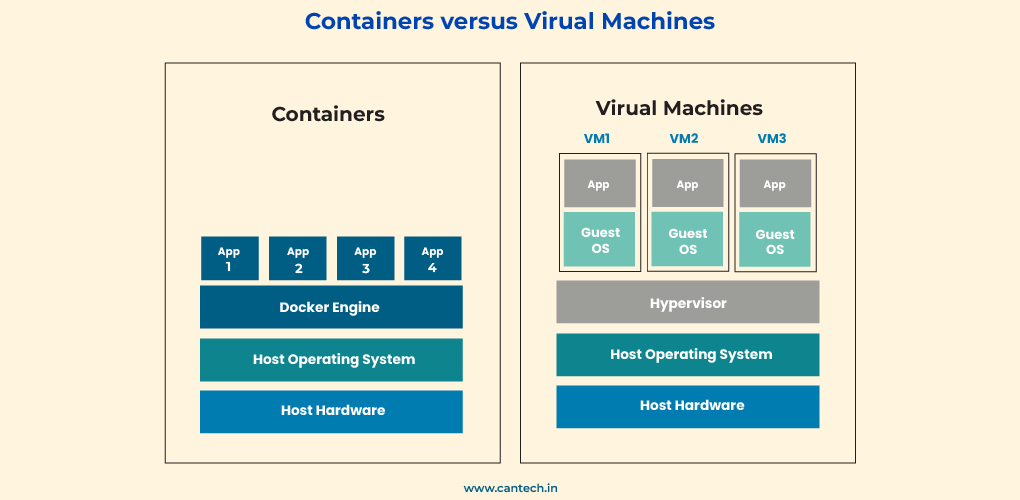
The better choice among the two technologies would be the one that specifically fits your business needs and goals.
| Feature | Virtual Machines (VMs) | Containers |
| Architecture | Full OS Emulation (Hypervisor virtualizes hardware)
Hardware Virtualization (Virtualized CPU, Memory, etc.) |
Operating System-Level Virtualization (Shares Kernel)
Lightweight (Uses OS features like namespaces, cgroups) |
| Overhead | Higher Overhead (Full OS per VM) | Lower Overhead (Shares Kernel) |
| Resource Utilization | Fixed Resource Allocation | Dynamic Resource Sharing |
| Startup Time | Seconds to Minutes (Booting full OS) | Milliseconds (Launching application environment) |
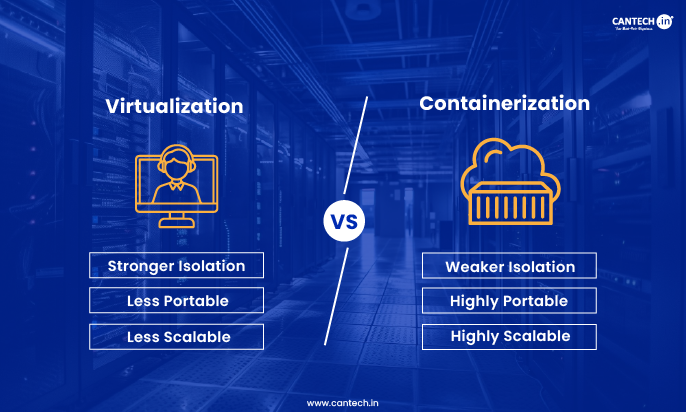
| Isolation | Strong Isolation (Separate OS per VM) | Process-Level Isolation (Relies on Host OS Security) |
| Portability | Less Agile (Large size due to full OS) | Highly Portable (Smaller size, standardized formats) |
Why Choose Cantech for Bare Metal & Virtualization Solutions?
Whether you are deploying containers, virtual machines, or both, Cantech’s infrastructure is built to handle every workload. Our Bare Metal Server India gives you dedicated resources for VM-heavy workloads, while our Cloud VPS Hosting provides the ideal environment for running containerized applications at scale. Contact us today to discuss the right solution for your infrastructure needs.
Conclusion
Containers and virtual machines each have a rightful place in modern IT infrastructure, and the best choice depends entirely on what your workload demands. If you need strong isolation, full OS flexibility, and support for legacy applications, virtual machines are the right fit. If you need speed, portability, and efficient resource usage for cloud-native or microservices applications, containers are the better choice.
For many businesses today, the answer is not one or the other; it is both. Running containers inside VMs combines the security and isolation of virtualization with the agility and efficiency of containerization, giving you the best of both worlds without compromise. Whether you are building a container-based microservices architecture or managing a VM-heavy enterprise environment, the right infrastructure makes all the difference.
FAQs
What is the Purpose of Containers?
Containers are designed to package applications and their dependencies into lightweight, portable units which enables consistent deployment across different environments with minimal resource usage.
What are the Disadvantages of Containers?
Containers share the host OS kernel, leading to potential security risks, limited OS compatibility, and challenges in managing persistent storage compared to virtual machines.
What is the Purpose of Virtual Machines?
Virtual machines provide isolated environments by running multiple OS instances on a single physical server that improves security, compatibility, and flexibility for different applications.
What are the Disadvantages of Virtual Machines?
Virtual machines consume more resources as each VM requires a separate OS, leading to increased overhead, slower boot times, and reduced efficiency compared to containers.
Which is the Better Choice Between Virtual Machines and Containers?
The choice depends on the use case: VMs are ideal for running multiple OS environments securely, while containers offer better efficiency, scalability, and faster deployment.
Can Containers and VMs Work Together?
Yes, many production environments use both containers and VMs together. A common approach is running containers inside VMs, combining the strong isolation and security of VMs with the speed and portability of containers. Cloud platforms like AWS and Google Cloud use this hybrid approach to deliver both reliability and efficiency at scale.
When to use VM vs Container?
You can opt for VMs if you want run legacy apps, require strong security. Opt for containers if you are seeking portability, speed and resource efficiency. In terms of Container vs VM security, VMs offer stronger isolation, but containers can be safe if they are properly configured. For regulated environments, VMs are a preferred choice, for development workflows, containers are better.