Running large language models (LLMs) locally has become increasingly popular as developers and businesses look for more control, privacy, and cost efficiency. Tools like Ollama and LM Studio make it easier than ever to run AI models directly on your machine.
But which one should you choose?
Ollama vs LM Studio: Quick Answer
Ollama and LM Studio serve different types of users. Ollama is best suited for developers who need API access, automation, and efficient performance, while LM Studio is ideal for beginners who prefer a graphical interface and an easy setup. The right choice depends on whether you prioritize control or ease of use.
What Is Ollama?
Ollama is a developer-friendly software that is used to execute LLMs in a local environment using a command-line interface. It enables users to download, administer, and execute models effectively and provide API support in application integration.
Key Features of Ollama
-
Command-line (CLI) based usage
-
Lightweight and fast execution
-
Built-in API for integration
-
Optimized model management
-
Ideal for backend and automation workflows
Ollama is widely used by developers who want to build AI-powered applications without relying on external APIs.
What Is LM Studio?
LM Studio is an easy-to-use desktop program that can run LLMs directly on the user machine, with a graphical interface. It makes downloading and communicating with models easier.
Key Features of LM Studio
- Graphical user interface (GUI)
- One-click model downloads
- Chat-based interaction
- Easy model switching
- Beginner-friendly setup
LM Studio can be used by the users who prefer a visual and easy understanding of local AI.
Key Differences Between Ollama and LM Studio
The core difference between these tools lies in their design approach:
-
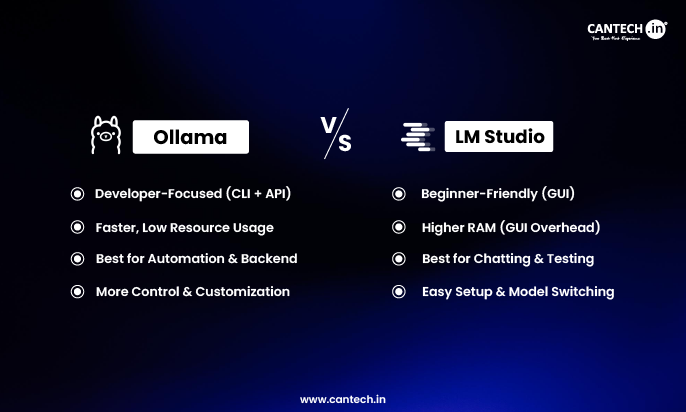
Ollama → Developer-focused (CLI, APIs, automation)
-
LM Studio → User-focused (GUI, ease of use, interaction)
Both tools can run similar models, but the experience they offer is very different.
Ollama vs LM Studio: In-Depth Comparison
| Category | Ollama | LM Studio |
|---|---|---|
| Interface | Command-line (CLI) | Graphical UI |
| Ease of Use | Moderate (technical knowledge needed) | Very easy (beginner-friendly) |
| Performance | Slightly faster (no UI overhead) | Slightly heavier due to GUI |
| Resource Usage | Low | Higher (extra RAM for UI) |
| Model Management | Manual but efficient | Visual and easy |
| API Support | Strong | Available but basic |
| Automation | High | Limited |
| Customization | High | Moderate |
| Best For | Developers & backend systems | Beginners & experimentation |
Advantages & Disadvantages of Ollama
Advantages of Ollama
Ollama is flexible and performance-oriented, and therefore it suits developers.
- Lightweight and efficient
- Good API to integrations.
- Best suited to automation and backend processes.
- Enhanced management of model execution.
Disadvantages of Ollama
Although very strong, Ollama might not fit all.
- Demands command-line expertise.
- Not beginner-friendly
- No full graphical interface
Advantages & Disadvantages of LM Studio
Advantages of LM Studio
LM studio is oriented to convenience and simplicity.
- Very easy to set up and use
- Graphical interaction interface.
- Large model library access
- Swift model changing.
Disadvantages of LM Studio
- LM Studio has its trade-offs.
- Higher memory usage
- The inability to automate.
- Less controllability to advanced users.
Performance Comparison
Both Ollama and LM Studio use similar backend technology (such as llama.cpp), and thus their raw performance is usually comparable on the same hardware.
But in practical application there are discrepancies:
-
Ollama performs better in automation and backend scenarios due to lower overhead
-
LM Studio may consume more RAM because of its graphical interface
-
Speed differences are minimal, but workflow efficiency varies significantly
Ollama vs LM Studio: Use Case Comparison
Use Ollama When
- You are a developer
- You need API integration
- You desire automation or workflows in the back-end.
- You like the command-lines.
Use LM Studio When
- You are a beginner
- You desire a graphical interface.
- You also often experiment with various models.
- You want an easy install and use experience.
Which One Should You Choose?
The decision between Ollama and LM Studio is dependent on your objectives:
- Go with Ollama, if you require performance, control, and integration.
- LM Studio is simpler, easier to use, and more visual.
Both tools can actually be used to supplement each other in the case of advanced users based on the workflow.
Common Mistakes When Choosing Local LLM Tools
The wrong tool is chosen by many users because it is not clear.
Avoid these mistakes:
- Selecting by UI preference alone.
- The neglect of system resource requirements.
- Failure to consider automation requirements.
- Ignoring API capabilities.
Conclusion
Both Ollama and LM Studio are powerful tools for running LLMs locally, but they serve different purposes.
-
Ollama excels in performance, control, and automation
-
LM Studio shines in ease of use and accessibility
By understanding their strengths and limitations, you can choose the right tool based on your needs and build more efficient local AI workflows.
Frequently Asked Questions
What is Ollama used for?
Ollama is used to run large language models locally with a focus on performance and developer control. It allows users to integrate AI into applications using APIs and automate workflows, making it ideal for backend systems and custom AI solutions.
What is LM Studio used for?
LM Studio is used to run and interact with LLMs locally through a graphical interface. It is designed for beginners and non-developers who want an easy way to download models, chat with them, and experiment with AI without technical complexity.
Is LM Studio better than Ollama?
LM Studio is better for beginners due to its ease of use and graphical interface, while Ollama is better for developers who need automation, API access, and control. The better choice depends on your technical skills and intended use case.
Which is faster: Ollama or LM Studio?
Ollama is slightly faster in most cases because it does not include a graphical interface, resulting in lower resource usage. However, the difference is usually small, and both tools perform similarly when running the same models on the same hardware.
Can I use Ollama and LM Studio together?
Yes, advanced users can use both tools together depending on their workflow. For example, LM Studio can be used for testing and experimentation, while Ollama can handle automation and backend integration for production use.