How to remove a DNS zone from WHM?
Introduction
You might be unable to open a new hosting account since the system says a “DNS Zone already exists.” This usually means a domain was previously hosted on the server but was not fully removed, or if the domain expired and was later repurchased. The solution to this is to delete the old records manually from the database of the server.
Records management is a standard part of server administration. When an inactive zone is deleted, you free up the domain name so it can be assigned to a fresh cPanel account. This can be done quickly via the WHM administration.
Why Delete a DNS Zone?
A DNS zone is a configuration file that tells the Internet which IP address is linked to a domain name. In case the server already has a zone file for a domain you are trying to add, the system will block the new setup to prevent data errors. Deleting these ghost zones makes the server clean and operational.
Occasionally, domains move to different DNS providers or other servers. When the old settings remain in your machine, they can cause routing issues for your local users.
Steps to Delete a DNS Zone in WHM
In order to modify or remove DNS information, you require root privileges. These steps will help you clear a zone from your system.
- Log in to WHM. Access the server dashboard using root administrator credentials.
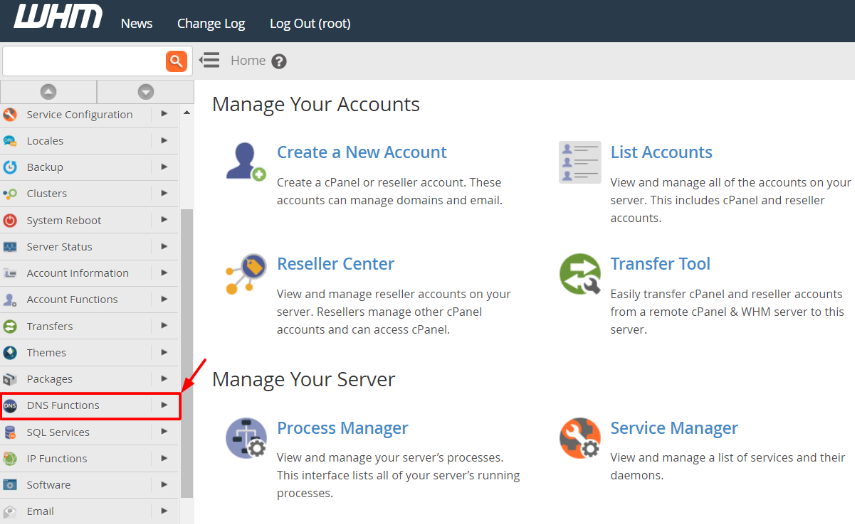
- Locate the DNS Functions in the left menu. It possesses everything to handle domain names on your server.
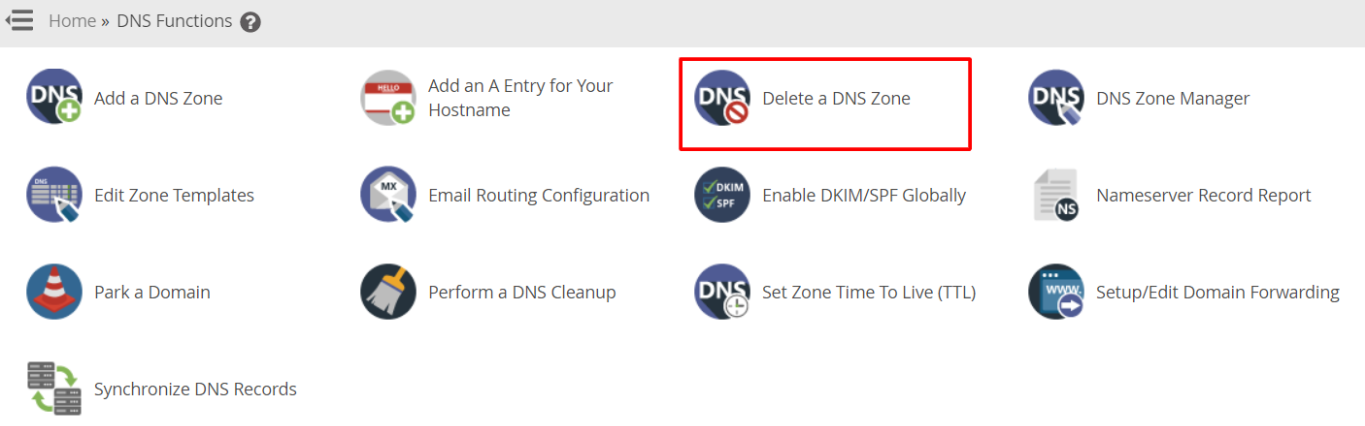
- Click Delete a DNS Zone. The system will load a page displaying every domain currently registered on your server’s DNS.
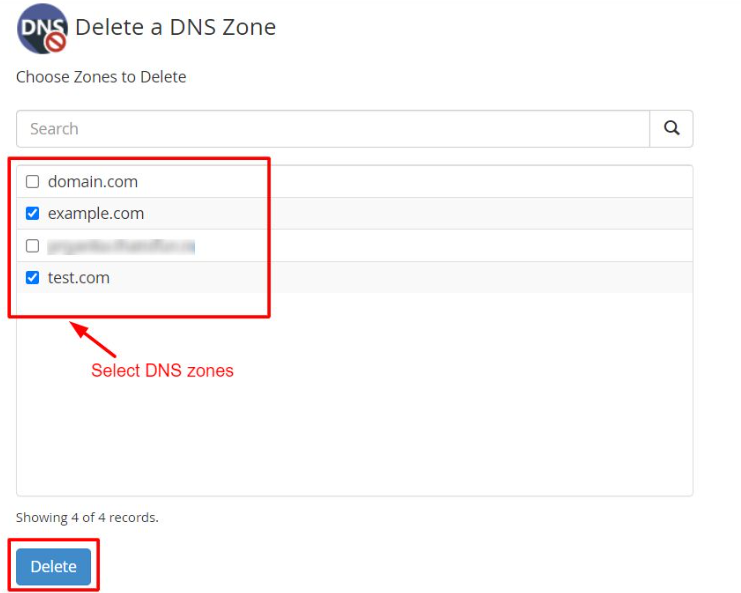
- Choose the zones to remove. To locate the domain, scroll the list or use the search box. Choose it and press the Delete button below.
- Confirm the deletion. The domains that you have selected will appear on a screen. Ensure that they are the correct ones and again, press Delete to complete.
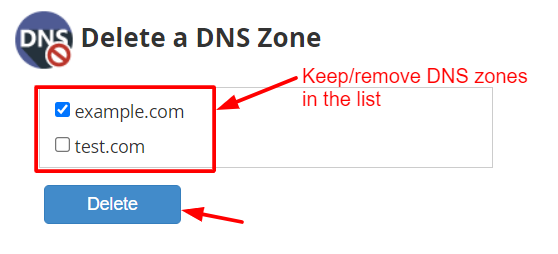
The system will then remove such configuration files from the server.
Troubleshooting: When a Zone Won’t Delete
You might find that the “Delete a DNS Zone” tool doesn’t work for a specific domain. This typically means that the domain is still actively linked to a live cPanel account on your server. To remove such a zone, you have two options:
- Change the account: Use the Modify an Account tool to change the domain name associated with that user to something else.
- Terminate the account: When the user is not required to have hosting, you can remove the entire account using the Terminate Accounts interface, which will automatically wipe the DNS zone.
Conclusion
It is also important to delete the old DNS zones so as to keep the server open to new clients. It corrects errors of a common domain already existing and maintains the network at a high speed. Deleting zones should be done carefully, as deleting a live record will put the site offline immediately.
FAQs
Will deleting a DNS zone delete the website files?
No. The deletion of a zone simply gets rid of the pointers (e.g., A or MX records) that inform the Internet where the site is. It does not destroy files or databases within the cPanel account. However, the website will stop loading for visitors without the zone.
How long does it take for a DNS deletion to take effect?
The change occurs immediately on your server. Due to the DNS caching on the internet (propagation), it can also take a couple of hours for other networks to realize that the records are gone. Usually, local changes are visible to the server within minutes.
What if I delete the wrong DNS zone by mistake?
When you accidentally delete a zone for a live website, you will need to recreate it. You can do this by using the “Add a DNS Zone” tool or by re-syncing the account if you have a backup. It is always wise to keep a copy of your zone records before performing mass deletions.
Can I delete multiple zones at once?
Yes, the WHM interface allows you to select several domains simultaneously. This is very helpful when you are cleaning up after a large number of account migrations or cancellations.
Related: Learn to Use the DNS Zone Editor in cPanel
Related: How To Add An MX Record In cPanel Through DNS Zone Editor?
