How to change FTP servers in WHM?
Introduction
Web Host Manager (WHM) provides the ability to choose the software that handles file transfers on your server. You have two common options to manage how you upload or download website files.
The right FTP server ensures that your data transfers stay fast and secure. Both options are available with benefits that suit your server needs and security preferences.
What is FTP Server Selection?
FTP Server Selection is a setting that identifies which service runs your file transfer protocol. This choice affects how users connect to the server to manage their folders and files.
You can switch between the available options based on your resource availability. This flexibility helps you optimize the server performance for your specific hosting environment.
Steps to Select an FTP Server
These are the steps that deploy your favorite file transfer service. You can change your active FTP software through the service configuration menu.
- Log in to WHM with your root account information.
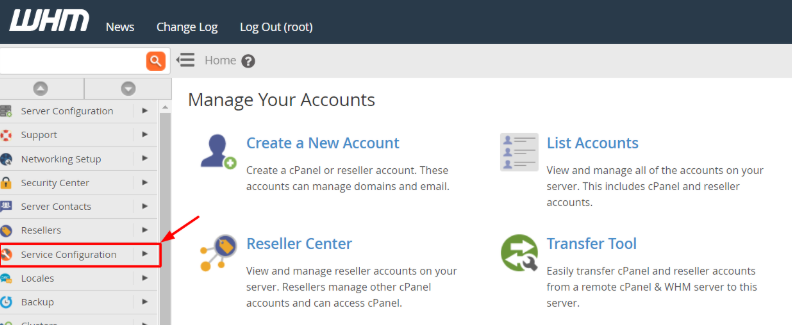
- Locate the Service Configuration section in the left navigation menu.
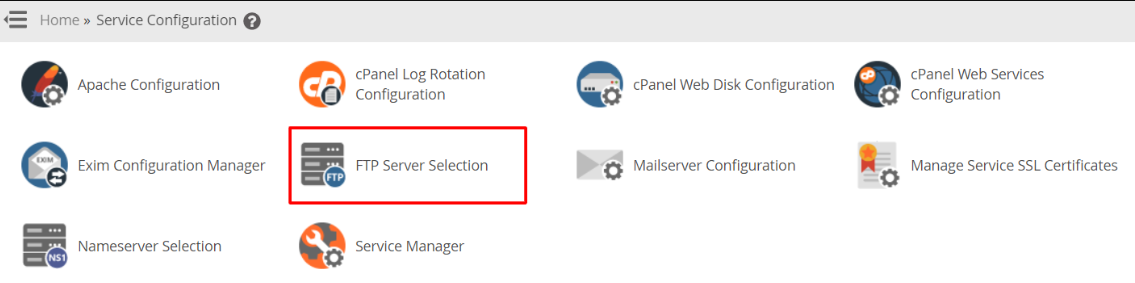
- Choose the FTP Server Selection option so that you can see the available software.
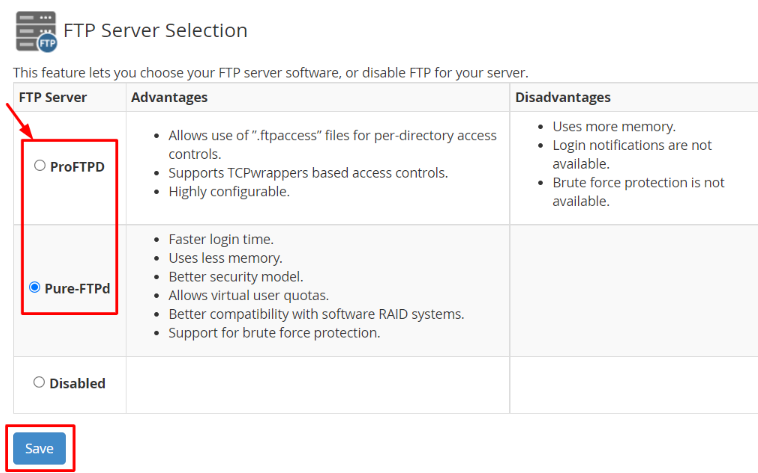
- Compare the options. Read the characteristics of ProFTPD and Pure-FTPD on the screen.
- Make your choice. Select the radio button of the FTP server that you wish to use.
- Click on the Save button to begin the installation of the chosen service.
Understanding Your FTP Options
The system has two primary options with different technical structures. Select the one that fits your server resource requirements and security objectives.
Pure-FTPD Features
It is the default option since it consumes minimal server memory. It offers faster login speeds and includes better security features for the user. It also supports virtual user quotas and works perfectly with RAID storage systems.
ProFTPD Features
This alternative has numerous extra advanced configuration options for experts. It supports access controls based on directories through .ftpaccess files. It takes up more disk space and lacks an inbuilt safeguard against brute force attacks.
Conclusion
The selection of the right FTP server is crucial for smooth website management. Most users normally prefer pure-FTPD due to its speed and low resource consumption. You are able to switch your choice whenever you want in case of any change in your technical needs.
FAQs
Which FTP server is more secure?
Most hosting environments are more secure with pure-FTPD. It provides better protection and follows modern security standards for file transfers.
Will my current FTP accounts stop working after a change?
No. Your current usernames and passwords will continue to work. The system just switches the background software that processes such login requests.
Does ProFTPD support login notifications?
No. This particular software does not send alerts upon a person logging in. Select Pure-FTPD if you need to monitor login activity closely.
Can I disable FTP entirely on my server?
Yes. Click on the Disabled option on the same selection page. This will prevent any FTP services and block file transfers for all users.
How long does the installation take?
The switch normally finishes in a couple of minutes. On completion of the process, a success message will be displayed on your screen.
Related: How to Upload and Download files from the Website using File Manager?
Related: How to get raw FTP logs from the WHM panel?
Related: How to Enable FTP Access in WHM?
