Introduction
cPanel manager is a web based tool within the cPanel hosting control panel that lets users manage files or directories related to their websites. It offers a graphical, user friendly interface similar to desktop explorers like mac OS finder or windows explorer which makes it accessible even to beginners without much technical expertise.
What is cPanel?
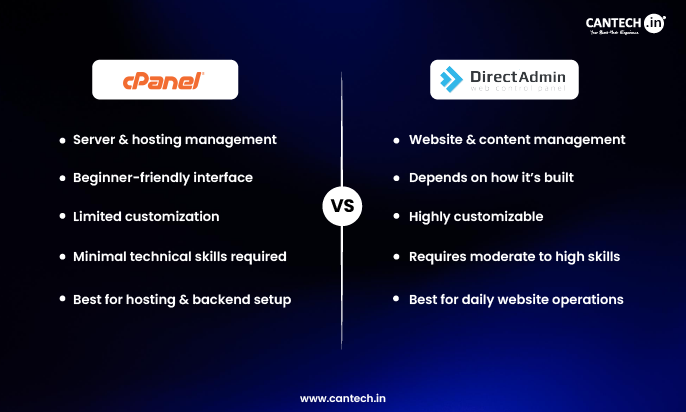
cPanel is basically the main control panel of your hosting, where you can manage your website settings, files, emails, etc. When you use the File Manager in cPanel, you can directly open, upload, edit, or delete files of your website from the browser, so you don’t need FTP or any extra software. It simply makes file management easier and faster. To learn more, check out our detailed guide on What is cPanel.
What is cPanel File Manager?
cPanel File Manager (also known as file manager cpanel) is the place where you can see all your website files from the browser itself. Here you can quickly upload a file, rename something, edit a small line in code, or remove unwanted folders, without using FTP or any extra tool. Most people use it for small updates or quick fixes because everything is just one click away.
Features of cPanel Manager
cPanel manager is versatile and has many features that are useful and simplifies file management tasks on the hosting server. Some of them are:
File Management
The cPanel file manager lets users manage files and folders properly. Users can create new files or folders, upload files from their local system and then download the files directly from the server. In addition, files and folders can be renamed, deleted or moved between directories. When deleted files are sent to trash for recovery or can be permanently removed. This provides a safety net against accidental deletions.
Editing Capabilities
The built-in editors within the cPanel file manager lets users edit text based files directly within the interface. This includes editing the CSS, HTML, PHP and other programming files with a code editor that provides syntax highlighting for easy editing. Users can edit important configuration files like .htaccess too, without any requirement of pre-download. This feature is useful for faster modifications or troubleshooting without external tools.
Permission Management
Users can manage file permissions to control the access levels for files and folders. This is essential to ensure efficient security and functionality of website scripts and data. By setting proper permissions, users can avoid unauthorized access or modifications to confidential files, which is important to maintain website security and integrity.
Disk Space Monitoring
cPanel file manager offers insights into disk usage. This helps users optimize storage by identifying large files. This feature is important for managing hosting resources and avoiding storage limits. By monitoring disk space users can eliminate unnecessary files, compress large files or upgrade hosting plans if required.
Advantages of cPanel File Manager
cPanel file manager offers multiple advantages which makes it ideal for managing web files. Some of the advantages are:
Efficient File Management
cPanel File Manager supports advanced file activities like extracting, compressing, and enabling permissions. These tools help users secure, organize, and manage their files efficiently. This ensures optimized web functionality and security.
User friendly Interface
The cPanel File Manager provides an user friendly, intuitive interface that makes it easier for file management. With no requirement for advanced tech skills, users can upload, edit, and manage files and directories easily by simple point-and-click interface.
Quick File Access
It allows users to quickly access the website files and manage them directly from the browser. It removes the need for third-party clients and offers efficient file management from anywhere with the need for internet connection.
Built-In Editor
The built-in file editor allows you to make changes to files without downloading. This feature is useful to make modifications to code or text files directly on the server.
By using cPanel file manager tool, users can manage their web content efficiently and ensure quick and secure operations.
Conclusion
The cPanel File Manager is simply a handy place to control your website files without any heavy technical steps. You just sign in, open the filemanager option, and you can upload, edit, or remove files right from your hosting account, all in one window. Whether someone is new in website handling or already experienced, this file manager cpanel tool helps finish small file-related tasks faster, so maintaining the site feels more organised and smooth.
FAQs
How do I access the File Manager in cPanel?
You can access file manager by logging into your cPanel account and going to the Files section >> File Manager menu.
How do I search files in cPanel File Manager?
To search files in cPanel File manager, follow the below steps:
- Firstly, login to your cPanel account.
- Then select the File Manager option below ‘Files’.
- At the top of the page, there’s a search option.
- Enter the text in the search box that to search in the cPanel.
What is the home directory in cPanel?
A home directory is a directory that is assigned for your usage. It has various content like raw data, configuration files and the public_html folder. The home directory contains your cPanel username on the server.
How do I download all files from the cPanel File Manager?
To download all files from cPanel File Manager, you should use the Compress option to create a ZIP file of the files or folders you want to download, and then download it. After you create the ZIP file, click on it and click Download from the top menu. This is a technique that is used to make backups or to move website data swiftly.
How to see hidden files in cPanel File Manager?
In cPanel File Manager, you can hide the files by accessing the File Manager and selecting the Settings option from the top-right corner. Then, enable the Show Hidden Files (dotfiles) option and save the changes. This will show hidden system files, which are usually hidden for security reasons, like .htaccess.