Fundamentally, hardware virtualization forms the backbone of contemporary cloud computing. It permits the creation of clouds’ virtual computing resources, so that several OS, and applications may run on one computer. This is done by abstracting hardware resources: CPU, memory, storage, etc. A layer of software called the hypervisor controls the resources and allocates them to several virtual machines (VMs). This hardware virtualization means maximized hardware utilization at lower costs, while also providing the flexibility required for cloud environments. This is why it is so important to understand what hardware virtualization is in cloud computing. Without it, cloud computing giants like AWS, Azure, Google Cloud cannot provide on-demand and scalable services.
How Hardware Virtualization Works?
To understand how hardware virtualization works starts with the hypervisor, or Virtual Machine Monitor (VMM). This is the sole software layer that sits either directly on the physical server (Type 1/Bare-metal) or on a host OS (Type 2/Hosted). This software’s main role is to pool the virtualized physical resources and assign them dynamically to VMs.
Each VM, referred to as a guest, functions with its distinct OS and apps while being completely isolated from neighboring virtual machines on the same host.
Certain critical hardware components are CPUs with virtualization extensions (Intel VT-x or AMD-V). These extensions allow the hypervisor to efficiently manage and trap certain privileged instructions from guest VMs, redirecting, and escaping them so that several VMs are able to safely share the CPU.
Types of Hardware Virtualization
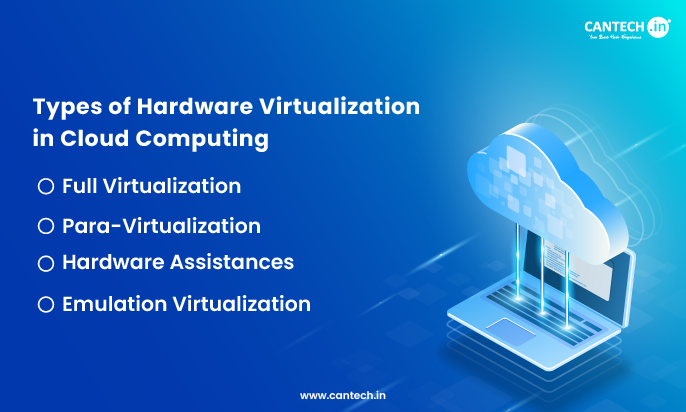
The types of hardware virtualization are primarily distinguished by the amount of abstraction and the amount of modification that are required from the guest operating system. The three main types of virtualization in cloud computing are:
1. Full Virtualization
This is the most common type being used in most general-purpose clouds. In full virtualization, the hypervisor offers a complete re-creation of the underlying hardware. The guest OS runs without changes and is completely unaware of the fact that it is running in a virtualized environment. It is under the impression that it has direct control of the CPU, the memory and other hardware resources. The hypervisor virtualization framework takes control of all the privileged instructions and does the requisite translations for the underlying physical hardware. This is total virtualization, and while it affords compatibility across the board in general virtualization cloud computing solutions, it does have some performance overhead.
2. Para-Virtualization
As of now, mode for para-virtualization is the modification of the guest operating system’s kernel, and this is different from the full virtualization. The guest operating system is made to \”realize\” that it is operating on a virtualization system. The guest OS is allowed to communicate and interact directly with the hypervisor and this is done by skipping the steps of emulating the hardware via efficient hyper calls. The result of this process system is that it leads to a more efficient and optimized full virtualization performance as well as reduced overhead. Despite this, there is a need for OS support and with that, there is limited compatibility. In most cases, this form of virtualization is used for highly efficient computing, as well as targeted optimized ones that are meant for the cloud systems.
3. Hardware Assistances
Rather than being a standalone category, this is an important addition to complete full virtualization. Modern CPUs have something known as a built-in hardware virtualization extension and these are known as Intel with VT-x, AMD with V. These extensions then provide the hypervisors with the capability to directly control the supervision of the instructions that are meant to contain the block of the CPU that is being used as a control unit. This is a good way that helps to decrease the complexity, as well as the overhead of the hypervisors. It also helps in cloud infrastructures as it helps achieve performance that is more efficient.
4. Emulation Virtualization
It has the emulation of the whole system on the hardware, even the CPU architecture and this also includes the most exhaustive forms as well. It is also able to create a flexibility where it is able to run a different OS that utilizes a different CPU and a completely different host. But this emulation carries along the highest performance degradation. It also is used in legacy precisions.
Related Blog: Hardware Assisted Virtualization in Cloud Computing
Advantages of Cloud Hardware Virtualization
Explaining the limitless benefits of hardware virtualization explains the growth of cloud computing:
Increased Efficiency and Profit
When considering the traditional data center, the most common problem they face is low efficiency. Underutilization, where singular applications receive a dedicated physical server, is running at only 10-15% of its total capacity, which is a real problem. Hardware virtualization is a significant improvement on this model.
It takes physical servers that are running with low efficiency and consolidates them into a pool of computing resources. With this model, one powerful host machine can run dozens of virtual machines. An 80% utilization rate is inarguably one of the best utilization rates one can achieve. A longer retention of the physical servers will be a cost-effective means for multiple organizations for optimal retention of profits. The need to purchase more physical servers will be delayed if not eliminated.
Cost Efficiency
The retention of 80% utilization is bound to achieve cost efficiency. Circulating such positive capability, one can only imagine the savings that will be achieved on a larger scale. Capital expenditures will not be a problem, as the number of physical servers in the data center will reduce drastically. Operational expenditures can also be determined to reduce as passive resources will now consume fewer power and cooling standards. The overall physical space of the data center will shrink and a simplified management will lead to operational savings from the administrative and IT labor.
Protection and Safety
Because of the ability to logically separate each unit of functionality, there is an ability to virtualize each service, computing unit, and layer, of the virtualization stack and create an isolated and protected zone where no intrusions can cross the boundaries without an alert notification. Each unit operates with the equivalent encased systems, with its own set of virtual resources with no external contact with the host remaining or with the other units.
If one unit fails, is overrun by malware, or has an attack or breach, there is no detrimental impact to the other units with access to the same physical resources. This is especially critical in protecting the security of each customer in the multi-tenant environment of cloud computing. Each layer is protected by the virtualization and also hosts an additional hardened defensive layer, with minimal functionality to ensure a weak security posture with minimal resource loops.
Agility and Speed
Because of the ability to decouple the software and the hardware, there is also an impressive step in operational flexibility. The creation of a new virtual server can be achieved in a matter of a few minutes as a software creation and automated process. This is in complete contrast with the traditional physical server setup where there is a periodic arrangement and physical delivery to the end location, followed by an OS layer installation, and then finally a resource configuration where the entire process can take months. This flexibility also allows for automated practices of software change deployments, and a response to customer or industry requirements to be completed in minutes, which is the core of cloud flexibility.
Related Blog: What is Network Virtualization?
Simplified Disaster Recovery and Workload Portability
Virtual machines have inherent portability advantages as they consist of files which enable easy backups, cloning, and migrations. Entire running VMs can be live-migrated across physical hosts without any downtime. In case of disaster recovery, VM snapshots and replicas can be rapidly copied to another location to allow for quick recovery. This portability also prevents vendor lock-in and supports mixed cloud approaches.
Application Legacy Support and Modernization
Virtualization provides an interface for old and new technology. It allows older operating systems and business-critical applications which may not support new hardware, expensive to rewrite technology, to run safely inside a VM on newer and reliable systems. This approach extends the useful life of legacy investments, provides a safe platform for application modernization, and resolves compatibility issues while retaining compliance and operational continuity.
Conclusion
Knowing the types and details of virtualization in cloud computing is essential, as it enables you to make the right choices for placing workloads, setting performance expectations, and controlling expenses. Virtualization in hardware form is the engine driving the cloud’s elasticity, flexibility, and the ability to scale – it’s the unsung hero.
There’s the complete compatibility, full virtualization, the performant para-virtualization, and the hardware-assisted virtualization that all contribute to the efficiency of cloud computing. Taking into account that it is a technology designed and developed many decades ago, cloud virtualization still has many advantages and very few downsides, allowing businesses to tap into the full potential of cloud computing.
If you’re exploring virtualization architectures, our article on the taxonomy of virtualization techniques in cloud computing explains how hardware virtualization compares with desktop, network, storage, and application virtualization.
FAQs
What are the Types of Virtualization in the Cloud?
There are several types of virtualization used in cloud computing for efficient resource utilization and performance. The main types are: Hardware Virtualization (virtualizing physical servers using hypervisors), Storage Virtualization (pooling physical storage into virtual storage resources), Network Virtualization (creating virtual networks independent of physical hardware), Desktop Virtualization (hosting desktop environments on central servers), and Application Virtualization (running applications without installing them locally). The basic building block of cloud infrastructure is hardware virtualization, which allows multiple virtual machines to be hosted on a single physical machine, each with its own virtual operating system and security measures, while achieving isolation and security.
What are the 4 Types of Cloud Computing?
The four main types of cloud computing are:
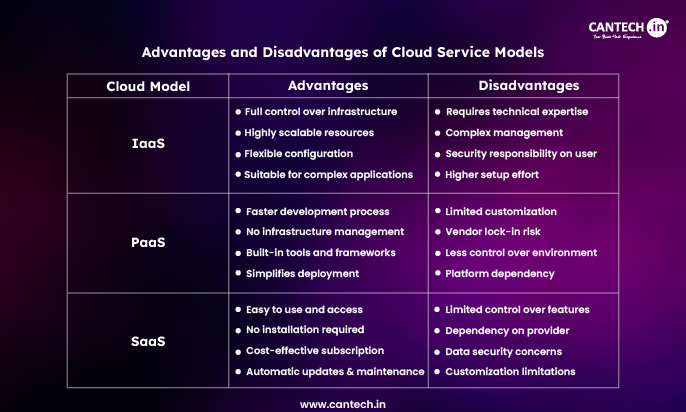
IaaS (Infrastructure as a Service): Virtualized infrastructure (servers, storage, networking)
PaaS (Platform as a Service): Provides infrastructure services while the underlying platform is managed by the provider
SaaS (Software as a Service): Provides software through the web for a subscription fee
FaaS (Function as a Service): Allows you to use serverless style of coding and run functions on the server side in response to events.
The foundation of IaaS is hardware virtualization, which offers the ability for cloud service providers to offer scalable virtual infrastructure provisioning to customers on-demand.
What is Hardware-Assisted Virtualization?
Hardware-assisted virtualization is a technology that enables virtualization to run faster and more efficiently, because the CPU has built-in capabilities to help with virtualization. There are two main technologies that deliver hardware-assisted virtualization: Intel VT-x and AMD-V. This technology also lets end-users to skip the complex software emulation, with support for virtualization instructions in the CPU. Using hardware-assisted virtualization, overhead is minimized, VM performance is optimized, VM security is increased due to hardware-level isolation and hardware-assisted features are offered such as nested virtualization in cloud environments.
What is Type 1 vs Type 2 Hypervisor?
Type 1 Hypervisor (Bare-Metal) is a hypervisor that is installed directly on the physical hardware without an operating system. Examples include VMware ESXi, Microsoft Hyper-V and KVM. Type 1 hypervisors provide better performance, enhanced security and reduced latency, which is why they are the preferred one for enterprise cloud infrastructure and data centers.
Type 2 Hypervisor (Hosted) is run on top of an existing operating system such as Windows or Linux. This includes VMware Workstation, Oracle VirtualBox and Parallels Desktop. The advantage of type 2 hypervisors is that they are simpler to install and are well suited for personal use, development and testing, but they come with a higher overhead because of the extra OS layer.
Type 1 hypervisors are used mostly by cloud providers to harness the highest possible performance and efficiency of resources.
What are the Benefits of Hardware Virtualization in the Cloud?
Hardware virtualization delivers multiple critical benefits for cloud computing:
- Resource Optimization: enables multiple VMs to run on single physical servers for maximum hardware utilization.
- Cost efficiency: It saves on capital expenditure, on the physical equipment and it reduces operational costs.
- Scalability: Provides quick provisioning and scaling of virtual resources as needed
- Isolation & Security: Strong separation of VMs to prevent the spreading of security breaches
- Disaster Recovery: Backup and replicate and recover easily using VM snapshots and migration.
- Energy Efficiency: Minimizes power usage and cooling load by consolidating servers
It is this benefit that makes hardware virtualization the foundation technology for the cloud computing infrastructure of today.
Related Blog: Server Virtualization in Cloud Computing