How to restart Apache Server within WHM?
Introduction
Apache Tomcat is used to host Java applications. It is a container for Java servlets and server pages to provide dynamic content. This tutorial demonstrates the process of restarting the Apache web server using the WHM control panel.
Restarting the web server is a routine after modification of configuration files or updating modules. A fresh start ensures that all your new settings are active and running. This specific process is available only for users with VPS or Dedicated hosting plans.
What is the Apache HTTP Server?
Apache HTTP Server, which is the core software, provides the visitors with the content of the websites. It communicates with languages like Java and PHP in order to show interactive pages. In its absence, your sites will not be visible in browsers.
The server might require a refresh to remove temporary errors or stuck processes. Rebooting eliminates small connectivity problems in a short time.
Steps to Restart Apache in WHM
You must have root access to perform a service restart on your server. Follow these steps to complete the reboot safely.
- Open your WHM login page and sign in using your root administrator user account.
- The Restart services section is found in the left navigation. It lists all background processes on your server.
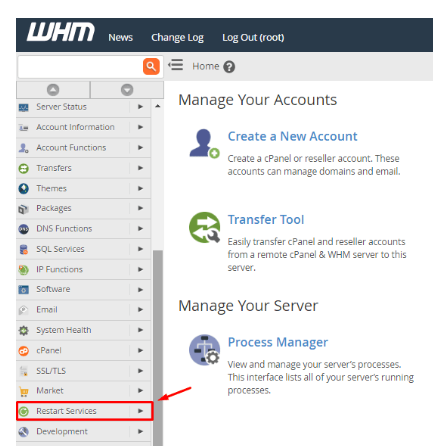
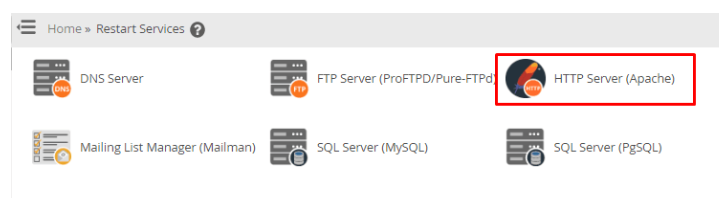
- Select the HTTP Server (Apache) option on the list. To avoid accidental restarts, the system will load a confirmation page.
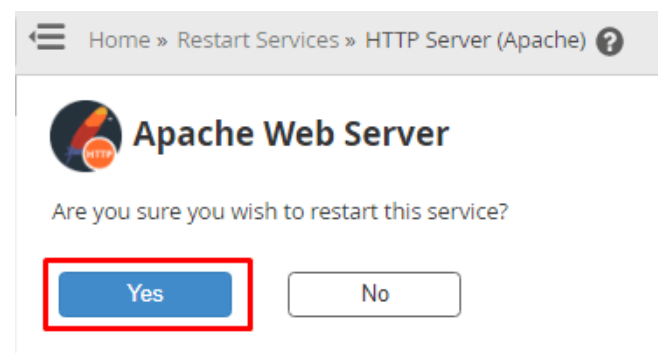
- Click the Yes button to continue with the action. The server will then close down the service and restart it at once.
Conclusion
The process of restarting Apache is a very basic but important maintenance process. It implements updates and maintains the web environment. Do not presume that the service is online again until the success message comes.
FAQs
Will my site go offline during the reboot?
Yes, websites go down for a few seconds. The server halts running processes to reload the configuration. Therefore, you must restart when there is low traffic.
Is Apache the same as Apache Tomcat?
Apache is a general-purpose web server, while Tomcat is specifically for Java applications. Many servers use both together to handle different types of web traffic. You can restart the standard HTTP server using the steps mentioned above.
What to do in case of a restart failure?
In case of failure in restarting, an error is recorded in the system. This usually means that there is a typo in your configuration files. Call Cantech support to correct the error and resume services.
How often should I restart my web server?
You do not need to restart the server on a regular schedule. You should only use the restart function when you change settings or notice a performance drop. Most servers can run for months without needing a manual reboot.
