How to Restart MySQL Server from WHM?
Introduction
MySQL is the engine that powers your website databases and stores all your valuable information. After making changes to server settings or installing new software updates, you might be required to reboot this service. This tutorial will describe the process of restarting MySQL using the WHM dashboard.
Restarting implements new configurations in real time. It empties the old data from memory, initiates new processes, and enhances stability. You should only perform this action through a root account to ensure the service restarts correctly.
Why Restart Your SQL Service?
The process of updating the database software also means that the full service has to be restarted in order to activate the new version. Sometimes a rolling restart is necessary to maintain the server in good health and performance. The process is safe, and all running processes terminates and the environment reloads.
You must be careful because a restart can stop unsaved data from being recorded. Thus, always create a backup of your databases.
Steps to Restart MySQL in WHM
You can manage your database services directly from the WHM admin panel. Follow these steps to initiate the restart process.
- Log in to WHM using your root account.
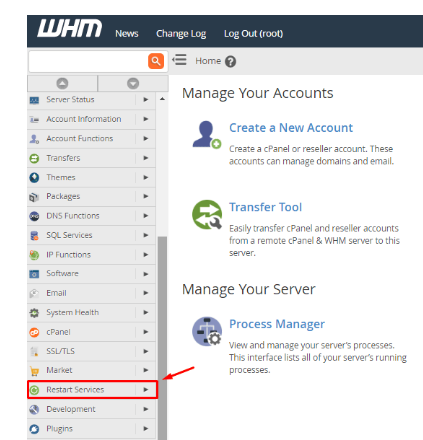
- In the sidebar, you will find the menu Restart Services. This section controls all the background applications on your server.
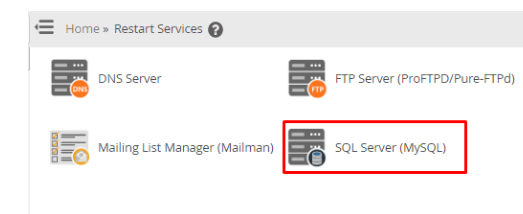
- Choose the SQL Server (MySQL) option.
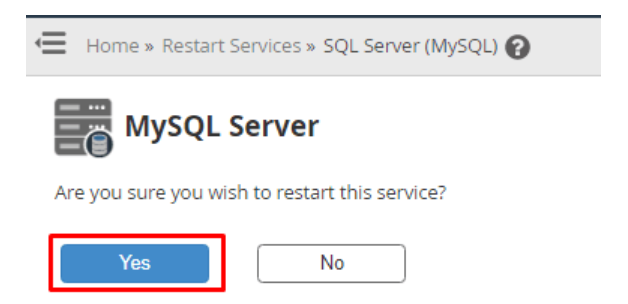
- A message asking for your confirmation to restart the service will appear. Click the Yes button to confirm.
Conclusion
To have a healthy hosting environment, it is important to restart MySQL. It ensures that your database engine stays healthy and runs with the latest settings. After restarting, check your site to ensure that everything is okay.
FAQs
Will my website be shut down during the restart?
Yes, your website will show a database connection error for a few moments. On a healthy server, restarts take about a minute. Plan the activity when the traffic is minimal.
Can I lose my website content during this process?
The restart process does not delete your saved database tables or rows. However, it might stop a transaction that is currently in progress. You should avoid restarting while your users are making purchases or submitting forms.
What if MySQL does not start back up?
A failure to restart usually happens because of a configuration error in the my.cnf file. You can check the error logs in WHM to find the specific problem. The Cantech support team can also help you fix the configuration to get the service online.
Is it better to restart the whole server?
You do not have to reboot the whole server in order to change a database. Restarting only the MySQL service is much faster and less disruptive for other users. Only reboot the full server if the operating system requires a major update.
Related: How to Create MySQL Profiles via WHM?
Related: Learn to configure Remote MySQL access in cPanel
