How to give reseller access within WHM?
Introduction
With the setup of a reseller account in WHM, you can easily start your own hosting business. This process allows you to give extra permissions to specific users so they can manage their own clients.
What is WHM Reseller Access
Reseller access turns a standard cPanel account into a management profile. This user gets the power to create and handle multiple sub-accounts under their own brand.
Create a New Reseller Account
You can set up a reseller right from the start during the initial account setup phase. This saves time because you do not have to edit settings later.
Steps for New Accounts
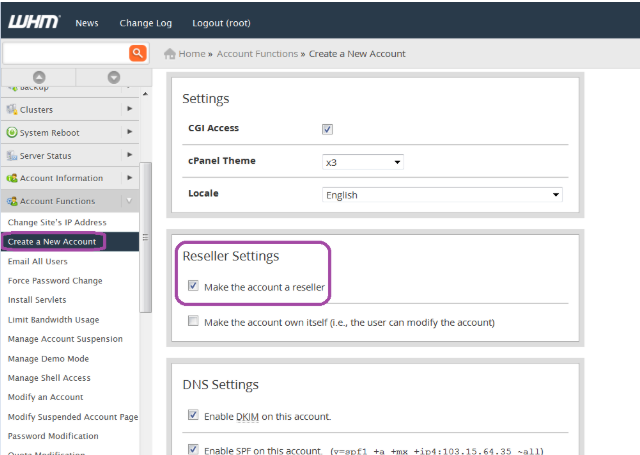
- Log into your WHM dashboard with your admin credentials.
- Navigate to the Account Functions section.
- Select the Create a New Account option.
- Fill in the domain and user details.
- Find the Reseller Settings section on the page.
- Tick the checkbox that says Make the account a Reseller.
- Click the Create button at the bottom.
Upgrade Existing Account via Modify Function
Sometimes a regular client wants to expand their business and needs more control. You can use the modification tool to grant them these extra privileges instantly.
Steps for Account Modification
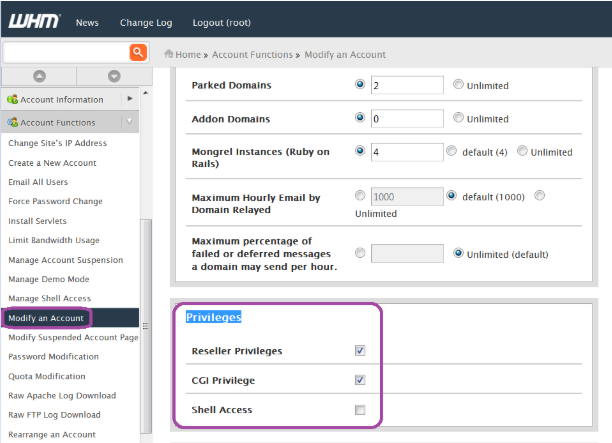
- Go to the Home screen of your WHM.
- Open the Account Functions menu.
- Click on the Modify an Account link.
- Choose the specific account from the list.
- Look for the Privileges section in the settings.
- Check the box for Reseller Privileges.
- Save the changes to update the account status.
Use the Reseller Center for Updates
The Reseller Center is a dedicated hub for managing all your sub-hosts in one place. It provides a direct method to add or remove permissions for any user on the server.
Steps in Reseller Center
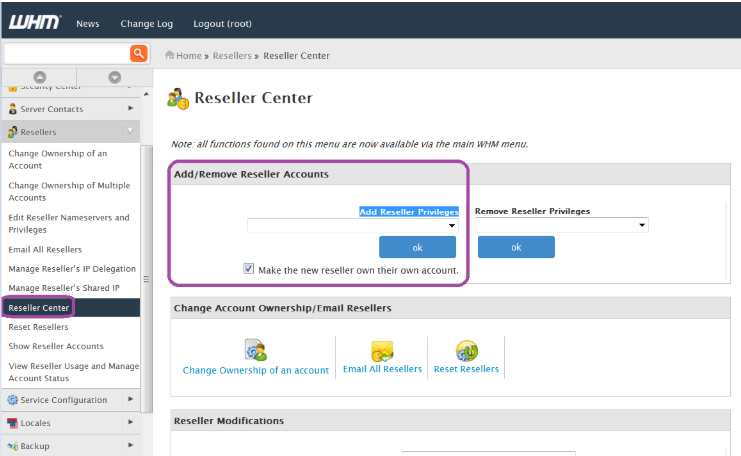
- Access the Resellers category from the side menu.
- Click on the Reseller Center icon.
- Locate the Add/Remove Reseller Accounts area.
- Select the username from the Add Reseller Privileges list.
- Press the Add button to confirm the selection.
- Enable the option for the reseller to own their account.
- Click the OK button to finish the process.
Conclusion
Managing resellers in WHM is a simple task with these three methods. You can choose the way that fits your current workflow best. Proper setup ensures your clients have the right tools to grow their hosting ventures.
FAQs
Can I remove reseller access later?
Yes you can remove these permissions at any time. You must visit the Reseller Center to revoke the privileges. The account will then become a standard cPanel user again.
Does a reseller need a separate license?
No, the reseller uses the main server license. You manage the limits of their account through WHM. They do not pay for individual software licenses themselves.
Will the user lose their data during this change?
The account data remains safe during this process. You are only changing the permission levels of the user. Their websites and emails will continue to work normally.
Can a reseller create unlimited accounts?
The admin sets the specific limits for every reseller. You can define the maximum number of accounts in the Reseller Center. You also control the total disk space and bandwidth usage.
Related: How to Log in to your Reseller Client’s WHM Account?
Related: An introduction to reseller access within WHM
