How to Check Apache Status in WHM?
Introduction
The primary software that runs your websites on a VPS is the Apache HTTP Server. In case of slow loading of your pages or inability of visitors to connect, you should check Apache Status. This facilitates live monitoring of the traffic to your server and indicates technical issues or spikes in traffic.
What is the Apache Status Tool?
The Apache Status Tool displays real-time traffic of your web server. It tracks all the connections and processes in the present time.
You can see the health of your server through this detailed report, and you will be able to know whether additional resources are required or a simple restart will be helpful.
Steps to View Apache Status
Access these live reports on your WHM dashboard with the steps below.
- Access your WHM panel using your root user details.
- Find the ‘Server Status’ section in the sidebar.
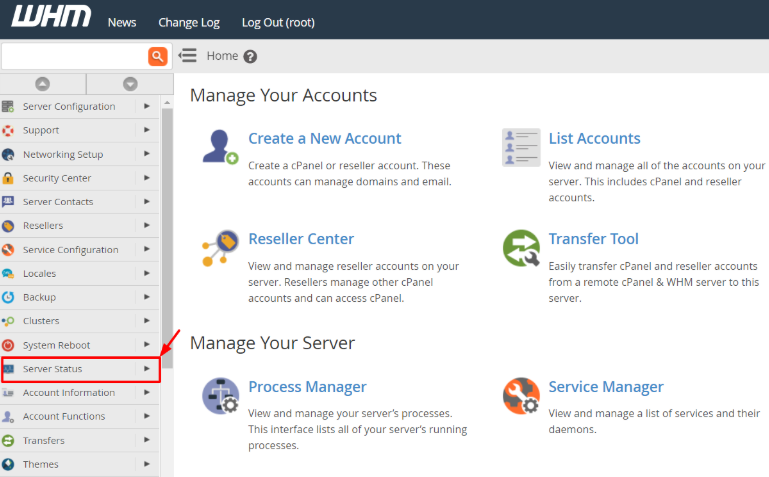
- Click Apache Status and open the live report.

- See the system log, which appears instantly.
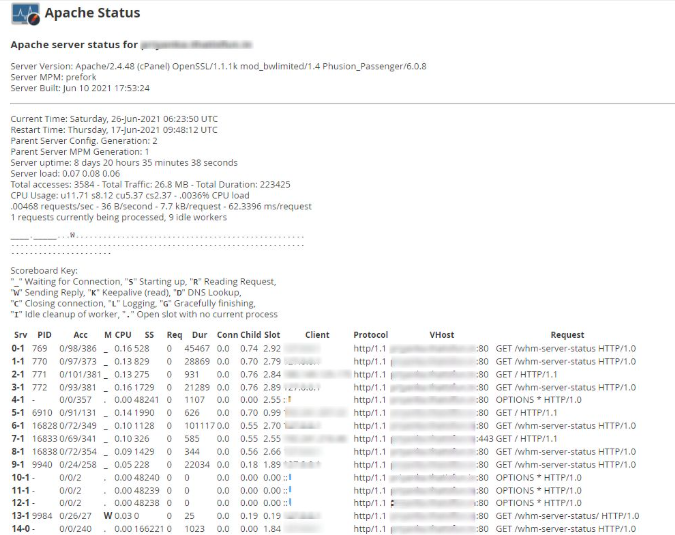
Understanding the Apache Log Details
The report includes technical information about your server configuration and load. Every line informs you about something significant about the present state of the Apache.
Server and Version Details – Displays Apache version, date of exact installation, total uptime, and date of last restart.
Traffic and Access Data – Shows the total requests and the total data traffic in megabytes.
CPU and Load Information – Displays the current CPU load of the web server and whether it is overworked.
The Scoreboard – This is used to show what each server process is doing, e.g., starting, reading, or finishing a request using symbols.
Conclusion
The most appropriate way of troubleshooting the problems of a web server is by checking the Apache Status.
Live data allows you to make fast decisions regarding hosting. You can maintain a healthy website by keeping an eye on these performance metrics.
FAQs
What does Server Uptime mean?
Server Uptime is the total time your server has stayed active without a break. A high uptime means your server is very stable and reliable.
Why is my Total Traffic number very high?
High traffic numbers mean many people are visiting your website or downloading files. It can also mean that search engine bots are crawling your pages.
Is there a need to check the Scoreboard every day?
Check the scoreboard only when you detect delays. It is a problem-solving tool for particular performance issues.
Can I restart Apache from this screen?
No, this screen only shows the status of the server. You must use the Restart Services menu to perform an actual restart.
What is Parent Server Generation?
This number counts how many times the server refreshed its settings. It increases every time you apply a new configuration change to Apache.
Related: How to Optimize Apache Web Server with WHM?
Related: How to Block Bots from Apache with WHM/cPanel?
