How to Change your MySQL Root Password via WHM?
Introduction
MySQL is an independent system that handles all databases on your server. These database accesses require a special root password to carry out management activities.
Your MySQL root password is not the same as your WHM login password; you have to change it using WHM to have complete control over your database engine.
What is the MySQL Root Password?
The MySQL root password provides the user with maximum access to the database server. It enables you to create or delete databases and control all user permissions.
It is also important to change this password frequently to keep your data secure from hackers. You can easily reset a lost password using the WHM interface without needing the old one.
Steps to Change MySQL Root Password
To modify your database security settings, you can use the following easy steps. Ensure that you are logged in to your primary WHM account.
- Open WHM and enter your main root passwords.
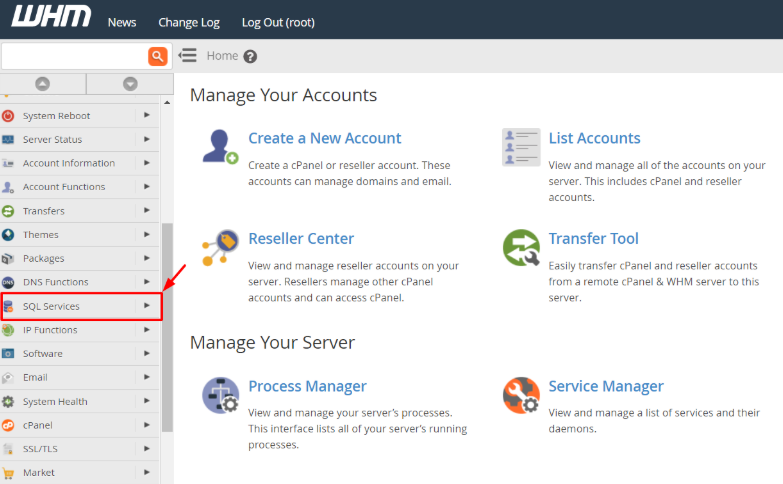
- Find the SQL Services section in the side navigation menu.
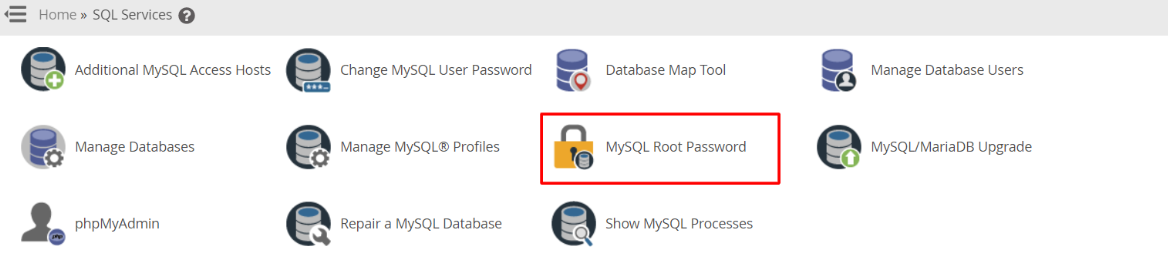
- To begin the reset, click on the MySQL Root Password link.
- Enter your new strong password into the two text boxes.
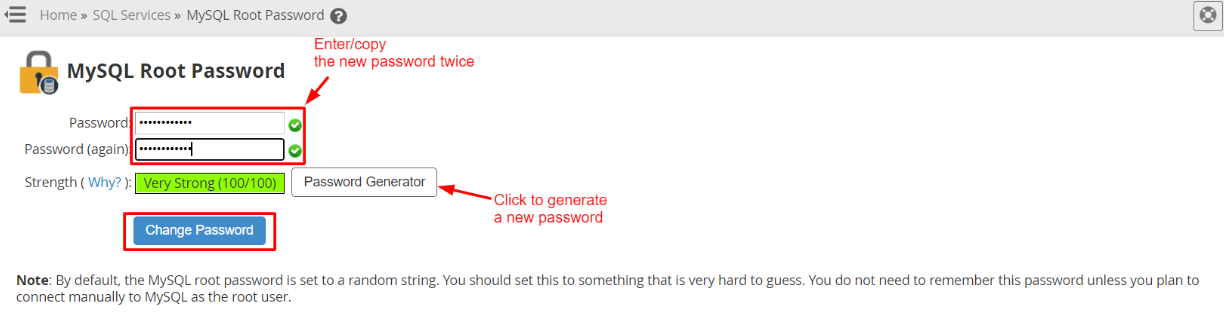
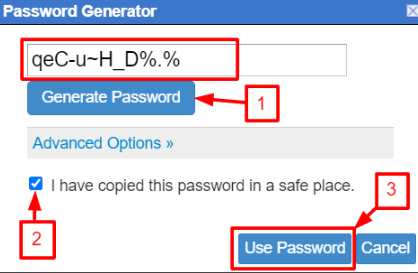
- Click the Password Generator button if you want the system to generate a strong password for you.
- Click the Change Password button to use the new login details.
Tips for a Secure Database Password
A strong password protects your client data from unauthorized access. You should follow specific rules to make your password hard to guess.
Mix Your Characters
A strong password will include both lower and uppercase letters, numbers, and special characters such as the at sign or the pound sign.
Save Your Details
You should always make a note of your new password in a secure physical or digital location. You will need this exact string to log into your database management tools later.
Conclusion
Changing your MySQL root password is a fast task that enhances your server security. This process is very simple for every server administrator with the help of the WHM panel. You should always use a complex password to keep your database information safe from external threats.
FAQs
Is the MySQL password the same as my cPanel password?
No, the MySQL root password is used on the whole database server. Each cPanel user has their own separate password for their individual databases.
Will changing this password break my websites?
No, this change only affects the main root user of the database. Your websites use their own specific database users, and those remain unchanged.
Can I use the Password Generator for better security?
Yes, the Password Generator creates a very complex string of characters. This is the best way to prevent someone from guessing your login details.
What happens if I forget my MySQL root password?
To set a new one, you just need to follow the steps in this guide. In WHM, you do not have to enter the old password in order to make this change.
What is the frequency of changing this password?
The best security is to change the root passwords every few months. It is also prudent to update it whenever any of your staff leaves your company.
Related: How to Restore a User Database Access?
Related: How to Create MySQL Profiles via WHM?
