
Introduction to Nginx
Web servers are essential for delivering websites quickly and efficiently across the internet. Among the available options, NGINX stands out as a powerful and lightweight open-source web server known for its speed and scalability. It not only serves web content but also works as a reverse proxy, load balancer, and mail proxy server. Thanks to its event-driven architecture, NGINX can handle high traffic volumes without performance issues. In this article, we will explain what is NGINX, how it works, NGINX Use Cases, and how to install it.
What is a Web Server?
Let us start with the basics and know the meaning of the web server. Web servers are the machines or computers that send the web pages in response to a request sent using the URL. You enter this URL in your browser. All servers have their IP address and domain.
That’s right!
The remote computer that sends the content of the URL when you request it is called a web server.
Example of the Web Server:
Open Chrome or any other browser and enter https://www.cantech.in/blog/ (domain name) in the URL.
When you enter, you will reach the blog page of Cantech.
Therefore, https://www.cantech.in/ will send requests to the web server and respond with the content or files of the blog page.
What is Nginx?
Nginx is an open-source software. It is a popular web server software due to its high-performance capabilities and stability that it provides. Further to add to the list for its popularity, it is known for its low resource usage and efficient static content delivery. Moreover, it has great compatibility with different operating systems and as mentioned before, it is widely used as a load balancer and reverse proxy.
It has 2 versions. NGINX Open Source handles the network traffic so that resources are used efficiently. It is favourable for modern web apps. Another one is NGINX Plus which is proprietary software that includes complex load balancing, health checks and other features. Both these versions enhance NGINX’s stable and innovative nature for server advancements. It is highly versatile and is excellent in optimising the performance and security of the website/app.
Other features of Nginx are, It has HTTP server capabilities and can perform as an email proxy server like IMAP, POP3, and SMTP. Also, its non-threaded architecture uses less overhead and gives less CPU computation for every request. Moreover, as it can process concurrent requests at a time, it decreases the client’s wait time. Further, you will face no downtime in upgrades with Nginx web hosting.
How Does Nginx Work?
To understand how does NGINX work, it’s important to know that it follows an event-driven, asynchronous architecture. NGINX uses a master process to control configuration and multiple worker processes to handle client requests. Each worker can manage thousands of connections at the same time without creating separate processes for every request. This reduces memory usage and improves server efficiency. NGINX also works as a reverse proxy and load balancer, distributing traffic across backend servers to maintain speed and reliability.
NGINX Architecture
NGINX follows an asynchronous, event-driven architecture that makes it highly scalable and efficient. It operates using a master process and multiple worker processes. The master process manages configuration files and controls the worker processes, while the workers handle incoming client requests.
Unlike traditional servers that create a new process for each request, NGINX workers can manage thousands of concurrent connections within a single process. This reduces memory usage and improves overall performance.
NGINX also works as a reverse proxy and API gateway, acting as an intermediary between clients and backend servers. It supports load balancing, caching, and SSL/TLS termination to enhance speed and security. With its modular design, NGINX can be extended to support various web applications, from simple websites to large-scale platforms.
Configuration Settings for Nginx
nginx.conf file has primary Nginx settings and has various contexts in a structured way. The main Nginx web server configuration includes below:
worker_processes
This means setting the number of workers under a master. It depends on the multi-core processor such as 6-cores and each one is in a single-threaded process. Therefore, when you set 6 worker_processes, you optimise the disk bandwidth fully for heavy load work.
worker_connections
It means the simultaneous worker connections towards the total clients. There’s a default setting of either 512 or 1024. Thus, 6 worker_processes with 512 worker_connections mean – you can serve 6*512 = 3072 connections.
access_log & error_log
These both are the Nginx log types with their events. The visitor activity is written in access_log. Thus, when anyone accesses any file, you can check it there along with the IP of the client. Also, it will show the response of Nginx in it and other aspects. However, if something went wrong or had any issue in Nginx, it would appear in the error log.
gzip
gzip is to compress the data of responses to optimise and boost performance. However, the process can affect Nginx speed if it is utilised on every item as it utilises a great deal of CPU power. Thus, you may continue running this only for large items.
How to install Nginx?
Let’s proceed to the next section, how to install NGINX. Follow the steps below to complete the installation efficiently.
FOR LINUX DISTRO
1. Go to the terminal in your Linux distro, Ubuntu
2. Type the command below for Nginx installation.
sudo apt-get update (to update your system)
sudo apt-get install nginx (to install nginx in the command line interface) – press Y to install
3. Enable the Firewall with the following command.
sudo ufw enable
4. Check the version of Nginx with the following command.
nginx -v
If you see nginx version: nginx/1.xx.x (ubuntu) then Nginx is installed.
5. Next, for your server to receive requests on HTTP and HTTPS ports, some rules need to be added to the firewall. The command below will give the configuration that you can add.
sudo ufw app list
6. The output below may appear:
Nginx Full, Nginx HTTP, Nginx HTTPS
7. Add them to the firewall with the below commands.
sudo ufw allow ‘Nginx Full’
sudo ufw allow ‘Nginx HTTP’
sudo ufw allow ‘Nginx HTTPS’
8. After adding them, check their status:
sudo ufw status
9. Then, check your server i.e. if it is running.
sudo systemctl status nginx
Your server is running if active (running) appears in the Active line.
FOR WINDOWS 7/8/10/11
- Visit https://nginx.org/en/download.html
- Click on the mainline version
- Unzip the file in a folder and open that folder.
- Open the Nginx application. Allow for changes in settings and firewall rules.
- The server should start running, to check it go to http://localhost/
A page with Welcome to Nginx will appear, which means the server is running.
NGINX Use Cases
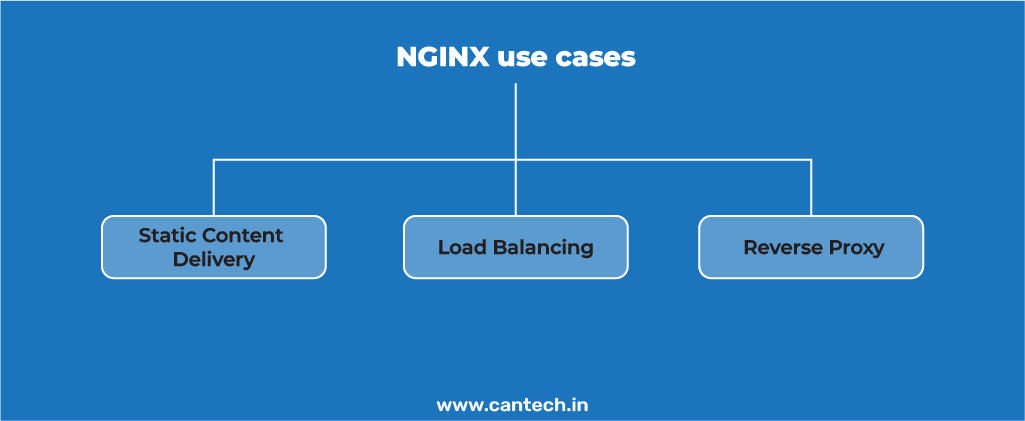
Now, let’s look at the key use cases of NGINX in web development and server management.
Static Content Delivery
NGINX efficiently manages static files such as HTML, images, JavaScript, CSS, etc due to its effective routing of requests. Static content is located and served fast while handling the concurrent requests too. Well, the auto-indexing feature also contributes to this process for speedy static content fetching and delivery. It is a highly useful feature if the site has large static files.
Therefore, NGINX is known for its high performance for demanding workloads.
Load Balancing
NGINX is also a load balancer. It is an efficient process to distribute traffic among multiple servers so that one server does not bear all the load causing downtime and slowdowns in heavy traffic scenarios. Thus, load balancing ensures the availability of the site as other servers contribute when one server faces heavy load. So, the server operation continues and gives increased uptime.
Moreover, this feature boosts the server’s performance. It also prolongs the server lifespan as any one server does not face over usage.
Reverse Proxy
NGINX for microservices uses a reverse proxy service. This capability is considered essential in modern web architectures. Reverse Proxy is in the middle of requests and responses i.e. it handles the requests from the client before they are sent to the back-end servers. Thus, the back-end servers receive only the required traffic and do not face the Internet directly.
This interference checks the traffic and prevents attacks and security vulnerabilities. Microservices architecture has various services so this feature of NGINX is highly useful for them.
What is NGINX vs. Apache?
Apache is powerful and flexible web server software. It starts a new process for every request so it can lead to a high resource usage.
Moreover, Apache can handle dynamic content and can support complex configurations. Thus, it is suitable for complex applications.
Whereas, NGINX is known to be a resource-efficient web server and can deliver high performance for heavy workloads too.
It has an event-driven architecture in which it handles simultaneous requests as a part of a single-threaded process.
NGINX is the top choice for static content delivery. It has a load-balancing feature and can efficiently manage multiple requests at a time. It is widely used for high-traffic sites/apps for their amazing performance results.
Read more the details comparison of NGINX vs. Apache
Getting started with NGINX
You can efficiently use NGINX with Linux as it is popular for high performance, security, and scalability.
Cantech offers affordable Linux-based plans for different types of web hosting. Therefore, you can run NGINX efficiently with these customised packages that you can choose as per your project-specific needs.
You can easily configure and install the required modules for the NGINX. Our VPS, cloud, and dedicated server offers great flexibility and customization with complete control of your server.
You can tailor settings as per your requirements related to web hosting, SSL/TLS, PHP applications, etc.
Conclusion
Nginx is an excellent software that can drastically boost your website performance and scalability. It is simple and customisable with powerful features. This web server software is a top choice for heavy-traffic sites due to the speed and reliability that it offers.
So, install Nginx with the mentioned steps and ensure efficiency with a significant boost in your server’s capabilities.
FAQs
What are the Main Features of NGINX?
NGINX is a powerful web server software for modern web infrastructure. It is a popular one due to its performance, scalability, and security capabilities. Well, it has some excellent features. It is a reverse proxy and load balancer. Moreover, it is known for managing static files efficiently. It also has SSL/TLS offloading and auto-indexing. Caching and compression are other features that boost performance and efficiency.
Is NGINX Suitable for Beginners?
NGINX is simple and customizable. Its installation and configuration are easy and effective. It has comprehensive documentation and community support so it becomes further easier. You can get extensive resources; also, there are forums and tutorials to help you learn as a beginner in server management.
Why is NGINX so Popular?
Apart from what we discussed in the blog about its amazing features, architecture and work, it is also efficient in handling data and errors. Furthermore, it has strong security features too. Moreover, web app deployment and management become smooth with the NGINX CMS integration as well as compatibility with deployment tools like Kubernetes. Also, NGINX caching boosts speed and reliability.
What is Nginx in Linux?
Nginx is a web server application that is based on Linux and other platforms. In Linux, it is often deployed in the server of websites, web traffic, and web pages to consumers. It is also reputed to be fast, light and capable of supporting large number of users simultaneously.
Nginx is used in most Linux servers since it operates effectively with minimal system resources, as well as on high traffic.
What is Nginx Used for?
Nginx is mainly used for:
- Hosting websites (serving HTML, CSS, images, and other files)
- Working as a reverse proxy to forward requests to other servers
- Load balancing between multiple servers
- Improving website performance with caching
- Handling secure connections (HTTPS)
- Acting as an API gateway for applications
In short, Nginx helps websites run faster, stay secure, and manage high traffic smoothly