The term virtualization has become one of the integral components of IT infrastructure today. However, with the rapid growth of cloud computing and the technology sector, confusion on the difference between virtual desktop infrastructure (VDI) and virtual machines (VM) remains. Despite being key components of the virtualization domain, they each have distinct functions and make up unique architectures. This guide will clarify the confusion, and assist in determining the best fit for your business.
What is VM?
A virtual machine (VM) refers to a software-based replica of a computer. To answer the question of what a VM is, the full form of a VM is a virtual machine. A virtual machine functions like a regular computer, and is capable of running applications as an operational system. However, a VM is not physically tangible as it operates on an imitation of the machine as it runs on a hypervisor, the software which creates a digital computing environment.
The process of virtualization is a hypervisor, e.g., VMware vSphere, is set directly on the server, which is called the bare-metal server. A hypervisor allocates the physical resources of a computer, such as networking, to form multiple, predetermined virtual apparatuses. A VM, like a computer, can download its software, an operating system, and can perform tasks without interdependence on other VMs in the bare-metal server.
Read More : What is VM?
Different Kinds of VMs
System Virtual Machines: This type of virtual machine is the most prevalent type for virtualizing servers or desktops, as they offer a whole system platform, accommodating the running of a complete operating system.
Process Virtual Machines: These focus on executing a single application or process, such as the Java Virtual Machine (JVM), and are more focused on providing programming environments that are platform-independent.
What is Virtual Desktop Infrastructure (VDI)?
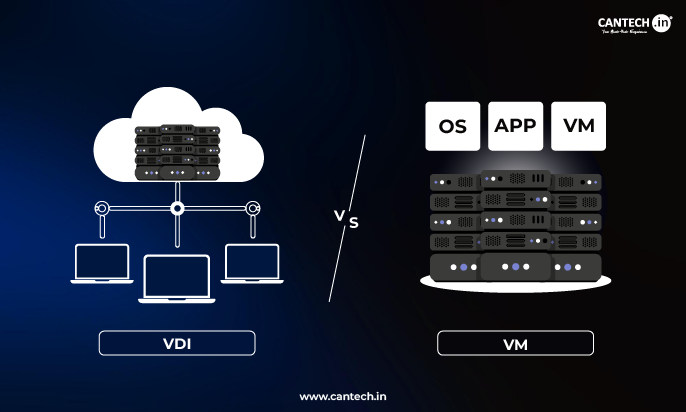
VDI is one of the frameworks of technology that employs server virtualization to host and control desktop environments in a centralized manner. In a VDI, desktop operating systems (typically Windows or Linux) run on virtual machines on a centralized server in a data center. Clients access their separate virtual desktops (VDIs) over the internet and from any device (laptop, thin client, or tablet) at their convenience.
VDI Machines: Each virtual desktop is a VDI machine, which is a dedicated virtual machine set up for desktop use. These VDI machines are assigned to users by a connection broker that authenticates the users and links them to the desktop machine they are entitled to.
Read More : What is VDI?
The Key Difference: Architecture and Purpose
What is the most evident dissimilarity between VDI and VM? It is their primary use case and their management system.
VM (Virtual Machine): The most important unit. It is a generalized, versatile, virtualized computer instance. The use cases for this technology are plenty, ranging from application servers (such as database and web servers), file servers, and development and testing environments, to even desktops. Its purpose is multi-fold: consolidation of physical servers, improvement of resource utilization, and flexible isolated environments for any software workload.
VDI (Virtual Desktop Infrastructure): One particular instance and solution design based on VM technology. VDI is a complete framework intended to deliver and manage user desktops. It is more than the desktop VMs and also comprises essential component:
- Image Management: Tools to create and update desktop master images and manage them.
- User Profile Management: Allows user data and settings to be separated from the OS for portability.
- Gateway: A gateway for secure external access to remote users.
- Monitoring and Capacity Planning: A set of tools designed to ensure performance and scalability.
VMs and VDIs are different. Virtual Machines are blank-slate computers, meaning you can make them a server, desktop, or office. Virtual Desktop Infrastructure, however, is a specific virtual machine that is a Windows or Linux desktop deployed to your computer securely. While every VDI is a Virtual Machine, not every Virtual Machine is a VDI.
Benefits of Virtual Machines
One of the greatest benefits is server consolidation. A single server can run numerous virtual machines, resulting in a significant reduction in both spending and data center footprint.
- Each virtual machine is isolated from the others. This means that if a single VM has a failure or a security breach, it remains contained and doesn’t affect the others.
- Provisioning new VMs can be done in a matter of minutes, as opposed to the much longer time it takes to acquire physical hardware.
- With VMs, you can create a temporary and isolated environment for development and testing.
- Backing up, replicating and migrating virtual machines is easy, something that can be massively helpful for disaster recovery and business continuity.
- You can run modern hardware, and still be able to run older applications with legacy support.
Drawbacks of Virtual Machines
Each virtual machine is run with a hypervisor, meaning there is a performance overhead with every VM. This is generally not a significant issue with modern hardware though.
- Resource Sprawl: Without management, the proliferation of virtual machines (VMs) can lead to wasted resources and licensing costs.
- Complication: The management of extensive virtualized spaces requires the mastering of the hypervisor, storage, and networking.
- Single Point of Failure: Physical host server failure can impact all the resident VMs, although this can be mitigated with clusters.
Virtual Desktop Infrastructure
Types of VDI
Persistent VDI: This model allows each end user a dedicated desktop virtual machine (VM), which can be customized, saved, and personalized to be their individual physical computer. This model works well for knowledge workers, power users, and those needing continual personalized experiences or environments.
Non-Persistent VDI (also referred to as Pooled VDI): Here users connect to one of many randomly assigned VMs cloned from a single so-called “golden image” and changes are typically wiped after each logout session. This model provides high control and low storage costs, thus it works well for educational labs, task workers, and shift workers.
Advantages of VDI
- Centralized Management & Security: The entire desktop estate can easily be patched, updated, and secured from a single pane of glass. Since users don’t leave the data center, the exposure and risk of a data breach from a lost device are drastically reduced.
- Access from Any Device: It allows secured remote work, BYOD (Bring Your Own Device) or access through thin clients.
- Business Continuity: If a primary workplace becomes unreachable, users can log into their desktop from any location.
- Reduced Endpoint Cost & Complexity: Users can utilize low-cost thin clients, and the older hardware is able to live longer due to the processing taking place in the data center.
- Consistent User Experience: No matter what device is accessed, all users get a consistent, high-performing desktop experience.
Disadvantages of VDI
- High Upfront Cost: Significant cost is needed in data center infrastructure (servers, storage, networking, licenses).
- Performance is Network-Dependent: User experience can be altered by a poor network due to latency.
- Scalability Challenges: Users can be in the hundreds and thousands, but efficient planning to mitigate contention on storage I/O is needed.
- Single Point of Failure: All users can lose access if the data center and connection broker fail.
Decision Matrix: When to Use VDI vs Generic VMs
Use Virtual Machines, or Server Virtualization, for:
- Environment for databases, email servers, web servers, or other line of business applications
- Development, staging, and testing environments
- IaaS for a private or hybrid cloud
- Converging physical servers that are underutilized
Use Virtual Desktop Infrastructure for:
- Remote & Hybrid Workforces: Secure, consistent desktop access from anywhere at all times.
- High-Security Environments: (Healthcare, Finance, Government) where data cannot reside on endpoints.
- Task & Call Centers: Application of non-persistent pools for employees with the same task.
- Educational Institutions & Labs: Providing the same software packages to students in class or remotely.
- Contractors & Short-Term Staff: Allocating temporary, easily removable, and secure access.
Real-World VDI Use Cases
- Healthcare: Doctors and nurses access patient records (PHI) securely from any hospital workstation, or mobile cart, with no local data storage, thereby being HIPAA compliant.
- Financial Services: Allowing traders and analysts to work with sensitive market data on persistent VDIs to avoid data leakage while enabling high-performance computing.
- Software Development: Developers can code on powerful, persistent VDIs that have all the necessary tools and can be accessed from a lightweight laptop at home or the office.
- Education: A university offers its students in a computer science lab non-persistent VDIs with specific programming software that work for one session, and reset for the next session.
Final Comments
The distinction between virtual machine and virtual desktop infrastructure is neither a question of better or worse, but of goal and perspective. VM technology is the primary engine that enables modern and efficient IT. VDI is a powerful, specialized vehicle built on that engine, designed for the specific task of delivering user desktops. To many organizations in this space, the question isn’t whether to invest in VDI or VMs. Rather, they implement a VM server virtualization solution to host backend services, then over that architecture, implement a VDI to service certain user access and user security needs.