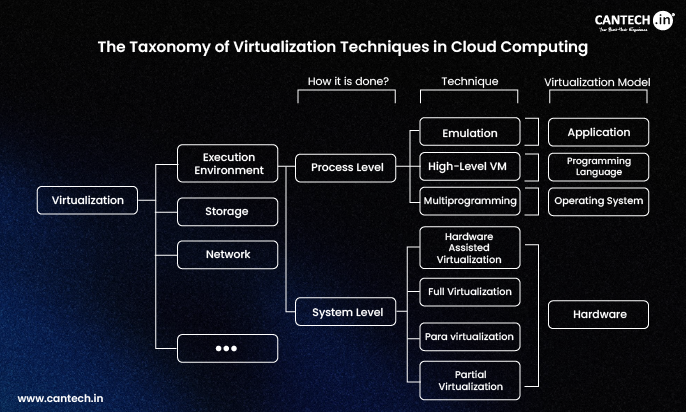
Many cloud computing resources explain that Virtualization is the foundation of modern infrastructure, but they rarely explain the different techniques that make virtualization possible. As a result, students, developers, and IT professionals often understand the concept at a high level but struggle to distinguish between the various virtualization approaches used in real cloud environments.
Understanding the taxonomy of virtualization techniques helps bridge this gap. It provides a structured way to classify virtualization methods based on architecture, resource abstraction, and system interaction. In this article, we explore the taxonomy of virtualization techniques used in Cloud Computing, breaking down each category to clarify how virtualization works behind the scenes.
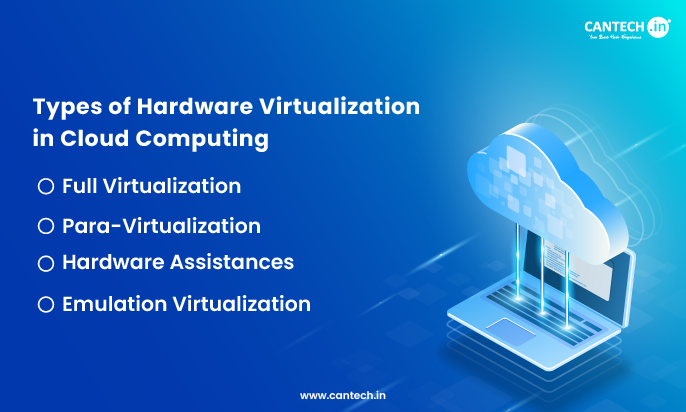
Virtualization of the Hardware: The Foundation
The base of our cloud computing virtualization taxonomy is hardware-level virtualization, which abstracts computing resources to form multiple, distinct, and isolated virtual machines.
The Hypervisor: The Central Node of Virtualization
Referred to as VMM as well, hypervisors play a vital role in enabling the software layer of hardware virtualization. Hypervisors can be found in the VMs, as well as the physical pieces of hardware, and are responsible for the distribution of resources, and the separation provisions of the VMs. Hypervisors are typically categorized into two:
Type 1 Hypervisors
Type 1 Hypervisors are arguably the most common of hypervisor architectures in enterprise cloud scenarios. A type 1 would be a hypervisor that installs directly on the physical server hardware, meaning it does not require a host OS. Examples of these are VMware ESXi, Microsoft Hyper-V, and KVM. These hypervisors are a must in cloud data centers, as they offer excellent performance and security, are more efficient, and have less isolation concerns particularly between the hardware and resources present.
Type 2 Hypervisors
Type 2 Hypervisors would, in comparison, run as an application on a conventional host operating system. They are generally easier to deploy for development and testing purposes (e.g. VMware Workstation, Oracle VirtualBox), but these hypervisors can create performance concerns, which is why they are not typically found in production cloud architectures.
Hardware Assisted Virtualization
To improve the performance of virtualization, modern processors contain specific extensions (Intel VT-x and AMD-V). Virtualization technology helps the hypervisor to control the memory and processor more efficiently, and the negative impact of virtualization on performance is mitigated. Thanks to this technology, the performance of virtual machines becomes almost as good as using the physical machine. This is one of the reasons why virtual machines are so efficient for cloud computing.
Infrastructure Virtualization – Abstraction of Select Elements
Cloud computing does not only virtualize whole servers; it uses the same techniques to apply virtualization to specific elements of the infrastructure.
Network Virtualization: Software-Defined Connectivity
Network virtualization decouples the physical components of networking and allows the creation of independent virtual networks. In cloud environments, this allows multi-tenancy, where hundreds of customers are logically separated even as they are using the same physical network device.
VMware NSX and Open vSwitch are key virtualization technologies. NSX provides network virtualization together with many security features. Open vSwitch provides a programmable and automated network. Cloud designers can build on the network, set and manage security and traffic rules, and do other complex tasks using software that would normally take many days to rearrange with physical devices.
Data Persistence and Storage Virtualization
Virtualized networks consolidate their physical storage assets and appear as one single storage device. The consolidation layer between the virtual machines and the physical storage adds flexibility and efficiency in storage management and allocation.
Cloud-hosted resources and facilities usually take advantage of Networked Attached Storage (NAS) and Storage Area Network (SAN) systems. The former allows for access to file storage systems while the latter is a block storage device that is faster and allows for higher-performance access at the cost of a single file storage access. Many contemporary cloud systems use software defined storage (SDS) that goes beyond the other cloud systems to form smart storage pools. SDS systems autonomously manage the placement and replication of data and the backup of information to additional inexpensive storage universes.
Resource Allocation and Memory Virtualization
The other type of virtualization that is efficient with resource optimization is memory virtualization. With it, the hypervisor abstracts the physical RAM and allows the virtual machines to see it as contiguous memory blocks that are carved out as isolated separate blocks. The hypervisor also implements more advanced virtualization techniques that allow it to create the illusion of more memory. With such memory over commitment, an algorithm is used to control the memory of the virtual machines and maximize its efficiency by doing processes swap to allow and better over use the physical memory. Such techniques are essential in densely populated cloud systems.
OS Virtualization Level 3
The last technique in the hierarchy of virtualization techniques systems in the cloud is virtualization of the operating systems. The ability of containerization meant that the application deployment processes and techniques could be reformed.
Operating System Virtualization: Lightweight Efficiency
In contrast to virtualization on hardware which needs complete guest operating systems, operating system virtualization uses the host operating system’s kernel while enabling the provision for separate user spaces. Containerization, for example, is a technique that virtually eliminates operational overhead and delays and thus starts up much quicker than its counterpart virtual machines (VMs).
What is Docker?
Containerization is the practice of consolidating an application’s files with its dependencies, and Docker is the most well-established platform that does this and enables the application to exist in a unit of software called a container. As each of these containers run in isolation as their own processes on the host operating system, their OS kernel is shared but they have their own unique filesystems, networking, and processes. A microservice architecture that uses Docker is highly efficient and it is also beneficial to have in a cloud environment multi-deployment pipelines as well as continuous deployment.
Learn more about what is docker?
What is Kubernetes?
Kubernetes is the container orchestrating platform that scales up and manages the containers Docker creates. Kubernetes automates the deployment, operational management, and scaling of container-based applications on clusters of host machines. The combination of Docker and Kubernetes is the basis for cloud-native applications, which allows developers to scale applications with resilience and the ability to run the application on any device to enhance application deployment across multiple environments.
Read more: What is kubernetes?
Application and Desktop Virtualization – User-Focused Abstraction
The last in the taxonomy is virtualization based on the user, the applications to be delivered, and the experience.
Application Virtualization
Application virtualization is when applications are taken from the host operating system. Instead, they are given everything they need to run in a unit called a container. Instead of integrating with the host OS, these applications run in separate containers or “bubbles”. This allows them to operate without conflict from other applications or other versions of the same app. This also helps with the streamlining of deployments and whenever the app requires updates. This is especially appreciated in cloud environments that host many applications for different users.
Virtual Desktop Infrastructure
Virtual desktop infrastructure is also the same as cloud environments. This is a specialized case where entire desktop environments are virtualized and run as virtual machines within a data center, streaming the desktops down to end user devices. In the cloud, this is also referred to as desktop as a service (DaaS). In this case the service provider takes care of the backend infrastructure while the users are able to access their virtual desktops from any location.
Read More: What is VDI?
The Integrated Cloud Virtualization Architecture
The types involved in virtualization under cloud computing help comprehend how these levels function to form cloud enterprise systems. In an ordinary cloud deployment, one would have to apply,
Type 1 hypervisors on bare machine servers to achieve hardware virtualization.
- Software-defined networking such as VMware NSX or Open vSwitch for virtualization in networks.
- Software-defined storage pools that abstract NAS and SAN devices.
- Container platforms such as Docker that run on virtual machines to enable application deployment.
- Kubernetes that manages containers in virtualized systems.
- Application virtualization for particular legacy or isolated systems.
It is this stratified architecture that enables cloud computing characteristics such as multi-tenant architecture, rapid elasticity, measured service, broad network access, and pooled resources. Target specific issues and virtualization methods work adjunct to one another.
Evolution and Future Directions
The classification of virtualization technologies continues to change, with notable new servers being deployed, and ongoing trends including:
- Serverless Technology: Extending virtualization to remove runtime perspective, so developers deal with code.
- Edge Virtualization: Modifying virtualization for distributed edge computing environments.
- Hardware Specialization: Incorporating barrier processors (GPUs, FPGAs) into virtualized environments for AI workloads.
Conclusion
In virtualization’s ordered classification, we can see the foundation for how cloud computing performs its wonders. Each virtualization technique focuses on addressing particular problems of the cloud stack, from hypervisors controlling the physical hardware to Docker containers that simplify the deployment of applications. This systematic approach to abstraction (which includes hardware, infrastructure, OS, and applications) makes the cloud’s defining features: efficiency (resource pooling), flexibility (software-defined management), and scalability (architectural isolation).
Whether you are implementing a private cloud, using public cloud providers, or developing cloud-native applications, this classification helps you choose which virtualization techniques to use on which layer and makes your infrastructure not just virtualized but also intelligently abstracted, overriding the physical limitations to create the digital paradigms of the cloud computing era.