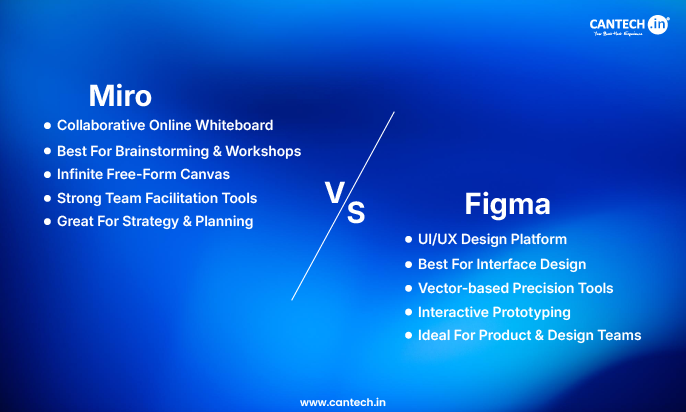
Miro and Figma are two of the most discussed tools in the digital creation of products and collaborating teams, yet they are also used in two contrasting purposes. Although both platforms have real-time teamwork and visual workflow, they are designed to address different phases of the design process. Their appropriate selection (or a combination of them) can lead to higher productivity, improved workflow, and make cross-functional team work easier.
What Are Miro and Figma?
Miro- Collaborative Whiteboarding & Ideation
Miro is a digital whiteboarding tool that is utilized in brainstorming, planning, mind mapping, and early project ideation. It serves as a boundless platform on which groups can share ideas visually, structure thoughts and conduct workshops.
Strength: Open-endedness of cooperation and collective thinking.
Figma-UI/UX Design & Prototyping Tool
Figma is an online design tool specifically aimed at user experience (UX) and user interface (UI) design, wireframing, and interactive prototyping. Designers, developers and product teams have been using it extensively to provide final product screens and specifications.
Strength: Structure design and prototype development.
Key Similarities:
Miro and Figma have a number of similarities but are different in purpose:
- Online and real-time collaboration: Both allow several people to collaborate in real-time, regardless of their location.
- Productivity: The accessibility of browsers implies the absence of barriers to installations and a smooth portable device transition.
- Freemium pricing: Both tools have free plans to begin with, with upgrades to add more features and use by the team.
Commenting & sharing: in both platforms, it is easy to leave comments and share files.
Miro vs Figma: Head-to-Head Comparison
| Feature / Aspect | Miro | Figma |
|---|---|---|
| Primary Use | Whiteboarding, brainstorming, planning | UI/UX design, wireframes, prototypes |
| Best Workflow Stage | Early stages of ideation and strategy | Mid-to-late stages of product design |
| Canvas Type | Infinite, free-form whiteboard | Grid-based, design-oriented workspace |
| Design Tools | Diagramming, sticky notes, templates | Vector design, auto layouts, interactive prototyping |
| Collaboration Style | Broad teamwork with retrospectives & voting | Designer-centric collaboration with developer handoff |
| Ideal Users | Cross-functional teams, PMs, educators | Designers, developers, product teams |
| Output | Concept maps, user journeys, planning boards | High-fidelity screens, prototypes, design systems |
| Ease of Use | Very intuitive, minimal onboarding | More complex — tailored to professional designers |
Detailed Feature Breakdown
Workspace & Canvas
Miro: Provides an infinite free-form canvas that is best suited to brainstorming, ideation, and problem framing.
Figma: The tool is a grid-friendly, vector-based layout design environment with layout constraints for creating pixel-perfect UIs.
Collaboration & Teamwork
Miro: Excellent at collaborating with large teams with such a set of facilitation tools as timers, voting, and workshop templates.
Figma: It is perfect in the design workflow because it has co-editing in real time, version history, and developer handoff.
Toolsets & Capabilities
Miro: Concentrates on mind maps, flow charts, project visualization and visual planning templates.
Figma: Provides editing with advanced vectors, reuse of components, auto layout, and interactive prototyping.
Integrations and Ecosystem
Miro: Has an integration with productivity and project software such as Jira, Trello, Zoom, Google Workspace, etc.
Figma: Works with design systems, development handoff tools, and collaboration apps.
Which One Is Better (Really)?
No universal winner – the best tool is determined by what you need to accomplish:
Choose Miro if…
- You are conducting workshops, brainstorming or defining strategy.
- You require wide, non technical team involvement.
- You are interested in mapping ideas, customer journeys, or workflow planning.
Choose Figma if…
- You have to create and develop interactive screens.
- Your task is the work on UI/UX deliverables of applications and websites.
- You desire developer handoff and fine-grained layout.
A Combined Workflow- The Best of Both Worlds
Combine Miro and Figma with various professional teams:
Begin in Miro to brainstorm, plan and do initial planning.
Refine in Figma to design, prototype, build, and handoff systems.
This methodology allows the teams to have the benefits of both tools, unstructured ideation and systematic design, without tradeoffs.
Conclusion
Although Miro and Figma might look like substitutes at first sight, they are not direct competitors in most processes. Miro prevails in ideation, collaboration, and strategy, and Figma excels in precision design, UI/UX workflows, and prototyping.
The choice of platform to follow will depend on whether you are oriented towards thinking and planning or design and execution. Teams in most instances would have advantages of employing both tools at various phases in the project lifecycle.