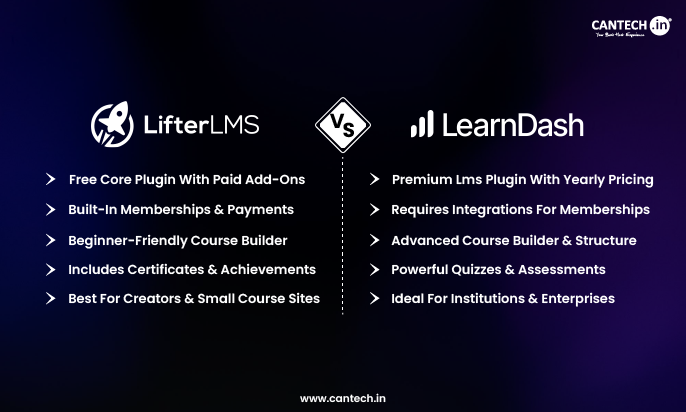
The main difference between LifterLMS and LearnDash lies in pricing structure, built-in features, and flexibility. LifterLMS provides many built-in tools for course creation, memberships, and student engagement, while LearnDash focuses on powerful course delivery with a simpler core system that can be extended through integrations. Both are popular learning management system (LMS) plugins for WordPress, but the right choice depends on your budget, technical skills, and course requirements.
What Is LifterLMS?
LifterLMS is a WordPress learning management system add-on which enables users to build, operate, and sell online courses right out of their website. It comes with inbuilt course-building tools, course membership, student interaction, and course tracking.
Educators, training firms, and entrepreneurs are the intended users of this plugin, who would desire to have total control of their eLearning platform, without having to use third-party marketplaces.
Key Features
-
Drag-and-drop course builder
-
Built-in quizzes and assignments
-
Membership and course bundles
-
Student progress tracking
-
Certificates and achievements
-
Payment integrations
Best Use Cases
- Online course creators
- Coaching businesses
- Learning platforms in membership.
- Training organizations
What Is LearnDash?
Another well-known WordPress LMS plug-in is LearnDash which assists businesses, universities, and training organizations in developing professional online learning platforms.
It is dedicated to the delivery of courses in the form of a structure and other attributes of the advanced learning that make it a powerful solution to organizations requiring scalable eLearning.
Key Features
- Advanced course builder
- Drip-feed lessons
- Management of quizzes and assignments.
- Course prerequisites
- Certificates and badges
- Payment gateway and membership integration.
Best Use Cases
- Corporate training systems.
- Educational institutions
- Professional certification programs
- Large online academies
LifterLMS vs LearnDash Side by Side Comparison
| Feature | LifterLMS | LearnDash |
|---|---|---|
| Platform Type | WordPress LMS plugin with built-in engagement and membership tools | Premium WordPress LMS plugin focused on structured learning |
| Pricing Model | Free core plugin with paid add-ons or bundles | Paid annual license with most features included |
| Ease of Setup | Beginner-friendly onboarding and setup wizard | Easy setup but more configuration required |
| Course Builder | Drag-and-drop visual course builder | Advanced structured course builder |
| Lesson Management | Supports lessons, modules, and multimedia content | Supports lessons, topics, and structured course flow |
| Content Drip | Available via add-ons | Built-in feature for scheduled lessons |
| Quiz System | Basic quizzes and assessments | Advanced quiz builder with multiple question types |
| Certificates and Badges | Built-in certificates and achievements | Certificates supported with customization |
| Student Engagement Tools | Gamification, achievements, progress tracking | Focus on course progression and quizzes |
| Membership Features | Built-in membership functionality | Requires integration with membership plugins |
| Payment Gateways | Built-in support with extensions | Requires integration with payment plugins |
| Integrations | Integrates with major tools but smaller ecosystem | Large ecosystem of integrations |
| Reporting and Analytics | Basic reporting dashboard | Advanced reporting tools |
| Scalability | Good for small to medium course platforms | Better suited for large training platforms |
| Customization | Flexible with add-ons and WordPress customization | Highly customizable through integrations |
| Best For | Independent educators and membership sites | Universities, corporations, and professional training platforms |
Key Differences Between LifterLMS and LearnDash
Ease of Use
- LifterLMS has a user-friendly interface that is easy to use. Its visual course builder enables users to easily create courses.
- LearnDash offers strong customization capabilities but can be more time-consuming to use, particularly to people unfamiliar with LMS systems.
Pricing and Cost Structure
- LifterLMS is based on a freemium model. The base plug is a free one, and other features need paid extensions or packages.
- LearnDash is a high-end yearly priced product. Majority of the features are covered under the standard package, and specialty is likely to need third-party integrations.
Course Creation Features
The two platforms offer robust course creation capabilities, although the methods differ.
- LifterLMS is flexible and has enhanced features of engagement, such as achievements and certificates.
- LearnDash is focused on structured learning tracks that have such features as:
- lesson progression
- prerequisites
- timed quizzes
- drip-fed content
Integrations and Extensions
- LearnDash also has a broader range of marketing, membership, and automation solutions as integrations.
- LifterLMS does not completely avoid major integrations but does not lean on external integrations as much as on its default capabilities.
Student Engagement Tools
LifterLMS has a few inbuilt engagement tools including:
- certificates
- achievements
- student dashboards
- progress tracking
LearnDash is another provider of engagement tools but tends to use integrations to provide advanced gamification and community capabilities.
Payment and Monetization Options
- LifterLMS also has a course payment system, membership feature, and bundle built-in.
- LearnDash will normally need to be integrated with payment systems or membership extensions to sell courses.
Pros and Cons
LifterLMS Pros and Cons
Pros
- Free core plugin
- Built-in engagement tools
- Elastic membership options.
- Beginner-friendly interface
Cons
- Add-ons are needed to use some advanced features.
- Less developed integration ecosystem.
LearnDash Pros and Cons
Pros
- Powerful course management
- Ecosystem of large integration.
- Good performance in large scale.
- Structured learning paths
Cons
- Higher upfront cost
- Some features will need integrations.
Pricing Comparison
One of the largest variations between the two LMS plugins is pricing.
- LifterLMS enables one to use it free and upgrade to paid extensions when necessary.
- LearnDash is a yearly subscriber but has numerous features embedded in the main plug.
- LifterLMS can make a smarter entry point in the case of creators with a constrained budget.
- LearnDash can provide superior value in the long run as an organization may need a more comprehensive LMS solution.
Which LMS Plugin Is Better for Different Use Cases?
Best as an Online courses creator
LifterLMS is effective in the case of independent educators that need embedded course-selling tools.
Best at Universities and Institutions
Universities and other large-scale training providers tend to prefer LearnDash because it allows them to manage courses in an organized way.
Recommended by Membership Websites
LifterLMS provides powerful membership features and bundles.
Best for Beginners
LifterLMS tends to be simpler to install and operate by novices.
LifterLMS or LearnDash: Which is better?
Between these LMS plugins, it is up to you to choose depending on your objectives.
Choose LifterLMS if you want:
- lower starting cost
- inbuilt course monetization.
- flexible membership plans.
Choose LearnDash if you need:
- high level learning arrangements.
- enterprise-level LMS attributes.
- large integration ecosystem
The two plugins are trusted to create online learning platforms using WordPress.
Conclusion
Both LifterLMS and LearnDash are powerful WordPress LMS plugins that enable users to build and sell online courses.
LifterLMS is ideal for independent educators and small businesses looking for flexibility and lower upfront costs. LearnDash is better suited for organizations that need structured learning systems, advanced integrations, and scalable course delivery.
The best choice ultimately depends on your course goals, budget, and technical requirements.
FAQs
What is the difference between LifterLMS and LearnDash?
The main difference between LifterLMS and LearnDash is how they deliver LMS functionality and pricing. LifterLMS offers a free core plugin with built-in tools like memberships, certificates, and engagement features, while LearnDash is a premium plugin that focuses on structured course delivery and advanced learning paths. LearnDash relies more on integrations to extend functionality, whereas LifterLMS includes many features natively within the platform.
Is LifterLMS easier to use than LearnDash?
LifterLMS is generally considered easier for beginners because it includes many built-in features and a guided setup process. Users can create courses, quizzes, and memberships without installing multiple additional tools. LearnDash also has a user-friendly course builder, but its advanced configuration options and integrations may require more time to learn. For new course creators, LifterLMS often offers a smoother initial experience.
Which LMS plugin is better for selling online courses?
Both LifterLMS and LearnDash can effectively sell online courses, but they approach monetization differently. LifterLMS includes built-in payment options, course bundles, and membership capabilities, making it convenient for creators who want an all-in-one solution. LearnDash usually requires integrations with payment gateways or membership plugins to sell courses. However, this flexibility allows businesses to build highly customized monetization systems.
Is LearnDash worth the price for LMS websites?
Yes, LearnDash can be worth the investment for organizations that require advanced learning management capabilities. It offers structured learning paths, course prerequisites, drip-feed content, and powerful reporting features. These tools make it popular among universities, corporate training programs, and professional certification platforms. While the initial cost may be higher than LifterLMS, many businesses value its scalability and extensive integration ecosystem.