Selecting the best GPU for AI Inference does not simply depend on its raw power-inference requires throughput, VRAM, and latency, and cost-efficiency. The best GPU is really dependent on your workload and scale whether you are deploying LLMs, running APIs, or creating applications that operate in real-time with AI.
Quick Answer: Which are the Best GPUs for AI Inference?
The best GPUs for AI inference include RTX 5090, RTX 4090, RTX A6000, RTX A4000, NVIDIA A100, and NVIDIA A40. The RTX 5090 leads in raw performance, while A100 and A6000 dominate enterprise workloads. For most developers, RTX 4090 offers the best balance of cost and capability.
Why GPU choice matters for AI inference?
AI inference is mostly about running models efficiently, not training them.
Here’s what makes these GPUs stand out:
- High VRAM capacity → run larger models without offloading
- Tensor core performance → faster token/image generation
- Memory bandwidth → critical for LLMs and diffusion models
- Scalability features → important for production system
The GPUs listed here cover everything from local setups to data center deployments, which is why they appear consistently in expert comparisons.
Related blog: Guide for choosing the Right GPU for LLM
6 Best GPUs for AI Inference
1. NVIDIA RTX 5090
RTX 5090 is the most powerful consumer GPU for AI inference due to its next-gen architecture and massive compute performance.
Built on Blackwell 2.0, it delivers:
- 32GB GDDR7 VRAM
- 450 TFLOPS FP16 tensor performance
- Significantly higher bandwidth than RTX 4090
Ideal for:
- Advanced local LLM inference
- High-end research workloads
- Future-proof AI setups
While not yet standard in enterprise, its price-to-performance ratio is extremely strong for developers.
Related: NVIDIA RTX 5000 vs. RTX 6000Ada
2. NVIDIA RTX 4090
Yes, RTX 4090 remains one of the best GPUs for AI inference, especially for small to mid-scale workloads.
Why it’s still popular:
- 24GB VRAM (enough for most 7B–13B models)
- Strong FP16 and INT8 performance
- Much cheaper than enterprise GPUs
Best for:
- Startups and indie developers
- Stable Diffusion / image AI
- Local LLM deployment
The only trade-off? It lacks enterprise features like ECC memory.
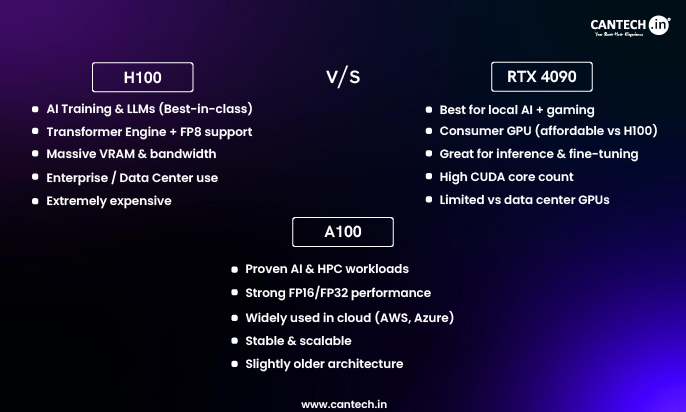
Related blog: H100 vs A100 vs RTX 4090
3. NVIDIA RTX A6000
Choose RTX A6000 GPU when you need large VRAM and enterprise stability for professional workloads.
Key strengths:
- 48GB VRAM
- ECC memory support
- Reliable workstation performance
Ideal for:
- Production inference pipelines
- Large model hosting
- Enterprise environments
Even though it uses older Ampere architecture, it’s still a trusted industry standard.
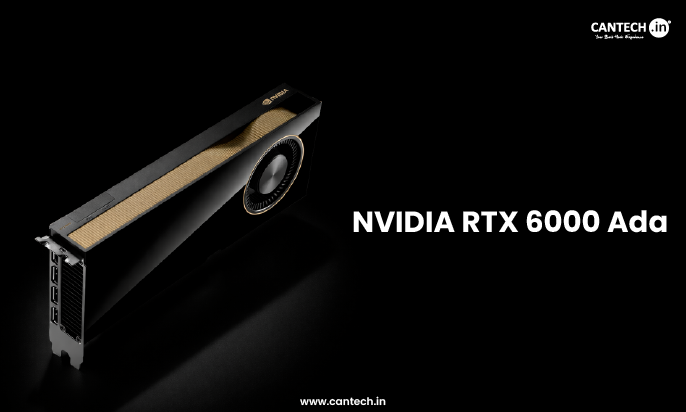
Related: What is RTX 6000 Ada
4. NVIDIA RTX A4000
RTX A4000 GPU is a solid mid-range GPU for AI inference, especially for budget-conscious setups.
What you get:
- 16GB VRAM
- Lower power consumption
- Reliable workstation performance
Best for:
- Small AI applications
- Edge deployments
- Lightweight LLMs
It’s not built for massive models, but it offers a great balance of cost and capability.
Related: Why Choose NVIDIA RTX A4000
5. NVIDIA A100
A100 GPU server is widely used for large-scale AI inference because of its massive memory bandwidth and data center features.
Highlights:
- 40GB / 80GB HBM2e memory
- Multi-Instance GPU (MIG) support
- Extremely high throughput
Perfect for:
- Large LLMs (30B–70B+)
- Multi-user AI systems
- Cloud deployments
It’s built for serious production workloads, not casual use.
Related blog: Why Choose A100 GPU
5. NVIDIA Tesla A100
NVIDIA A40 is a cost-effective data center GPU for scalable inference workloads.
Why it matters:
- 48GB VRAM
- Balanced performance vs cost
- Strong for visual + AI workloads
Best for:
- Enterprise inference at scale
- Virtualized GPU environments
- Rendering + AI hybrid workloads
It sits between workstation GPUs and high-end accelerators.
6 Best GPUs for AI Inference
| GPU | VRAM | Best For | Performance Tier | Ideal Use Case |
|---|---|---|---|---|
| RTX 5090 | 32GB | Cutting-edge local AI | Very High | Advanced inference |
| RTX 4090 | 24GB | Best value | High | Developers/startups |
| RTX A6000 | 48GB | Workstations | High | Enterprise apps |
| RTX A4000 | 16GB | Budget setups | Medium | Small workloads |
| A100 | 40–80GB | Data centers | Extreme | Large-scale LLMs |
Which GPU Should You Choose for AI Inference?
Choose based on model size, scale, and budget.
Simple decision framework:
- Local AI / budget → RTX 4090
- Future-ready local → RTX 5090
- Workstation → RTX A6000
- Entry-level → RTX A4000
- Enterprise / cloud → A100 or A40
Related blog: Best GPU For Deep Learning
Conclusion
Picking the right GPU for AI inference comes down to one simple idea: match the hardware to your workload, not the hype.
If you’re running models locally or building early-stage products, the RTX 4090 still delivers exceptional value. Need more headroom and longevity? The RTX 5090 pushes local inference further. For production-grade systems, GPUs like the A100, A40, and RTX A6000 offer the reliability, scalability, and memory that serious deployments demand.
In practice, the smartest choice isn’t the most powerful GPU-it’s the one that gives you the lowest cost per inference while meeting your latency and scale requirements.
FAQs
Which are the best GPU for AI inference in 2026?
The RTX 5090 is considered the most powerful GPU for AI inference in 2025 due to its Blackwell architecture and higher tensor performance. However, for most users, the RTX 4090 remains the best value option, while A100 is preferred for enterprise-scale deployments.
Is RTX 4090 enough for LLM inference?
Yes, RTX 4090 is sufficient for most LLM inference tasks, including models up to around 13B parameters. With optimizations like quantization, it can even handle larger models, making it a practical choice for developers and startups.
How much VRAM do I need for AI inference?
For most workloads, 16GB–24GB VRAM is enough. Larger models (30B+) typically require 40GB or more, which is why GPUs like A100 and A6000 are used in production environments.
What’s the difference between A100 and A40?
A100 offers higher performance, better memory bandwidth, and advanced features like MIG, making it ideal for large-scale AI inference. A40 is more cost-effective and better suited for scalable, mixed workloads that include both AI and rendering tasks.
Are workstation GPUs good for AI inference?
Yes, workstation GPUs like RTX A6000 and A4000 are excellent for AI inference, especially when stability, ECC memory, and professional drivers are required. They are commonly used in enterprise and production environments.
Can I run AI inference without a high-end GPU?
Yes, but performance will be limited. Lower-end GPUs or CPUs can handle smaller models, but latency and throughput will be significantly worse compared to modern GPUs designed for AI workloads.