How to Use Webuzo to Improve a WordPress Site’s Search URL Slug?
Introduction
Normal URLs help search engines to index your website appropriately. But the default search link in WordPress is not very well organized and is usually messy. This link structure will be improved to enable better reading of your pages by search engine crawlers.
What is a Search URL Slug?
WordPress creates a particular link when a visitor searches for a term on your site. This link appears by default as example.com/?s=search-term. This is not a very search engine optimization-friendly format. You can change this to a cleaner format, such as example.com/search/search-term, to fit your normal site links.
The reason why you should change search links is that it helps you get better search results.
A neat linking structure informs the search engine that your site is professional and well-organized. It simplifies your search results pages, both to the bots and humans.
Improve Crawler Efficiency
Search engine bots like simple and descriptive links. A clean path, such as a search/term, is far superior to a query string full of symbols and question marks. This minor adjustment can assist in the optimization of your search pages.
Match Your Permalinks
The majority of WordPress websites have beautiful permalinks for posts and pages. Changing the search slug makes sure that all elements of your site follow the same clean pattern. This is one of the aspects of modern web standards.
Method 1: Edit the Functions File in Webuzo
To redirect your search links, you can add a small piece of code to your theme files. This can be easily done by the built-in file manager of Webuzo users.
- Log in to your Webuzo user account.
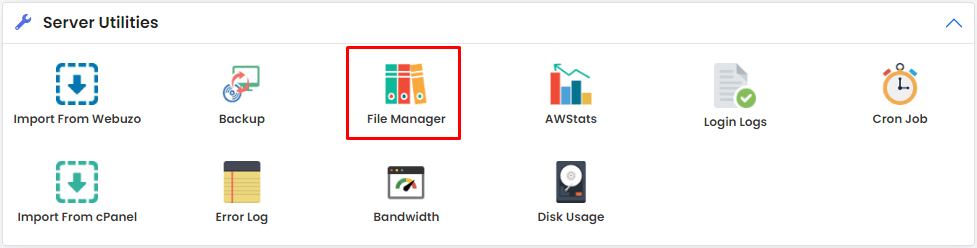
- Go to the Server Utilities section and open the File Manager.
- In the public-html folder, locate the wp-content/themes.
- Go to your active theme folder and open the functions.php file.
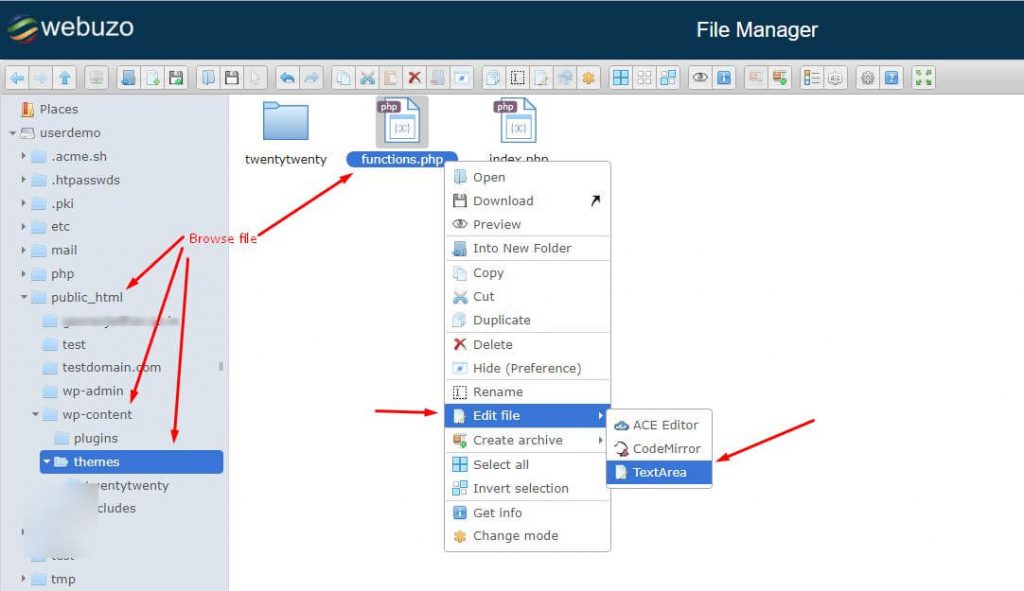
- Right-click the file and choose the Edit option with the TextArea editor.
- Copy the code below and place it at the bottom of the file:
function wp_change_search_url() {
if ( is_search() && ! empty( $_GET['s'] ) ) {
wp_redirect( home_url( "/search/" ) . urlencode( get_query_var( 's' ) ) );
exit();
}
}
add_action( 'template_redirect', 'wp_change_search_url' );
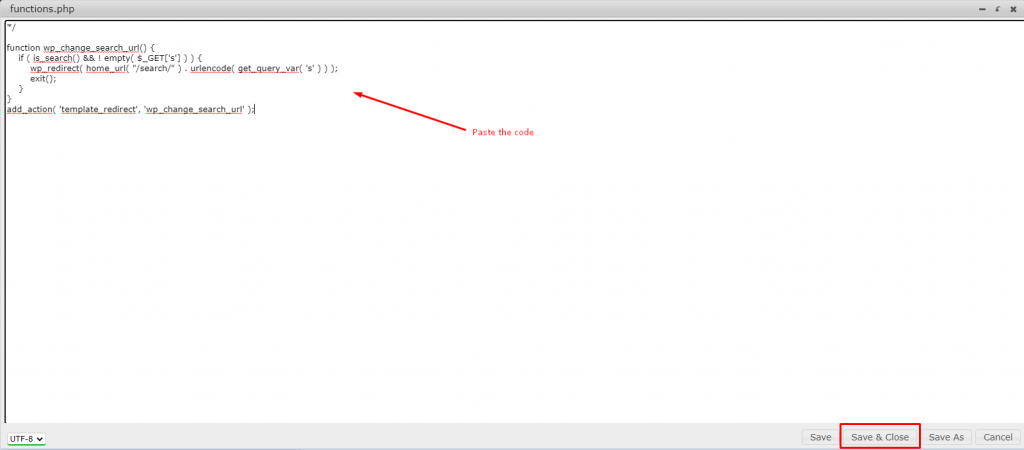
- Save and Close button: Click the button to implement changes.
Method 2: Add to the .htaccess File
You can use your server configuration file instead of editing your theme files. This is a server-level method that rewrites the link structure.
- Access your File Manager via the Webuzo dashboard.
- Find the .htaccess file in your public_html directory.
- Click with the right button and choose the Edit* button.
- At the bottom of the file, put the following code:
# Change WordPress search URL slug
RewriteCond %{QUERY_STRING} \?s=([^&]+) [NC]
RewriteRule ^$ /search/%1/? [NC,R,L]
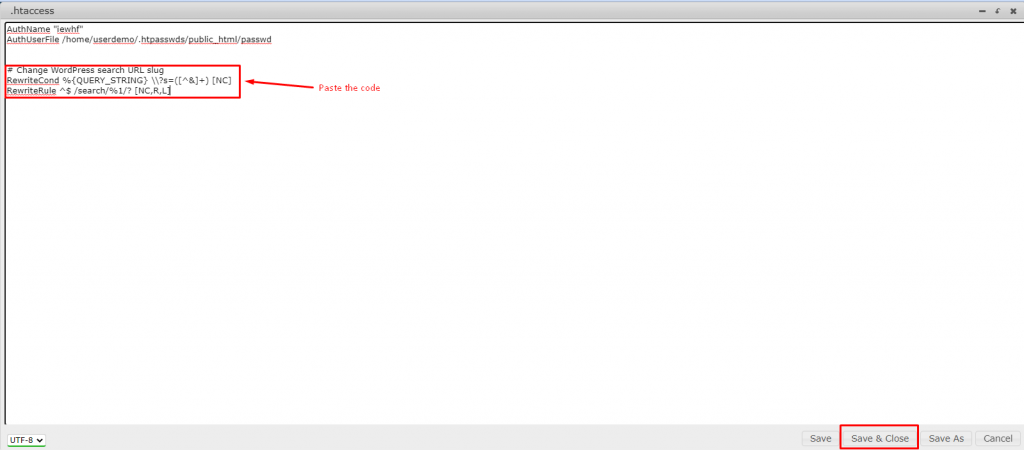
- Save and exit the editor.
Cantech SEO Features
Cantech offers high-performance hosting packages that have in-built advanced URL rewriting. Our servers are well compatible with Webuzo and other recent panels to manage files easily. You receive high-speed SSD storage that makes these redirects occur immediately without delays. Our technical team can also help you optimize your server settings to achieve maximum search engine rankings.
Conclusion
An easy method of improving the health of your site is to clean up your search URL. You can use either the functions file or the server configuration file to accomplish the task. Both of them guarantee that your search terms are presented as part of a clean web path. Begin to optimize your links to make your WordPress site more business-like and search engine-friendly.
Frequently Asked Questions (FAQ’s)
1. Will this change affect my existing search results?
No, this change just changes the appearance of the URL in the browser bar. The same relevant content will still be displayed in your search results. It just gives the link a cleaner appearance to users and search engines.
2. Do I need to do this for every theme?
When you apply the functions file method, you have to add the code again when you change your theme. The .htaccess technique is more permanent as it remains on the server irrespective of the theme you use.
3. Is it possible to use an FTP client?
Yes, you can download these files with an FTP program such as FileZilla to your computer. You can then edit them using a text editor and re-post them on your server. This is a secure option in case you do not wish to use the Webuzo file manager.
4. Will this make my site faster?
Your site speed is not directly affected by changing the URL structure. However, a cleaner site structure is part of a well-optimized website, which usually performs better. It assists the search engines in crawling your site with less confusion.
5. What happens if I make a mistake in the code?
A mistake in the functions or .htaccess file can cause a temporary site error. You should always keep a backup copy of the original file before you start editing. In case there is a mistake, just restore your backup to fix the site immediately.
