Removing password protection from the site statistics page
The protection mechanisms for subdirectories used for administration, such as pages for site statistics, can usually be configured using Basic Auth, .htaccess, or similar methods. While these can be effective when tuned to work with your server the right way, they tend to be a first order of business for most unauthorized access attempts. A web developer looking to examine the perimeter for such protective measures as they pertain to their site will need to know the ways these measures are suppressed, as there are a number of ways to legitimately bypass such protective measures, or lift controls on data that should be retained.
Steps to Remove Password Protection
The following steps will need to be performed to remove password protection on the site statistics page for a site or domain:
1) Access your Plesk account.
2) In the Plesk panel on the left sidebar, click on Websites & Domains.
3) Locate the domain you want to set and click on Hosting Settings:
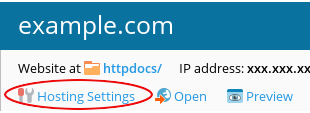
The Hosting Settings page should appear.
4) In the Hosting Settings page, locate the Web scripting and statistics section and scroll down:
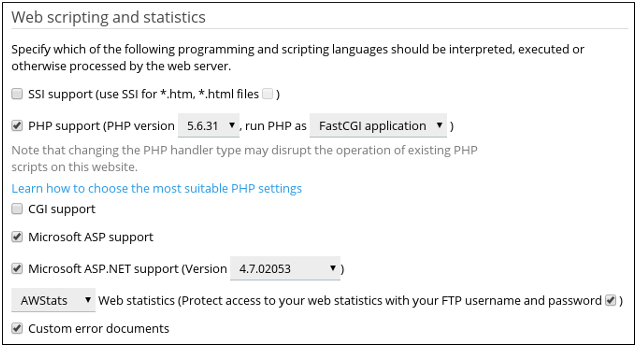
5) Uncheck the box for Let users access your web statistics with their FTP username and password.
6) Click OK. Now users will be able to access web statistics pages without entering a username and password.
Conclusion
Grasping the methods to protect or unprotect stat pages shows the balance between accessibility and the potential risk of exposure. It does not matter whether the lack of password protection was deliberate for the sake of public reporting, or whether it was simply a misconfiguration. It serves as a reminder to periodically check your directory permissions. A fully developed protective strategy should involve a defense in depth approach, so that the exposure of one page does not lead to the compromise of the entire web server.
