How to Log in to Applications from Softaculous in cPanel?
The applications can be accessed by logging into the applications through Softaculous and one can even log out of the cPanel account and go to Softaculous.
To Log in to Applications from Softaculous in cPanel
Log in to your cPanel account.
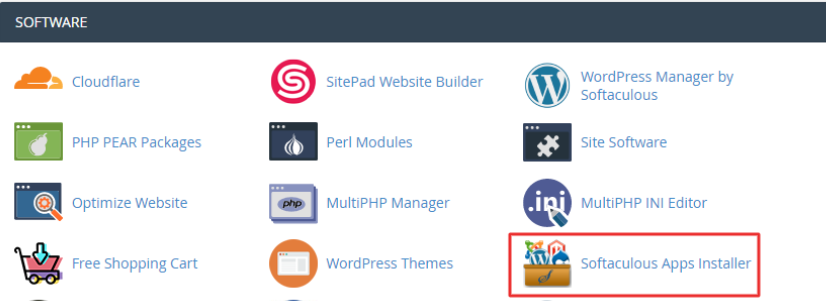
Softaculous Apps Installer under SOFTWARE section.
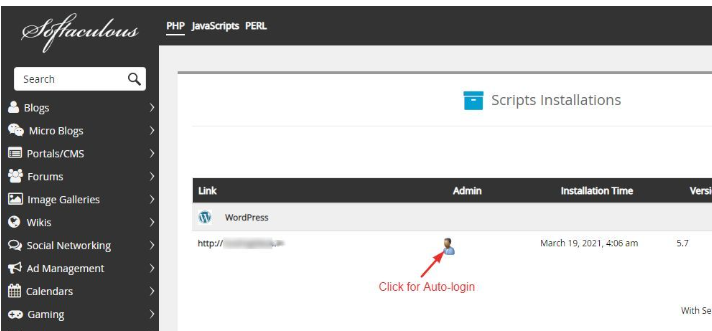
The Softaculous window is opened, and it allows one to choose and install application scripts, like WordPress, phpBB, Joomla, and so on.
To see the already installed applications, click the All Installation icon.

Note: Only applications which have already been installed via Softaculous can be accessed. In case the application is still not installed then please refer to online tutorials.
Click the Profile icon which is as shown in the screenshot so as to use auto- login. You need not enter your username and password to log in.
Note: The set up described below should not be switched off.
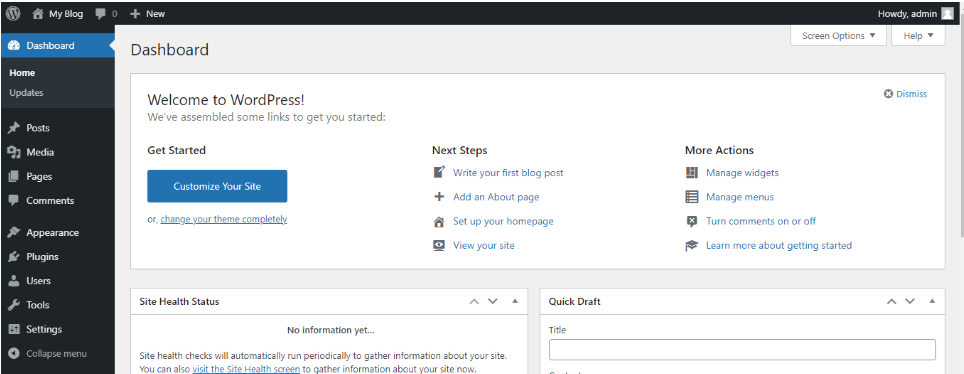
The dashboard of the application will be shown. As evidenced below, the WordPress application was selected as direct log.