How to Install ImageMagick Extension for a PHP Version from WHM?
ImageMagick is a crucial add-on that can help users to edit and alter pictures on a web site.
Installation of ImageMagick on WHM/cPanel
Log into WHM with your root user.
Go to the Software option.
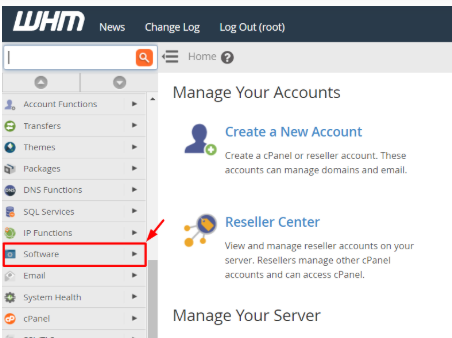
Choose Module Installers.

A list of installations of language modules will be presented.
Click on Manage next to PHP PECL.
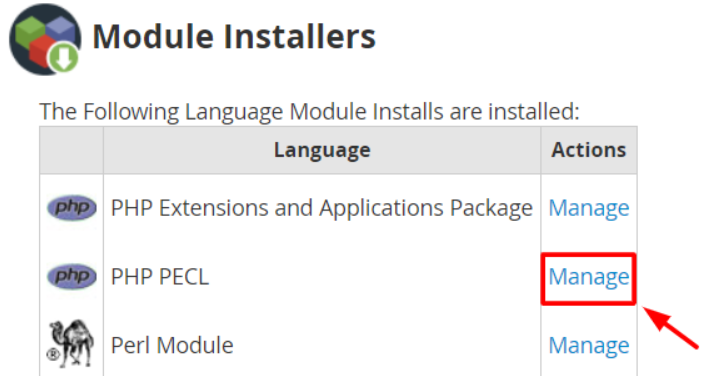
To obtain a compatible ImageMagick extension, it is necessary to select a proper PHP version in the drop-down list.
Type Imagick in the search box and press hold button.

Imagick module will be listed in the search results.
Click Install in the Actions column.
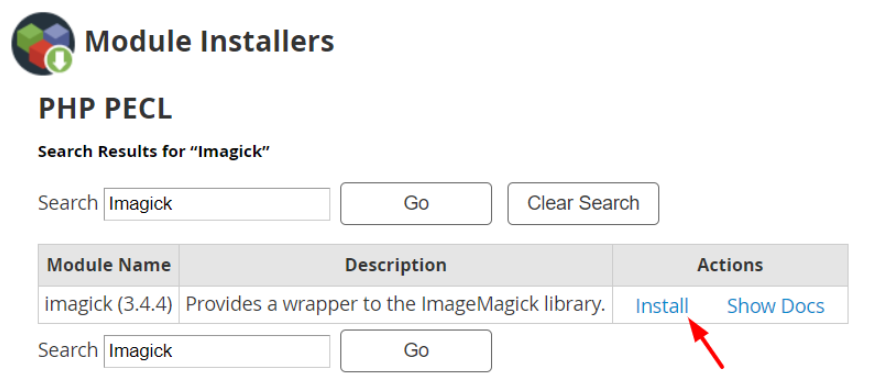
The installation will start and within a few seconds the system will have installed the Imagick PHP PECL extension and a success message will be displayed.

Note: You are to allow the ImageMagick add-on to be installed by the pocel() and ini_set PHP extensions without problems.
