How to Improve the Search URL Slug of a WordPress Site via cPanel?
Introduction
Standard URLs help search engines understand your website structure. But WordPress’s search URL is usually messy and confusing in appearance. A cleaner version of this link makes it easier for search engines to understand your site and enhances your site’s professionalism.
What is a Search URL Slug?
When someone uses a search bar on your website, WordPress generates a link. This link will be in the format, such as example.com/?s=search-term. This is not very SEO-friendly. You can modify this to example.com/search/search-term, just like other regular site links.
Why You Should Change Search Links?
Clean links tell search engines that your site is structured. It makes your search results pages easier to understand for both automated bots and real humans.
1. Improve Crawler Efficiency
Search engine crawlers would prefer a simple link to symbols. A clean path is preferred over a query string with question marks. This makes it easier to optimise your search pages.
2. Match Your Site Permalinks
Almost all professional WordPress sites have beautiful permalinks for their posts. Editing the search slug makes sure that every part of your website follows the same clean pattern. This is an important aspect of modern web standards.
Method 1: Edit the Functions File in cPanel
You can redirect the search links by inserting a few lines of code into your theme files. cPanel users can do this easily through the built-in file manager.
- Sign in to your cPanel user account.
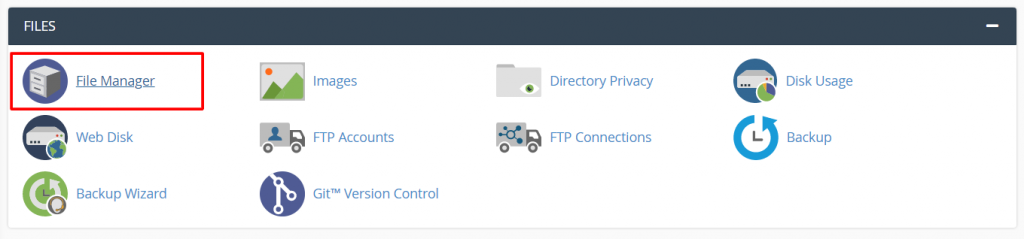
- Click on the Files icon and open the File Manager.
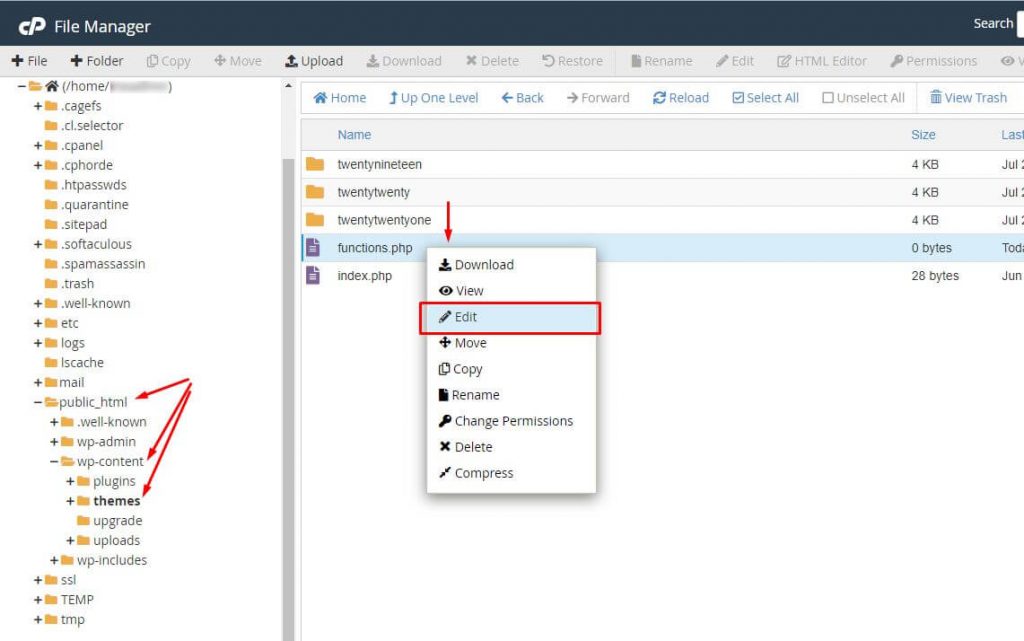
- Go to the public_html folder and then find wp-content/themes.
- Click on the active theme folder and then find the functions.php file.
- Right-click on the file and choose the Edit option.
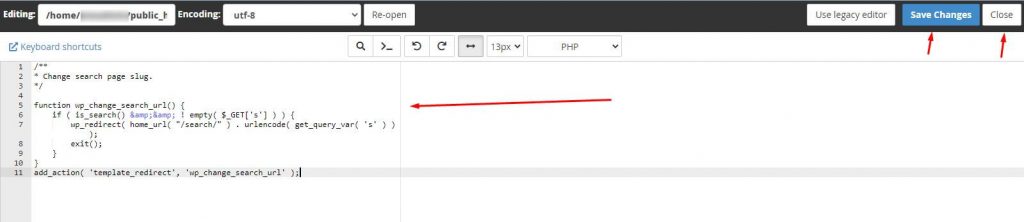
- Add the following code to the bottom of the file:
/**
* Change search page slug.
*/
function wp_change_search_url() {
if ( is_search() && ! empty( $_GET['s'] ) ) {
wp_redirect( home_url( "/search/" ) . urlencode( get_query_var( 's' ) ) );
exit();
}
}
add_action( 'template_redirect', 'wp_change_search_url' );;
- Click the Save Changes button and close the editor.
Method 2: Update the .htaccess File
If you do not wish to make changes to your theme files, you can use the server configuration file. This will permanently rewrite the links on the server level.
- Go to the cPanel dashboard and click on the File Manager.
- In the public_html folder, find the .htaccess file.
- Right-click and select the Edit button.
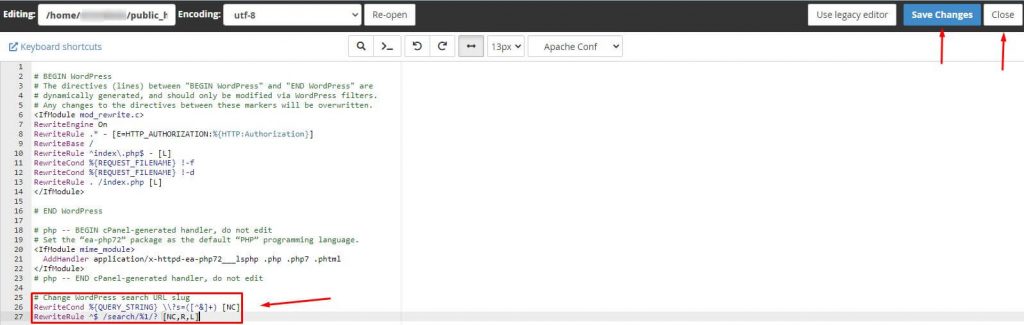
- Add this code to the bottom of the file:
# Change WordPress search URL slug
RewriteCond %{QUERY_STRING} \?s=([^&]+) [NC]
RewriteRule ^$ /search/%1/? [NC,R,L]
- Save Changes and close the window.
Cantech SEO Features
Cantech offers blazing-fast hosting plans and our servers are also ready for cPanel users to manage their files without any delay. We provide you with quick SSD drives for these redirects to happen immediately. Our team can help you to optimise your server for search engine visibility.
Conclusion
Search URL optimisation is useful to improve your SEO ranking. The functions file and server configuration file are two ways to do it. The end result is that your search terms appear as part of a clean web path. It is time to tidy up your links for a more professional WordPress website.
Frequently Asked Questions (FAQ’s)
1. Will this change delete my old search results?
This won’t affect your search results. This code only affects the URL in the address bar. Your content and results will be unaffected.
2. Which method is better for a beginner?
The cPanel File Manager method for the functions file is very simple. But the .htaccess method is preferred if you will be changing your website theme. Both achieve the same result.
3. Can I use an FTP client for this?
Yes, you can use any FTP program to transfer these files to your PC. Then you can modify them using a text editor and upload them again to the server. This is a great option if you don’t want to use cPanel.
4. Does this improve my site loading speed?
Your site speed will not be affected by this change. However, a cleaner site structure is part of a well-optimized website. It helps search engines crawl your site with much less confusion.
5. What if I make a mistake in the .htaccess file?
An error in this file will result in a “500 Internal Server Error”. It is important to have a backup of the original file. In this case, you can simply replace it with your backup copy to restore the website if you see an error.
