How To Update cPanel License On Your Server?
When you are switching from a trial cPanel license to a paid one, switching from one license provider to another, or when you are dealing with a renewal of an expired license. In this article, we show how to easily update your server’s cPanel license.
Pre-requisites
- Root or root privileged account on server.
- SSH Access
- A valid cPanel license
Step 1: Verify the cPanel License
At the start, you should check if your VPS/Dedicated server has a valid cPanel option. So, follow the below steps.
1. Go to https://verify.cpanel.net/ through your browser.
2. Enter the server’s IP address in the corresponding text box and click “verify license”.
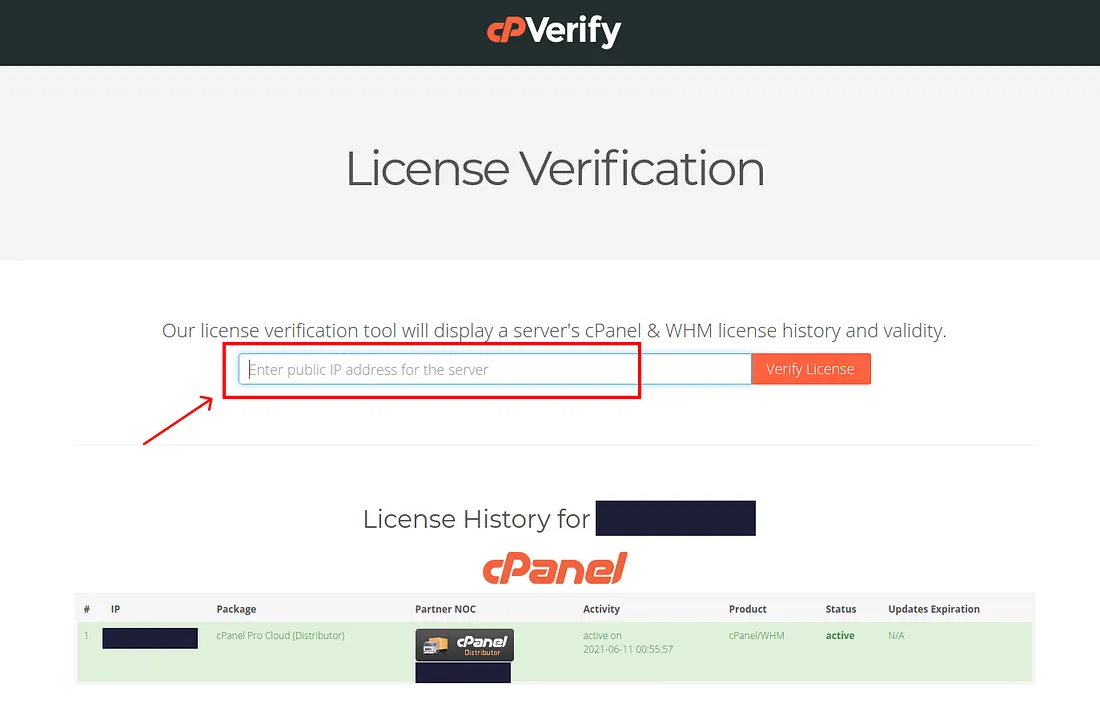
If you have a valid cPanel license then you proceed with the below steps in this tutorial.
Step 2: Run the cPanel License Key Update Script
cPanel provides a script which checks the status of the license and updates the server’s license accordingly. To run this script follow the below steps:
Login to your Server as root
e.g. ssh root@server_ip_address
Run the below command:
/usr/local/cpanel/cpkeyclt
Wait for a few seconds and then you will see the following message:

Conclusion
Once you get the above message. It means your cPanel license has been finally updated on the server and you can now login to WHM/cPanel.
