Ways for Stopping Contact Form Spam in WordPress
What is Contact Form Spam?
Contact form spam refers to spam messages that are posted in your form’s empty fields. They are not from real people. Rather, spambots are automated programs that find your form and fill it with links or spam. You can get thousands of these entries within one hour.
Most of the site owners have to deal with these issues on a daily basis. These junk emails fill your inbox, and you cannot get the real messages of your actual customers.
Spambots and the Risks
Such programs may also pose a risk to your website’s health.
How Spambots Work?
Spambots are computer scripts that crawl the web in search of forms. They type in information into all fields they come across. Their main intention is to spread viruses or identify vulnerabilities in your server.
Why They Target Your Forms?
The bots are designed to take control of your email address or website. They can steal your customer emails and spam you more. The only way you can secure your business data is by blocking them.
Effective Ways to Block Contact Form Spam
Some tools ensure that your forms are clean. The majority of these methods are free and simple to set up.
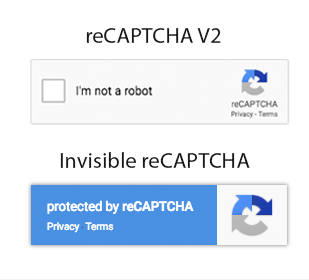
1. Use Invisible reCAPTCHA
This works silently in the background. It is a smart tool from Google. It does not present any puzzles to common visitors.
It monitors how a visitor moves their mouse on the page and allows actual humans to fill out the form without any additional measures.
It shows a challenge in cases where it suspects a bot. This ensures that the user experience is seamless and prevents junk.
2. Block Specific IP Addresses
In case of numerous spam messages from the same source, block that IP. Each computer has its own IP address. The sender IP is there in the check your form notification.
Click on Discussion settings on your WordPress dashboard. Enter the bad IP in the Comment Blacklist box. WordPress will now reject any form entry coming from that specific address.
3. Install Anti‑Spam Plugins
Special plugins fight bots. The most popular are Akismet or Jetpack. Find them in the WordPress directory, install and activate the one you like.
Such tools compare each entry with an international spam list and automatically transfer junk to a special folder.
4. Add Custom Math Questions
Bots are good at filling text but lack simple logic. Include a math quiz at the bottom of your form, e.g., “What is 5 + 3?” Set the form to only submit if the user types the number 8.
Change the question every month to be ahead of bots. This is effective if you do not want to make use of Google services.
5. Use the Honeypot Method
This is a trick that catches bots without the humans ever seeing it. It uses a hidden field that can only be identified by a program. Real users leave it empty because they cannot see it. It is automatically filled with spambots. The system will reject any system in which that field is filled with text.
Cantech Security Solutions
Cantech hosting includes server-level security that prevents bots before accessing your site. We intend to install advanced firewalls that filter out spam networks. We offer 1-Click installs of the best anti-spam extensions and track your traffic to ensure your inbox stays clean.
Conclusion
To secure your data, select an easy-to-use checkbox or hidden honeypot. These measures will help you to spend time with real customers. Choose one of the ways to maintain your WordPress site today. It is important to prevent form spam on a business site.
Frequently Asked Questions (FAQ’s)
1. Will reCAPTCHA slow the speed of my site?
The current reCAPTCHA versions are quite light and barely influence loading time. The invisible version is the best in terms of performance since it only runs a small script when a user interacts with your form.
2. Is it possible to block spam from certain countries?
Yes, most security extensions allow you to block traffic of entire regions. This would help in cases where you conduct business in India alone and get spam from other countries. However, be careful not to block real customers who might be traveling.
3. Is Akismet free for business websites?
Akismet offers a free version for personal blogs, but a business will most likely require a paid plan. There are alternatives like Antispam Bee, which is free. Read the terms of the check license prior to installation in a business location.
4. What is the difference between v2 and v3 reCAPTCHA?
Version 2 asks users to click a checkbox or pick images of traffic lights. Version 3 stays hidden and gives each visitor a score based on their behavior. Most people prefer Version 3 because it does not interrupt the user.
5. Does disabling the right-click actually prevent spam?
It stops human spammers who copy and paste the same message into many forms. It does not stop automated bots that use code to submit data. It is a good extra step but you should use it along with a CAPTCHA.
