How to Setup Scheduled Tasks in Plesk?
Learning to schedule tasks in Plesk, commonly referred to as cron jobs, is a valuable skill for any web server manager. If you need to schedule tasks such as rotating server logs, clearing server cache, or executing a PHP script for newsletters, you can automate these tasks so you do not have to intervene every few hours to keep the server healthy.
With Plesk, you can avoid the complexities of using the Linux command line, so you can focus on using Plesk to accomplish what you need. Here is the process to schedule tasks.
How to schedule tasks in Plesk:
- Log in to Plesk.
- Select Scheduled Tasks.
- Before you schedule a task, select Settings. You will see a pop-up. Set your time zone, then click OK.
- You will get a message confirming your update.
- To schedule a new task, click Add Task.
- In the Task type box, designate the task time to a type of task you want to schedule.
- In the example, we have chosen Fetch a URL.
- In the URL box, type the URL you wish to run.
- In the Run box, select the day you want the task to run.
- In the Description box, type your description.
- To set a notification, select from the options provided.
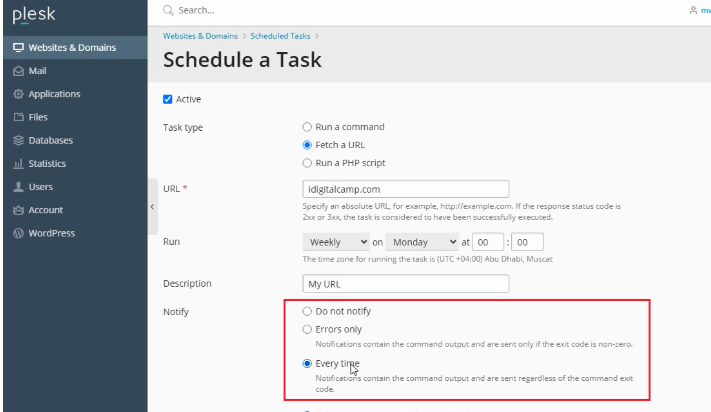
You can also choose to send a notification to the Subscription owner, or if you want to send the notification to Other user’s, you can type in the email address.
You can execute a specific task right away by clicking on the Run Now button.
In this case, we are clicking on the OK button to schedule the stated task, and you will receive a success messageIn this case, we are clicking on the OK button to schedule the stated task, and you will receive a success message.
Conclusion
In Plesk, creating scheduled tasks is easy and brings great automation to your hosting environment. Automating background maintenance tasks not only increases application efficiency, but also eliminates possible human error. Just remember to test your commands to make sure that the paths and permissions are correctly configured.
