How to Protect your WordPress Site from Brute Force Attacks?
Introduction
Any website is vulnerable to a brute force attack. This kind of attack can slow your website, enable hackers to inject malicious code into your website, or even lock you out of your own website. Knowing how to prevent a brute force attack on your WordPress website is crucial in protecting your business.
What is a Brute Force Attack?
During a brute force attack, hackers use scripts (automated programs) to try to guess your password. The programs attempt thousands of passwords per minute until they get it right.
Even if the hackers can’t access your account, the hundreds of thousands of login attempts can overwhelm your web server. This may cause your site to slow down or even crash. To avoid being traced, hackers frequently use different IP addresses from different countries, so it is hard to block them manually.
Best Ways to Stop Brute Force Attacks
To protect your website, you can employ several security measures. This will make it difficult for scripts to get through.
1. Use a Strong Firewall
A firewall is a barrier between your website and the rest of the internet. It catches and blocks malicious requests before they reach your login page.
- DNS-Level Firewall: This is the best option. It is the best choice because it filters the traffic via cloud servers such as Cloudflare before it reaches your site. This conserves your server’s resources and helps keep your site running fast.
- Application-Level Firewall: These are plugins such as Wordfence that scan traffic once it reaches your website. While beneficial, they still use some of your server’s resources.
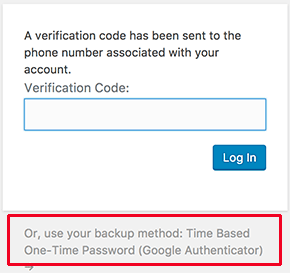
2. Use Two-Factor Authentication (2FA)
2FA adds an extra layer of security. Even if someone cracks your password, they won’t be able to get in without the code that is sent to your phone. It is impossible to complete a brute force attack.
3. Lock the Admin Folder
The majority of attacks will be directed at the wp-admin folder. To secure this, you can password-protect this directory.
In cPanel, you can lock the wp-admin folder using the Directory Privacy tool.
If you get a “404 Error”, add ErrorDocument 401 default to the .htaccess file to resolve the redirect problem.
4. Limit PHP Execution
Hackers often try to hide “backdoor” files in folders where you normally upload images. You can prevent these scripts by turning off PHP execution in certain areas.
- Add a file called .htaccess to your /wp-content/uploads/ folder.
- Add the following code:
<Files *.php>
deny from all
</Files>
This means that if someone does upload a virus, the server will not execute it.
5. Disable Directory Browsing
If your server can’t find an index file, it may display all the files in the folder to a user. This allows hackers to find “soft spots” of your site
- Edit your root directory’s main .htaccess file.
- At the bottom, write Options -Indexes.This will prevent your file structure from being seen.
Maintenance and Best Practices
Security is an ongoing process. Most online attacks can be avoided by taking a few precautions.
1. Update Regularly
Hackers love easy prey, and that comes in the form of outdated WordPress themes and plugins. These updates are designed to fix security vulnerabilities. Stay up-to-date to avoid attacks.
2. Use Random Passwords
Don’t use your birthday, name, or any simple words for your login. Create and store passwords that include symbols, numbers, and letters using a password manager. This includes your WordPress, FTP, and hosting accounts.
3. Keep Fresh Backups
If you are hacked, you need a backup to get your site back. Make sure your hosting provider offers daily backups, or use a backup plugin such as UpdraftPlus to schedule your own.
Cantech Security Benefits
Cantech is “security-first” hosting. Our servers use state-of-the-art DDoS protection and monitoring systems to prevent brute force attacks from impacting your performance. We also provide seamless integration with Imunify360 and daily backups to protect your data. Our team of experts is available 24/7 to assist you in securing your WordPress site.
Conclusion
Securing your WordPress website is about making it an unprofitable” target to hack. Through the use of firewalls, 2FA and strong passwords, you prevent bots from easily accessing your website. Combine this technical security with a good host, such as Cantech, to make your site safe for your customers.
Frequently Asked Questions (FAQ’s)
1. Can I be attacked even if my site is small?
Yes, spambots are not interested in the size of your business. They search the whole web for websites with a login page. New blogs can be targeted with hundreds of attacks per day.
2. Can I use a free security plugin?
The free versions of plugins such as Akismet or Sucuri are good but for commercial websites with a lot of traffic, the premium versions have additional features such as real-time IP blocking and country filtering.
3. How can I tell if I am under attack?
Your website may load very slowly or your hosting account hitting high CPU limits. Many security plugins will also send you an email alert if they detect too many failed login attempts in a short time.
4. Will 2FA work without a phone?
Many 2FA plugins will generate “backup codes” when you set them up. You need to print these and store them securely. These can be used to log in if you lose your phone or it breaks.
5. Why shouldn’t I use ‘admin’ as my username?
“Admin” is the first username every hacker uses. Using a non-standard username means the hacker has to guess your name as well as your password, making you twice as secure.
