How to Install Redis and PHP Redis on a cPanel Server?
As a developer who is building projects using PHP and running them on a Linux-based server, it is essential that you install both Redis and the PHP Redis extension. This combination will make a great contribution to the speed and performance of your application. We will discuss the installation procedure of both the software on your cPanel server.
What is Redis?
Redis is an open-source and very powerful in-memory data structure store. It is a flexible key-value store and handles various data types like simple strings, complex hashes, lists, sets, and sorted sets. Using Redis makes it easy to store large amounts of data without decreasing data transfer performance. It uses a passive data caching mechanism whereby old and unused cache is cleared while updating new content.
Steps to Install and Configure Redis
You must first install and configure the main Redis server software using SSH access to your server.
- Log in to Your Server via SSH
You need to use a command-line tool to get an SSH connection to your cPanel server.
- Download RPM Files
Run these commands one by one to download the required RPM files. These files are necessary for installing Redis from external repositories.
wget http://dl.fedoraproject.org/pub/epel/6/x86_64/epel-release-6-8.noarch.rpm

wget http://rpms.famillecollet.com/enterprise/remi-release-6.rpm
- Install Redis Using Yum
Enter these two commands now and install Redis and the required packages. The yum command handles the actual installation process.
rpm -Uvh remi-release-6*.rpm epel-release-6*.rpm

yum install –y redis
This process will successfully install the core Redis application on your server.
- Enable Redis on Reboot
You have to make sure that Redis automatically starts operating when the server is rebooted. Run this command to enable it:
chkconfig redis on
- Configure Redis Settings
The second step is to configure basic memory configurations for Redis. Access the main configuration file and add the memory limits.
Open File: Use the vi /etc/redis.conf command to open the redis.conf file.

Add Configurations: Enter or copy these lines at the end of the file:
maxmemory 256mb
maxmemory-policy allkeys-lru
This creates a maximum memory limit of 256 MB and specifies the least-recently-used key eviction policy.
Steps to Install the PHP Redis Extension
Once you have installed the core Redis server, you must now install the PHP Redis extension. This extension serves as the interface such that your PHP projects to communicate with the Redis server. WHM root access is needed in this step.
- Log in to WHM and Access Software
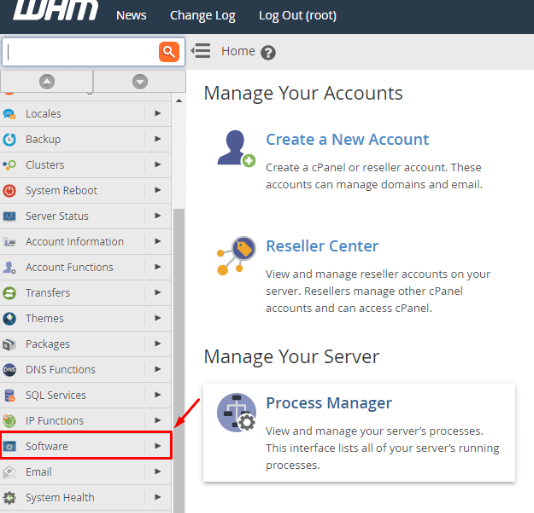
Log in to WHM with your root access credentials. Then go to the Software option from the navigation menu.
- Go to Module Installers
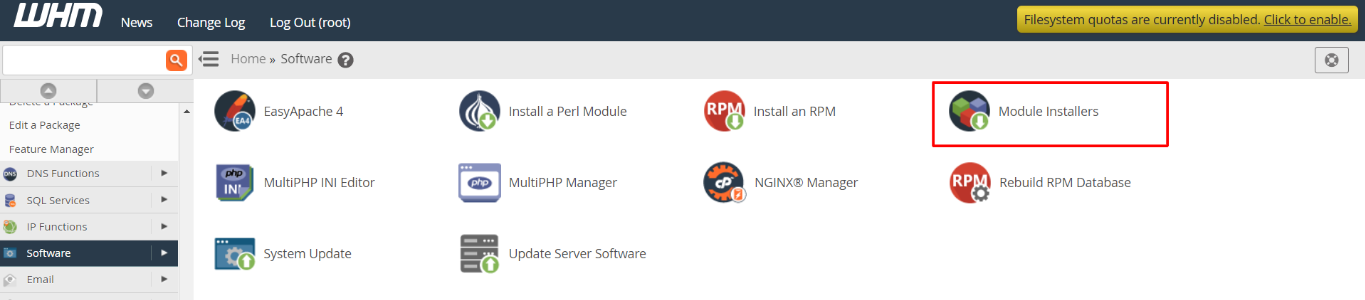
Within the Software section, click on Module Installers.
- Manage PHP PECL
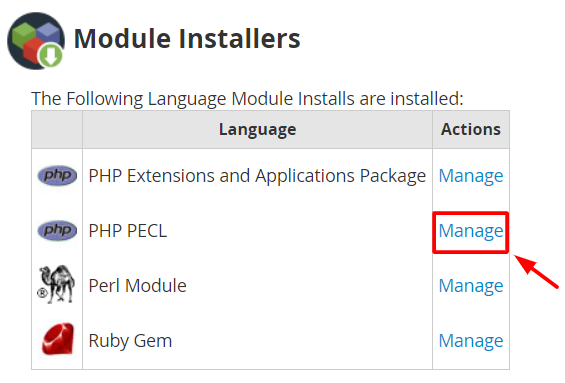
You will see a list of language module installs. Click the Manage link for PHP PECL. The PHP PECL Installer section will open.
- Search and Install PHP Redis
Look for the section titled Find a “PHP PECL”.
Search: Type “redis” in the Search box and click Go.
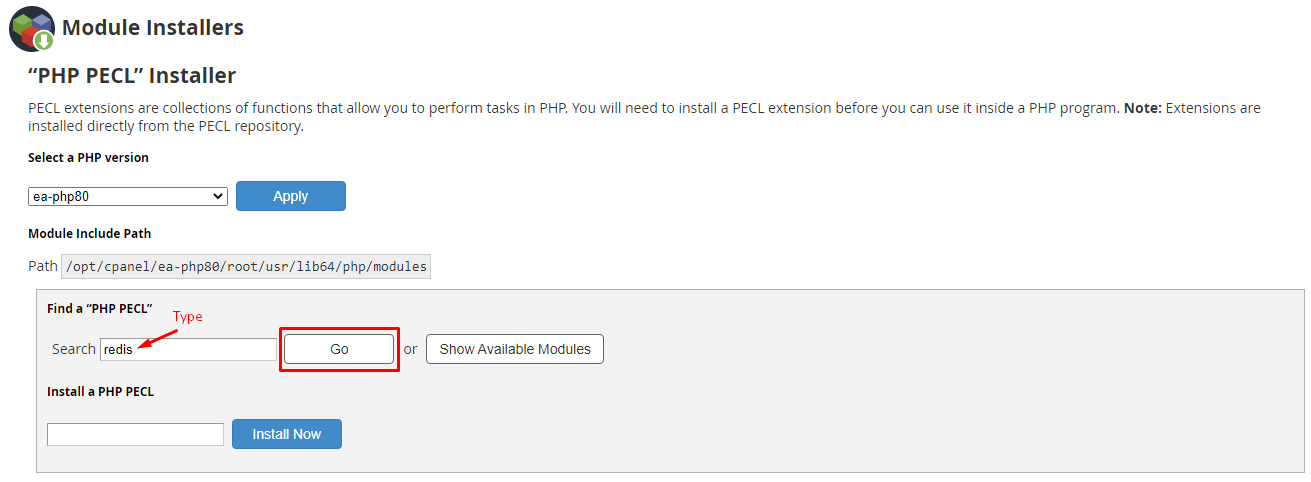
Install: The search results will show the appropriate PHP Redis module. Click the Install button next to it.
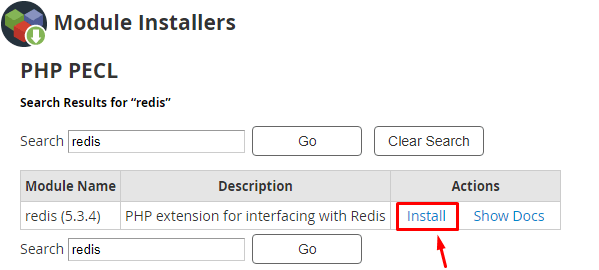
This action installs the PHP extension that serves as the interface for Redis.
- Restart Services
Lastly, you have to restart all the relevant services through SSH for all the changes to fully take effect.
service httpd restart

service redis restart
These commands restart the web server (httpd) and the Redis server, completing the installation of Redis and PHP Redis on your cPanel server.
Conclusion
To optimise your PHP application performance on your cPanel server, it is necessary to install the Redis server and the PHP Redis extension. By following the command-line steps for the core server and then using the WHM interface for the PHP extension, you successfully implement an effective, high-speed, caching solution.
FAQs
What does ‘in-memory data structure store’ mean for Redis?
It means that Redis stores data primarily in the server’s RAM (Random Access Memory). This allows for extremely fast data access and retrieval, which is ideal for caching.
What is the importance of the maxmemory-policy allkeys-lru setting?
This setting tells Redis what to do when its memory limit is reached. The allkeys-lru policy means it will automatically remove the least recently used data from all keys to free up space for new data.
Why must I install the PHP Redis extension separately?
You need to install the PHP Redis extension since it is the software bridge that is required to enable your PHP code and applications to effectively communicate and use the separately installed Redis server.
What is the purpose of the chkconfig redis on command?
This command enables the Redis service to start up automatically whenever the Linux server is rebooted. This ensures the caching service is always running.
Why do I need to restart the httpd and redis services at the end?
You need to restart these services to force them to reload their configuration files. This ensures the web server (httpd) recognizes the new PHP Redis extension and the Redis server applies its memory settings.
