How Do I Enable The SSH / Shell Access in cPanel On VPS?
Granting Secure Shell (SSH) access is an important step in giving developers (and power users) command line control over their environments. On a VPS (Virtual Private Server), this access is an administrative feature that is controlled by WHM (Web Host Manager) and not the regular cPanel user dashboard. This is to ensure that the server admin has fine control over who can run high level commands that can destabilize the server.
The purpose of this article is to describe the professional workflow to enable SSH access for new and existing accounts. Using the following steps, you can safely close the gap between basic web management and advanced terminal control, giving the users the freedom to manage their accounts while you keep the standards of server security intact.
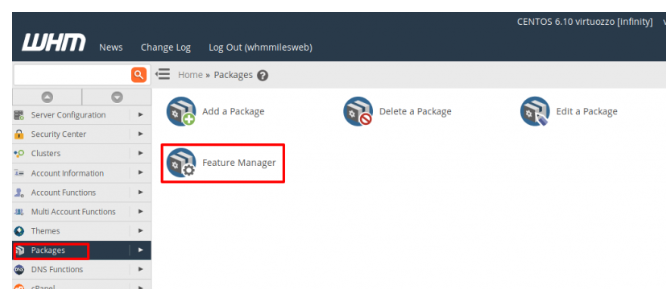
1. Navigate to Packages > Feature Manager
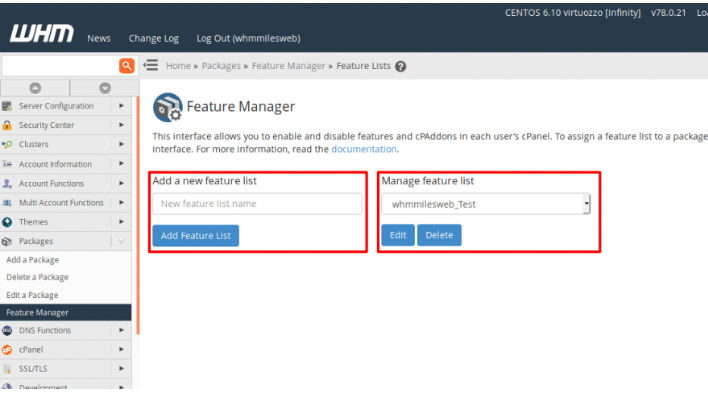
2. Add a new feature list, or edit the current one, making sure to check the SSH Access & Terminal option.
3. Click the Save button to keep the changes.
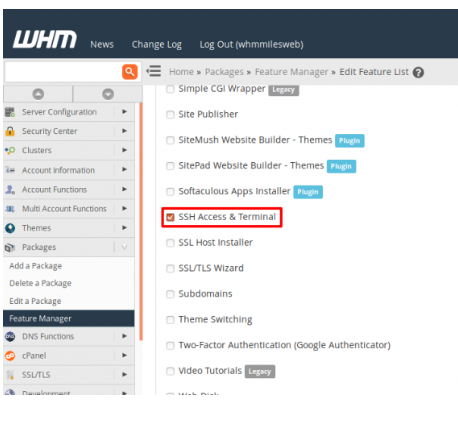
You will need to apply this feature list to all the accounts for which you want the SSH/Shell Access icon to appear in cPanel.
Summing Up
SSH access is the unlocking of a window into a standard hosting account and turning it into a multifunctional hosting account. One can do a lot with it: deploy using Git, run scripts, access and modify files, and other advanced practices. However, it transforms standard hosting into a VPS development environment, and with it, the responsibility of security. Using Jailed Shell access is best practice as VPS administrator, as it allows for the partitioning of resources amongst the different tenants. Passwords should also be discouraged and the use of SSH Keys encouraged to reduce the success of brute force attacks.
By managing properly, the implementation of SSH access using WHM, you make it so your VPS is a new asset and development is streamlined. The security for your VPS is guaranteed.
