How to Disable ModSecurity in cPanel?
Introduction
ModSecurity or Modsec is a web application firewall that is open-source. It is a software utility of the Apache HTTP Server that is used to protect your website against brute force attacks. It is default set to automatically run on any new account created.
However, sometimes it is imperative to turn down ModSecurity temporarily to overcome a specific problem.
What Is ModSecurity in cPanel?
ModSecurity (Mod_Security) is an open-source web application firewall (WAF) built for the Apache HTTP Server. In cPanel, it runs automatically on every new hosting account to protect your website from brute-force attacks, malicious scripts, and other common exploits.
Why Disable ModSecurity?
ModSecurity’s security rules can sometimes be too strict, blocking legitimate actions like file uploads, plugin installations, or form submissions. If you’re seeing a 403 Forbidden error or an action failing without a clear reason, ModSecurity may be the cause. Disabling it temporarily lets you confirm this and complete the task.
How to Disable ModSecurity in cPanel
Log in to your cPanel account.
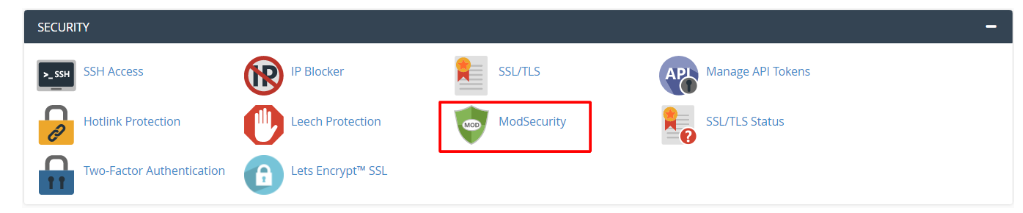
Click the ModSecurity option, which resides in the Security section.
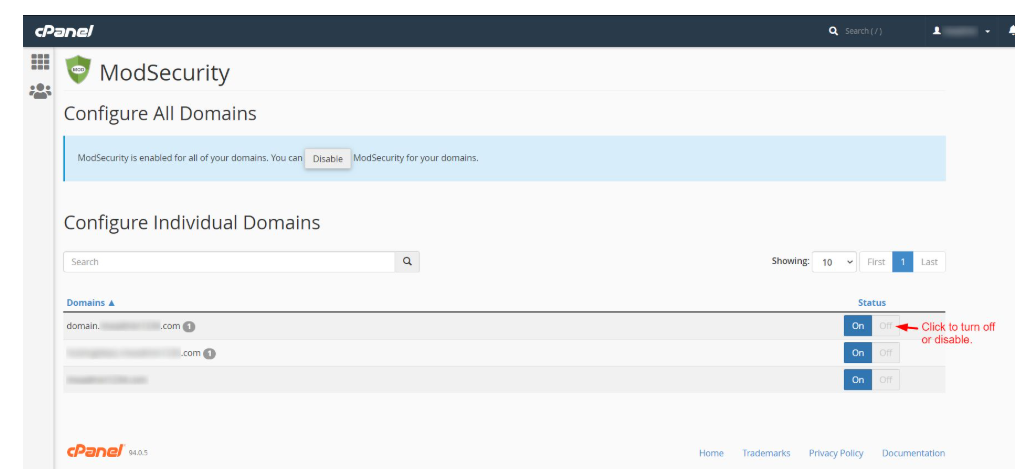
You are able to see the list of domains that relate to your cPanel account.
ModSecurity can be switched on or off on a domain by clicking on the Off button in the Status of the domain.
Take action and solve the problem at hand.
Then, turn on ModSecurity by pressing the On switch of the domain.

Caution: Do not forget to re-enable ModSecurity on the domain when troubleshooting. Otherwise, it can create severe security risks. ModSecurity is not supposed to stay off long.
Conclusion
Disabling ModSecurity in cPanel is a quick fix for troubleshooting blocked uploads, forms, or 403 errors, but it should only ever be temporary. Always re-enable it immediately after resolving your issue to keep your site protected. If you’d rather not manage this manually, Cantech’s cPanel server management team can handle security configuration and troubleshooting for you.
FAQs
What does mod_security do?
Mod_Security acts as a firewall between your website and incoming traffic, scanning requests for attack patterns like SQL injection and cross-site scripting. It can also mistakenly block legitimate actions like file uploads or form submissions.
Is it safe to disable ModSecurity?
Only temporarily. Leaving ModSecurity off exposes your site to attacks, malware, and exploits – always turn it back on immediately after troubleshooting.
Does disabling ModSecurity affect my whole account?
No. ModSecurity can be toggled per domain in cPanel, so disabling it for one domain does not affect other domains on the same account.
Can I disable ModSecurity using .htaccess instead of cPanel?
Yes. Add SecRuleEngine Off to your .htaccess file to disable ModSecurity for that directory – useful when cPanel access isn’t available.
