How to Disable ModSecurity in cPanel?
ModSecurity or Modsec is a web application firewall that is open-source. It is a software utility of the Apache HTTP Server that is used to protect your website against brute force attacks. It is default set to automatically run on any new account created.
However, sometimes it is imperative to turn down ModSecurity temporarily to overcome a specific problem.
To Disable ModSecurity on cPanel
Log in to your cPanel account.
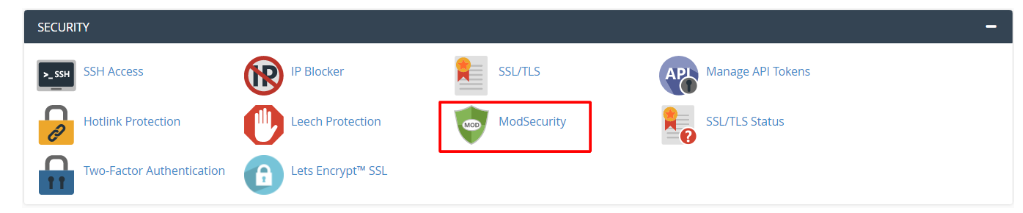
Click the ModSecurity option, which resides in the Security section.
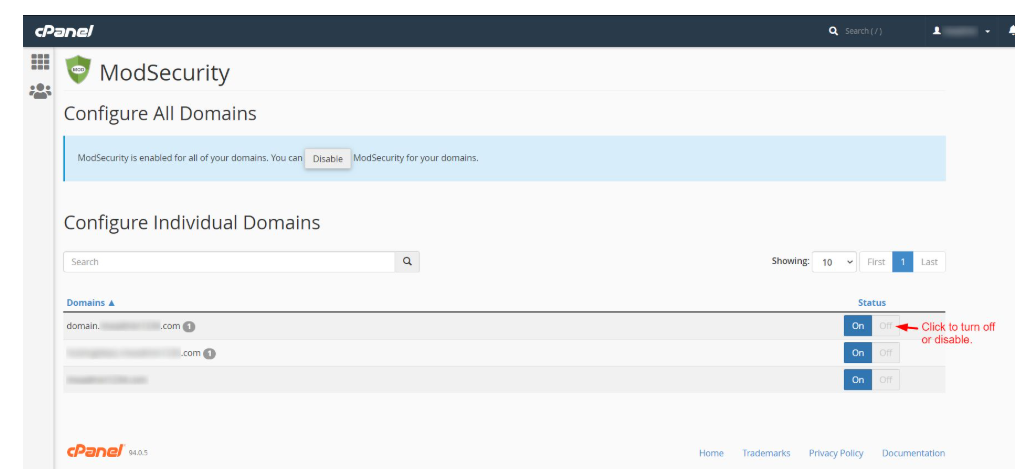
You are able to see the list of domains that relate to your cPanel account.
ModSecurity can be switched on or off on a domain by clicking on the Off button in the Status of the domain.
Take action and solve the problem at hand.
Then, turn on ModSecurity by pressing the On switch of the domain.

Caution: Do not forget to re-enable ModSecurity on the domain when troubleshooting. Otherwise, it can create severe security risks. ModSecurity is not supposed to stay off long.
