How to create a Service Plan in Plesk?
Each web host and server administrator must complete a critical step when developing a new service plan in Plesk. A service plan describes how many resources (disk space, bandwidth, email accounts, etc.) a customer can use in their subscription. With this plan, you can easily and consistently set up new customer accounts and maintain server stability and hosting tier organization.
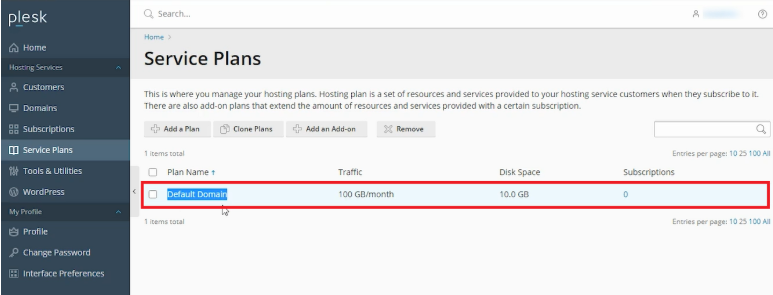
Access Plesk. In the left sidebar, under Hosting Services, select Service Plans. Here you can see the default service plan.
Click on Add a Plan to create a new service plan. Enter the name of your service plan in the Service plan name textbox.
Move to the Resources tab. Here you can set quotas and limits according to your requirements. You can either define the limits individually or select unlimited for each of the options.
In the Permissions tab, you can enable or disable the checkboxes for the services and privileges you want to grant. Some checkboxes are selected by default. If you want to restrict a certain permission, you may uncheck it.
In the Hosting Parameters tab, check the boxes for any hosting options you would like to configure.
In the PHP Settings tab, you can choose your preferred PHP version and settings by using the drop down menus or leave it as it is.
In the Mail tab, choose which email options you would like to configure.
In the DNS tab, choose the option you would like for the DNS zone.
In the Performance tab, you can configure the quotas and limits by using these options.
In the Logs & Statistics tab, check the boxes, and complete the text boxes to enable these settings.
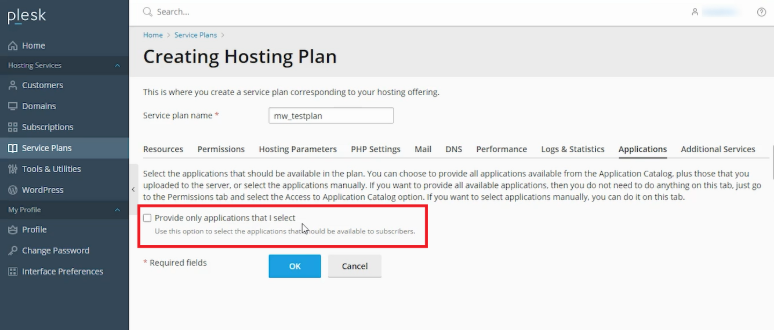
In the Applications tab, check this box if you want to restrict your customers to select applications, or leave this box unchecked if you want to give your customers access to all applications.
In the Additional Services tab, to configure Let’s Encrypt and WordPress Toolkit, select the option from these drop-downs as applicable.
Click OK to store the settings you have configured for all the tabs.
You will get a success message once you have completed this.
Conclusion
Understanding service plans enables you to optimize the hosting environment and control the allocation of server resources more stringently. These templates are beneficial, whether you provide free hosting to friends or operate a commercial hosting business, and they help avoid “noisy neighbor” problems, where one site uses all the server resources. With your plan active, you can start migrating sites or onboarding users in a few clicks.
