How to Configure Silverlight in Plesk?
Microsoft Silverlight may be a legacy technology, but it is still a valuable technology for some enterprise apps and rich internet apps needing a .NET-based runtime. To make sure these apps work properly on your server, you have to teach your web hosting your Silverlight to the web hosting environment. In a Windows-based environment with Plesk, this is done by setting certain MIME (Multipurpose Internet Mail Extensions) types. By doing this and correctly setting file types (like .xaml and .xap), you allow browsers to stream Silverlight content. In this document, we will explore steps to do this in the Plesk control panel so your rich media apps are always available.
# Steps to configure Silverlight
1. Access your Plesk control panel.
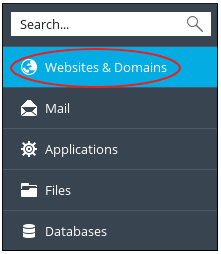
2. On the left side of the control panel, click on the Websites & Domains button.
3. Find your domain and click on Virtual Directories.

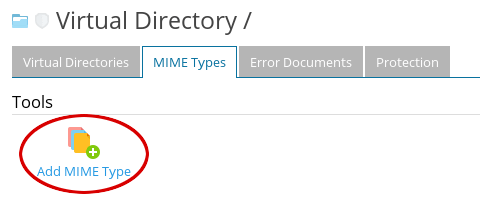
4. On this page, find and click on the MIME Types tab.

5. Click on Add MIME Type.
6. Proceed to the Edit MIME Type section:
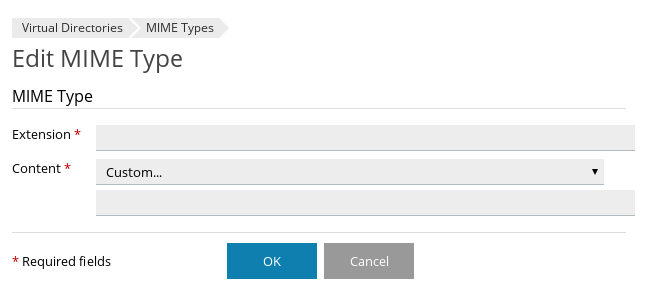
7. In the field for Extension, enter .xaml.
8. In the field for Content, choose application/xaml+xml.
9. Select OK.
10. In the MIME Types section, examine the list of extensions to confirm that .xaml is listed. Also, confirm that the following extensions are configured:
.xap – application/x-Silverlight-app
.xbap – application/x-ms-xbap
Conclusion
The process for configuring Silverlight in Plesk is relatively simple and takes place mainly through the proper registration of MIME types in your virtual directories. When you add the extensions .xaml, .xap, and .xbap, you complete the connection between the server and the end user’s browser, allowing the application framework to load without errors. Although Silverlight has been largely superseded by more modern web standards, such as HTML5, keeping such configurations is very important when the application still relies on legacy systems and specialized web tools. Now that these settings are configured, your server is optimized to provide Silverlight content to your customers.
