How to Change your cPanel Language?
cPanel is probably the most widely used control panel for web hosting, but there can be issues if it is not displayed in the language of your preference for ease of navigation for web hosting. There is no doubt that working with a control panel is less complicated when in a language that you understand fully.
Fortunately, you can change your cPanel display language using the following guide. Once you’s make the changes, your control panel wouldn’t only be more customized, but you would also be able to manage your website better.
Method one: Change cPanel Language using Username dropdown.
Log in to your cPanel.
Click on your username in the Top Right. A drop down menu will display. Click change Language.

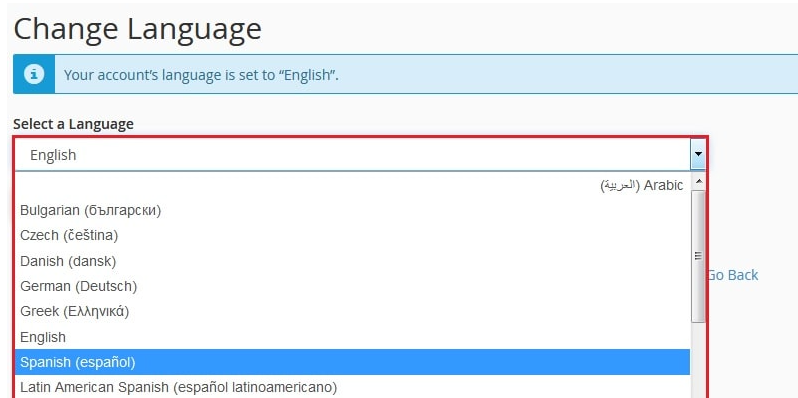
In the Select a Language section, there is a drop-down menu. There is a list of languages to choose from. Pick one.
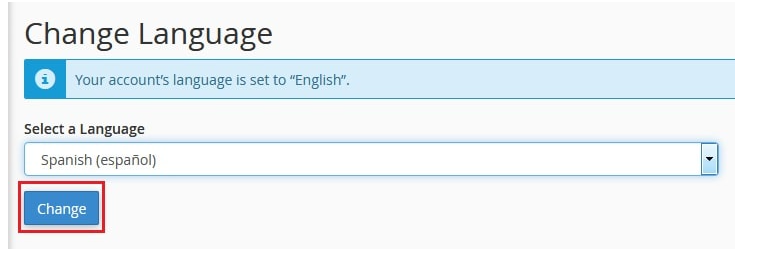
Hit the Change button.
A success message concerning your language change will show.
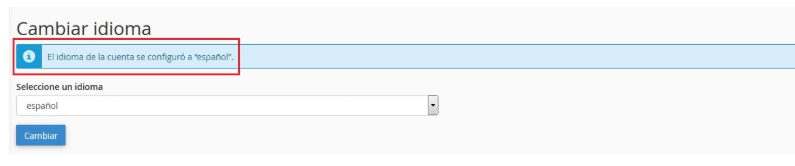
You’ve now changed your cPanel language using the Username drop down.
Method two: Change cPanel Language Via Preferences
Log in to your cPanel.
In the Preferences section, scroll down and click on Change Language.
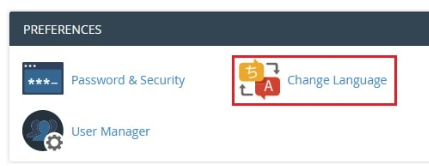
A new page will immediately open. There is a drop down menu on the section labeled Select a Language. Choose the language you want to be changed to.
Then, you will be able to continue by pressing the Change button.
A success message will be displayed acknowledging the change to your language.
Thus, you may adjust the language in cPanel using the options under Preferences.
Conclusion
You have now made a very simple and quick change to your cPanel in which you have changed the language. This change will make the management of your website, be it file uploads or setting up an email, more straightforward.
Have a great time with your customized control panel, now more straightforward to use! You will always have access to the language settings to switch to your preferred language or one that you wish to try.
