How To Boost cPanel Performance?
Being the industry-standard control panel, cPanel is the powerful backbone for countless hosting environments globally. Understanding the complexities concerning the management of server, multiple websites, and applications like Apache, PHP, and MySQL, there can be performance bottlenecks at the. A poorly performing server or cPanel more than likely results in longer load times for websites, adding a negative impact to user and admin experience and SEO. Also, shared hosting and more vps environments can result in performance resource contention more frequently.
To fully improve cPanel performance, a more structured and more professional approach is to be required in order to exceed simple operational changes in resource monitoring, configuration and maintenance.
This performance improvement plan overall, will provide and outline the strategies from improved data handling, the implementation of better caching and overall coordination of services for core machines and systems already at fine operational levels to be deployed in order to troubleshoot low performance operational cPanel environments to improve overall operational resource levels for immediate and stable performance.
For users trying to load cPanel and experiencing slow loading times, cPanel x3 theme can cause slow loads as it has a lot of advanced features.
While other services like Apache, PHP, and MySQL might be optimized, cPanel cannot be optimized if it loads slowly. However, there is a workaround to improve cPanel’s speed.
Simply switch the theme to Paper Lantern for your account. This can be done through cPanel >> Preferences >> Change Style.
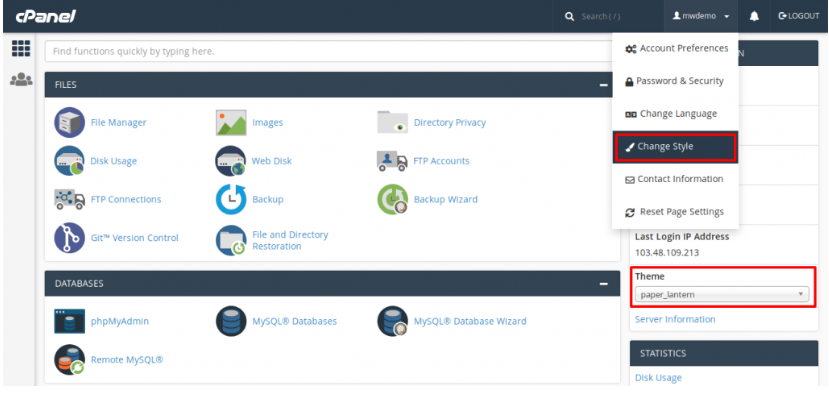
The Paper Lantern theme is relatively faster than other themes as it is available in the most recent versions of cPanel.
Summing Up
The cPanel surrounding your account has been optimized so that other features and services connected to this account can be more stable and perform better. Not to mention, in order to get the most out of your host, the above-mentioned services must also be optimized. This is how the hosting performance and other metrics are improved. Reduced time to load pages, more user interactions, and lower level of maintenance activities are the primary impacts of this hosting environment.
This is how the overall environment is improved. Some level of monitoring is required to keep a positive level of maintenance in order to keep this environment in a positive condition. It is encouraged to keep a monitoring level of the resource usage and activity to keep this environment stable. Updating software components like cPanel, PHP, and the databases that are connected and working together are also essential and encouraged.Embrace these best practices, and your cPanel-managed server will deliver the speed and reliability necessary for long-term operational success.
