How to Block Country Traffic in cPanel?
It is very important to prevent some users from accessing your website to prevent any kind of conflicts or attacks. Regular cPanel users can block the web traffic of a country on their hosting by editing the htaccess file.
To Block Country Traffic
- Log in to your cPanel account.
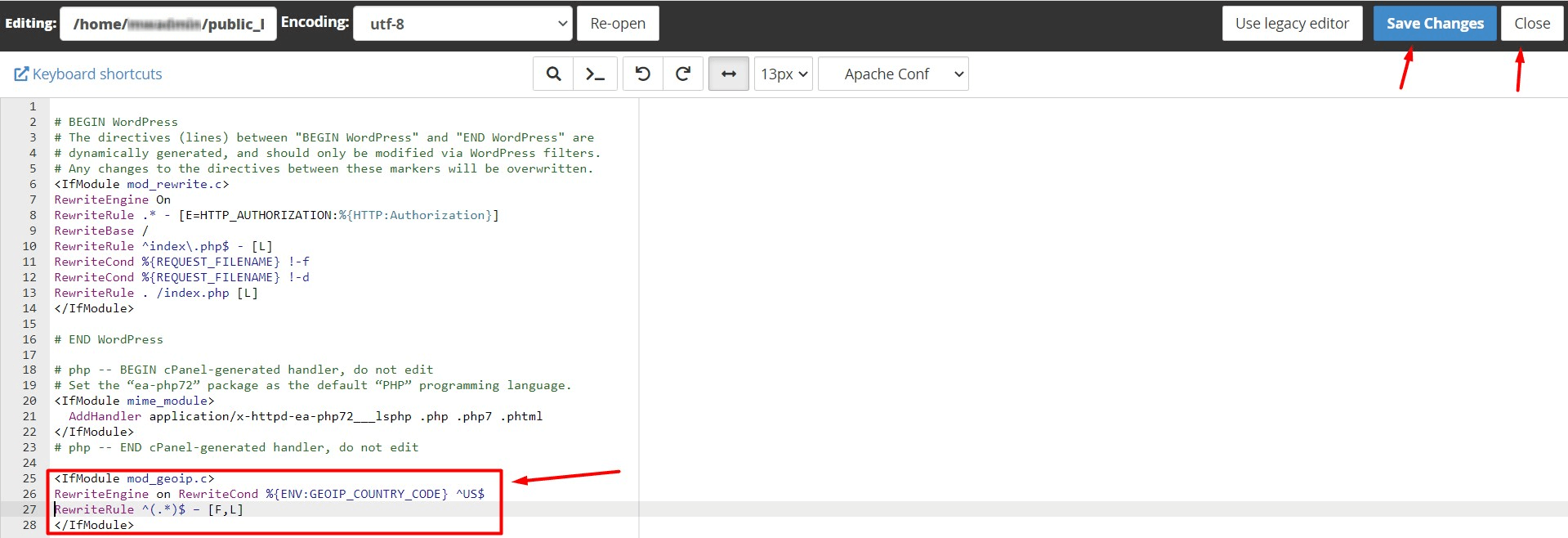
- Edit the .htaccess file via the File Manager Tool.
- Enter this line at the end of the file:
<IfModule mod_geoip.c>
RewriteEngine on RewriteCond %{ENV:GEOIP_COUNTRY_CODE} ^US$
RewriteRule ^(.*)$ – [F,L]
</IfModule>
The given line has the US, which is the country code for the USA. Refer the link ISO 3166-1 alpha-2 to find the country codes you want to add.
4. Click on Save Changes and Close.
Conclusion
By following the above steps, you can choose to block and will be screened by cPanel. This means the server will reject any access request from the country you blocked and return a 403 forbidden errors for the users.
