Find Out the Latest Visitors to Your Website in cPanel
Have you been wondering who has been visiting your site? As a site owner, you should be tracking the visit to optimize your success. Although Google Analytics can be configured for in-depth tracking, your host’s control panel can give you a quick view to your most recent visitors.
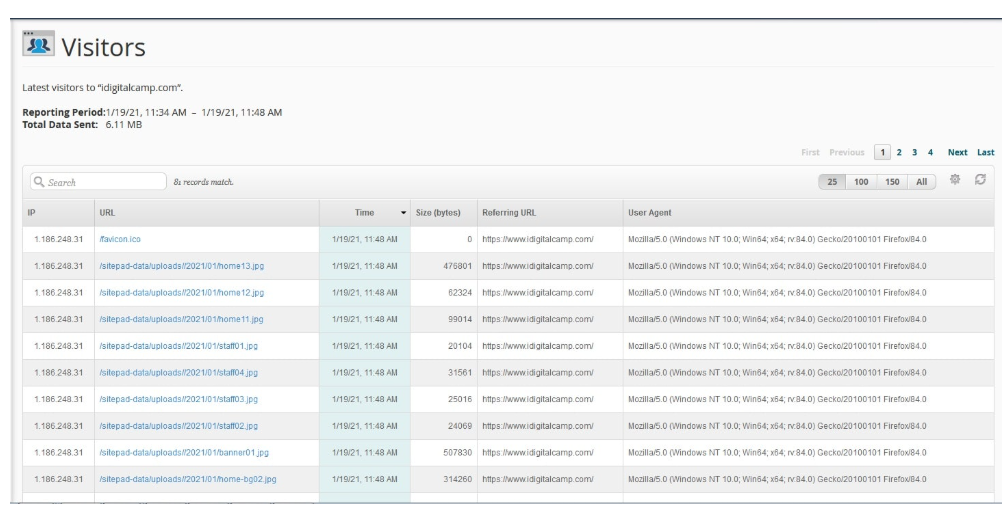
Your host can provide you with your visitors IP addresses, what webpages they accessed, and the timestamps for their visits. If you are ready to become a digital detective with your site, you can find who has visited your site recently with the following instructions you can find inside your cPanel.
- Log into your cPanel
- Look for the Metric Area and select Visitors
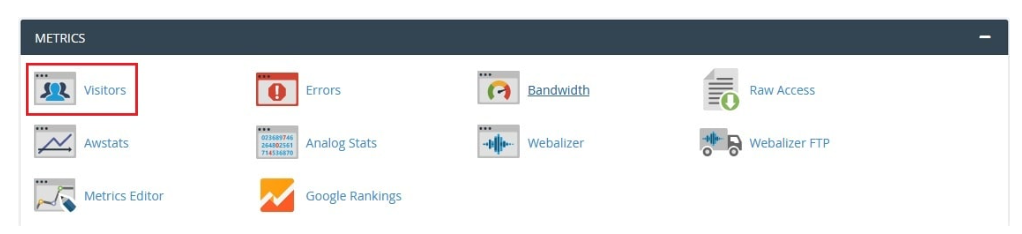
3.Choose the domain/subdomain you want to see the stats and hit the search button

4. You should be able to see the most recent visitors for the domain you have specified below
For any additional help, you can reach out to our support team through live chat or email.
Conclusion
One of the easiest ways to monitor real-time activity on your website is through the Visitors tool in the Metrics section of your cPanel. It is extremely useful because it shows you valuable raw data such as the IP addresses of recent visitors and the URLs they accessed, allowing you to check for recent activity. This tool is also very helpful in spotting potential site errors like 404 errors or any other issues that may negatively impact your site.
By performing these smaller checks regularly and then performing deeper analyses using other tools like AWStats or Google Analytics, you will gain a significant understanding of your site and its visitors. Keep monitoring the logs, and keep improving your site!
