Copy an Account from another Server Using cPanel Password
When migrating a hosting account from one server to another, it may seem like a complicated process, but it is rather easier if you are only moving accounts between two cPanel-based servers. Using WebHost Manager (WHM) to move an account is quick and simple, especially if you have only cPanel username and password for the account you need to transfer. This function is called “Copy an Account from Another Server with an Account Password,” and it is especially useful for users without root access to the source server.
This tutorial aims to explain this beginner-friendly WHM feature and how it connects you to the old server, allowing you to create a full backup and restore all the account’s data (website files, emails, and databases) in one seamless process using only the account’s login details.
We are moving an account from a WHM / cPanel server in this example, and we can begin with the steps below.
1. Login into WHM.
2. On the top left search box, type “Transfer.”
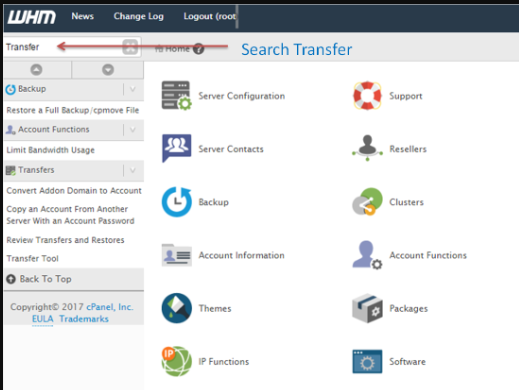
3. Click on “Copy an Account from another server using cPanel Password.”
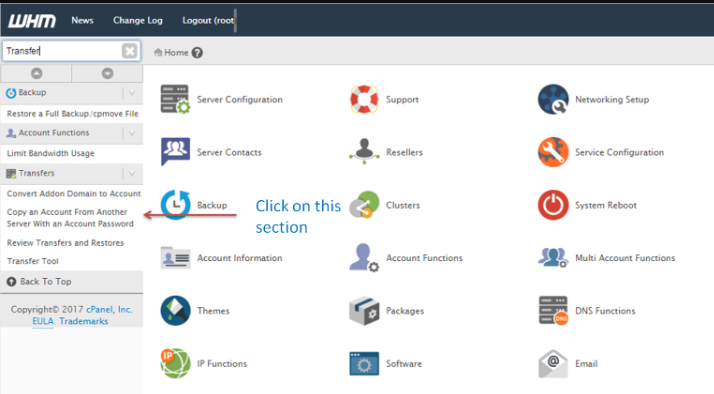
4. You will be presented with the “Copy an Account From Another Server With an Account Password” page.
5. Input the IP address of the server from which you want to copy the account. 6. Provide the corresponding username and password.
6. Enter the username and password.
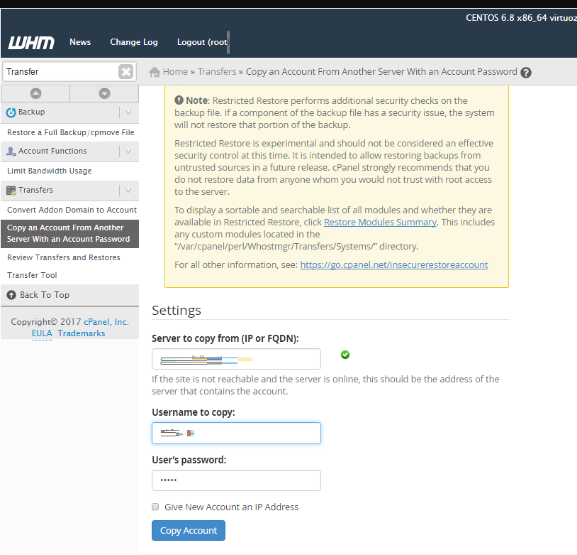
7. Hit the “Copy Account” button.
Conclusion
The feature which allows WHM users to copy cPanel accounts while only having access to that account’s password is an incredible and necessary function for all hosts and server admins. It opens the possibility of seamless copying and migration, even on rootless environments where the standard Transfer Tool is not operable. It is, however, still necessary to check for any server configuration restrictions, and to plan for DNS changes after the migration is done. With this function, you get a fully automated copy of all data attached to that account. The feature of Copy an Account From Another Server With an Account Password allows secure and honest migrations while hosted websites remain operational.
