How to Change a WordPress Site’s Search URL Slug via DirectAdmin?
What is a Search URL Slug?
When a user searches for a term on your WordPress site, WordPress will generate a link with a question mark. It looks like this: example.com/?s=term. This is not ideal with SEO. You can instead use example.com/search/term to improve your site rankings.
It is important to have clean links for your website to look professional in search results. You can change the default search link structure to make it more user-friendly and search bot-friendly.
How to Clean Your Search Links?
Method 1: Change the Theme Functions File
You can tell WordPress to redirect searches by adding a script to your theme. This can be done by DirectAdmin users without additional software.
- Log into your DirectAdmin user account.
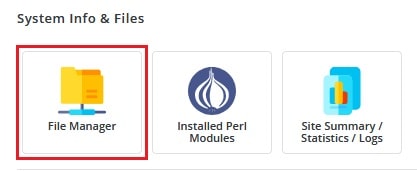
- Click on the System Info & Files and then File Manager.
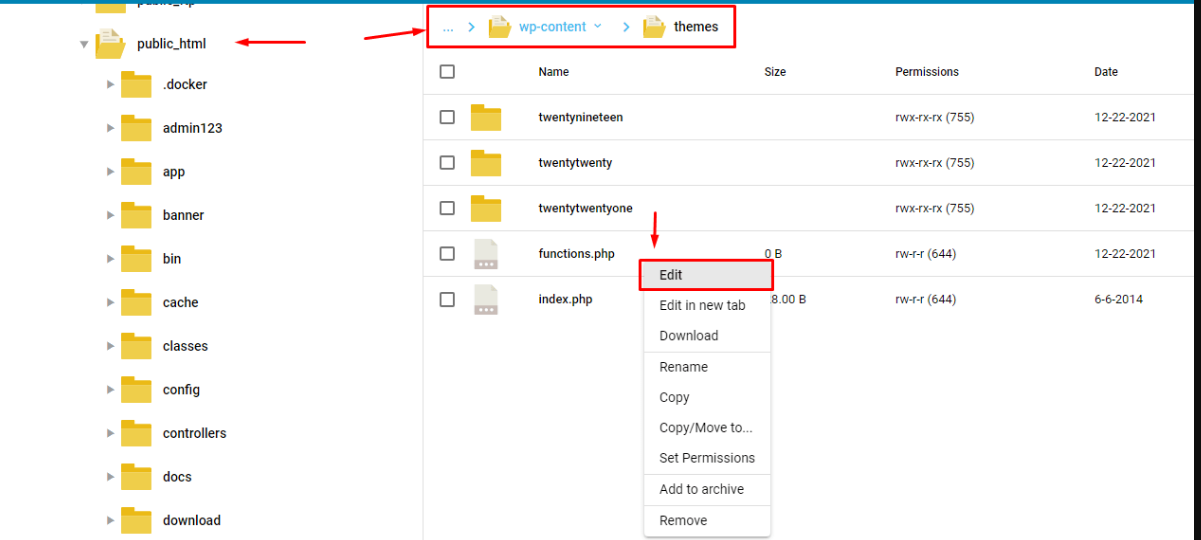
- Go into the folders to public_html/wp-content/themes.
- Open the folder of your current theme and locate the functions.php file.
- Right-click and select Edit.
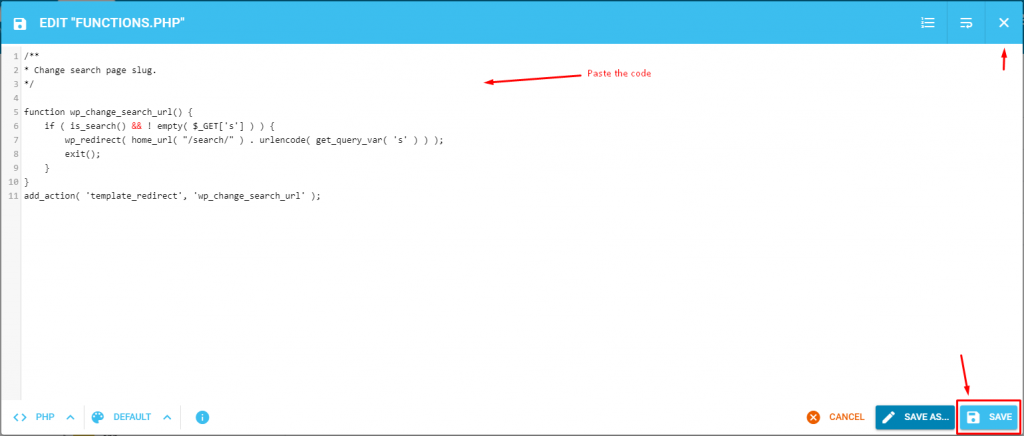
- Paste this code at the end of the file content.
function wp_change_search_url() {
if ( is_search() && ! empty( $_GET['s'] ) ) {
wp_redirect( home_url( "/search/" ) . urlencode( get_query_var( 's' ) ) );
exit();
}
}
add_action( 'template_redirect', 'wp_change_search_url' );
- Click the SAVE button and close the window.
Method 2: Edit the .htaccess File
You can modify the server file for a permanent fix even if you change themes. This will rewrite the URL using server rules.
- In your DirectAdmin, click the File Manager.
- Find the .htaccess file in your public_html directory.
- Click on the file and click Edit.
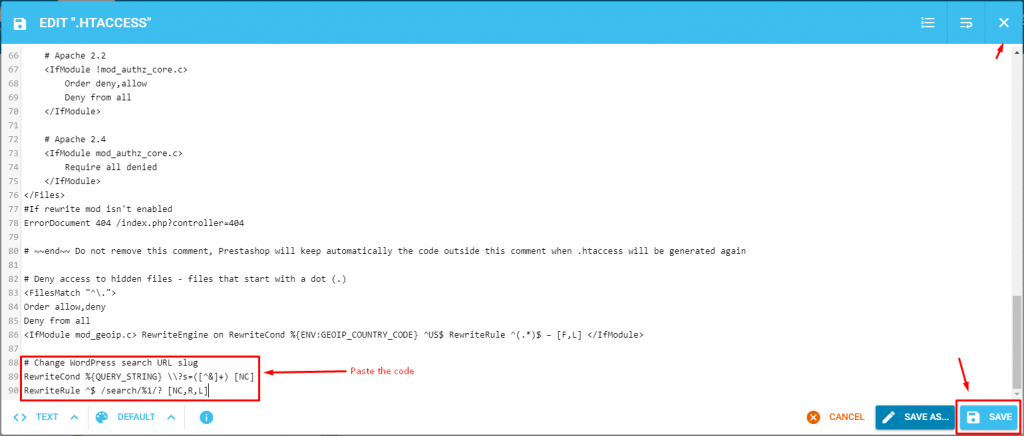
- Add the code at the bottom of the file:
# Change WordPress search URL slug
RewriteCond %{QUERY_STRING} \?s=([^&]+) [NC]
RewriteRule ^$ /search/%1/? [NC,R,L]
- Click SAVE to save the new rules to your server.
Why Should You Clean Your Search Links?
Standard links are easy for search engine crawlers to read. Organised links make your site appear more credible.
1. Better Search Engine Indexing
Search engines like links that have a folder structure. Instead of a search symbol, use a simple word like “/search/”. This makes internal site information more appealing to search engines.
2. Consistent Website Branding
You probably already have pretty permalinks for your blog posts. By changing your search URLs, all of your pages and posts will meet this same high standard. This makes it easier for readers to navigate your site.
Cantech Hosting Performance
We offer fast servers that handle URL redirects very quickly. Our servers are configured for DirectAdmin users for easy file management. You have fast and secure storage to store and process these search queries. Our support team is available to assist with other advanced SEO settings.
Conclusion
Optimising your search URL slug is good for SEO. You can do it with the theme functions or the .htaccess file. Each will help you convert your messy search URLs to clean ones.
Frequently Asked Questions (FAQ’s)
1. Will this change how my search bar works?
No, it will still work as it did before. The code simply converts the messy URL to a clean one as the page loads. This is a safe modification for all WordPress sites.
2. Can I use a plugin instead of code?
Yes, there are some SEO plugins that have this option in their settings. However, adding a few lines of code is better for your site speed because it does not require an extra plugin.
3. Do I need DirectAdmin for this?
DirectAdmin is just the tool we use to access your files. You can also do this using any other hosting panel like cPanel or by using an FTP client. The code for the files remains the same for every host.
4. Will this help me rank higher on Google?
Clean URLs are just one of many SEO strategies. It may not be the only thing to get you to the top, but it helps to improve your site structure. Google likes it when sites are easy for bots to crawl.
5. What if I don’t see the .htaccess file?
The file manager may be hiding the .htaccess file. You can look under the File Manager settings to show hidden files. If you still don’t see it, you can create a new file with the same name.
