How to Change the Schedule to Process Log Files in WHM?
Log processing is an important server monitoring activity. Admins need to configure the system logs routine to make the most out of it.
This article explains how to change log file scheduling for optimal system efficiency.
Follow the below steps to change the schedule for processing the log files.
Steps to Change the Schedule To Process Log Files
1. Log into your WHM root account.
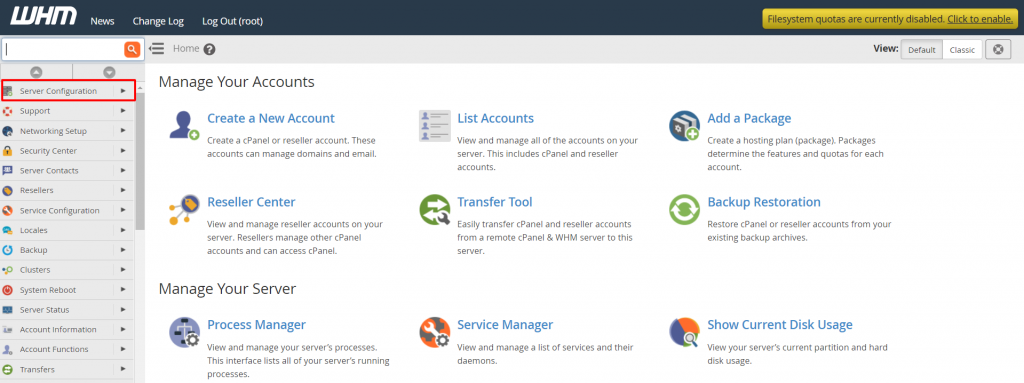
2. Choose the Server Configuration from the navigation menu.
3. Click Statistics Software Configuration
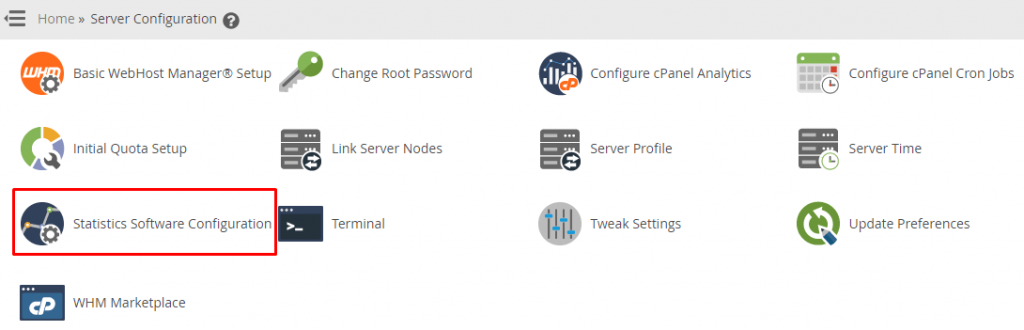
The Statistics Software Configuration interface appears.
4. Go to the Schedule Configuration section and edit the schedule hours for the Log Processing Frequency.
5. Click on Change.
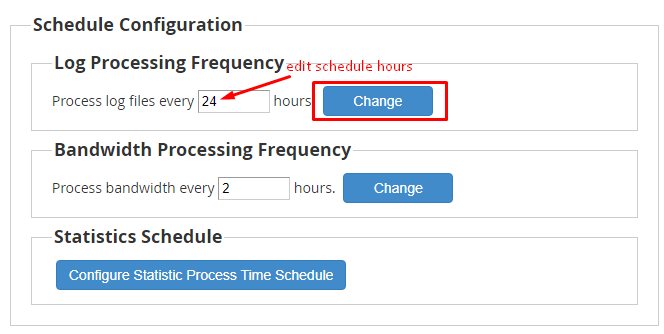
WHM will change the schedule to process log files for the server.
Conclusion
Configuring log processing in WHM is important to improve server monitoring. By following the above steps properly, you can change the schedule to progress log files in WHM successfully.
