How to Change the Document Root of Addon Domain or Subdomain in cPanel?
A document root is a directory, which is specific to each domain. Similarly Addon domains or subdomains in cPanel have their own document root folders that cPanel allows its users to edit the document root of both Addon domains and subdomains.
To modify the Document root of Addon Domain
Log in to your cPanel account.
Go to the Domains page and visit the Addon Domains.

Go to the Modify Addon Domain area and the edit icon is found next to the document root of the addon domain you want to edit.
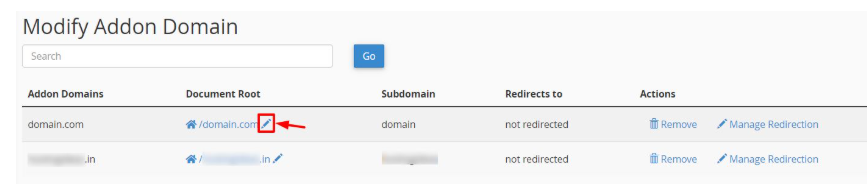
The Change Document Root window will be opened. In the Document Root field, enter the root desired document and click the Change button.
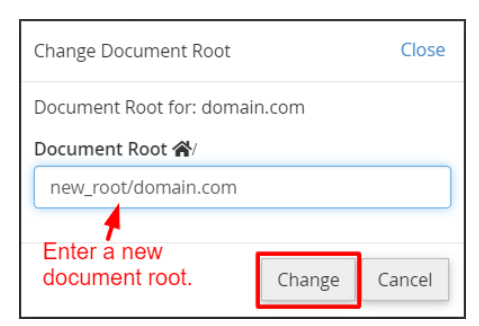
A new document root will be added to your addon domain with cPanel.
To Change the Root of Subdomain
Go to the Domains section and click Subdomains.

To edit a subdomain, in the Modify a Subdomain section, you should choose the edit icon on the document root of the subdomain you want to edit.
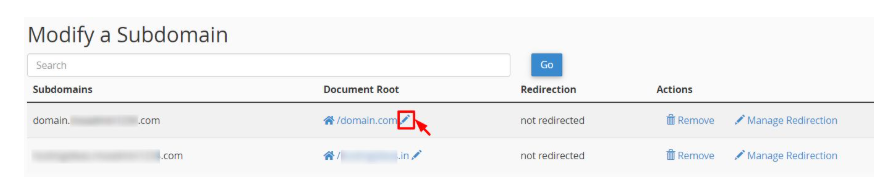
In the Change Document Root window type in the new document root in the Document Root field and click the Change button.
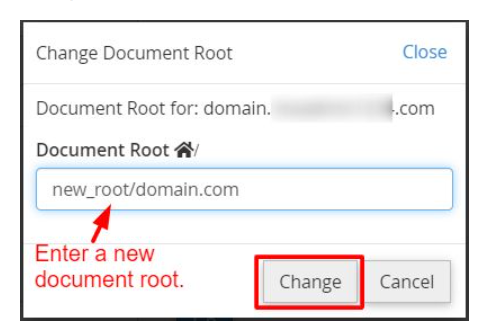
The new system will establish your subdomain as a document root.
Caution: It is possible that the changing document root can sometimes result in the site breaking, especially when links or pathways to the web application or the database are not available. This can go wrong in case you get in touch with your systems administrator or developer.
Get in touch with your systems administrator or developer in case of this problem.
