How to Add a Password to wp-admin Directory via cPanel?
The WordPress admin area can be accessed from the WordPress admin directory (wp-admin).A password-protected wp-admin directory adds an extra layer of security to your WordPress admin area. By using cPanel, you can add a password to the WordPress admin directory (wp-admin).
To Add Password to wp-admin Directory
1. Log in to your cPanel account.
2. Click on Directory Privacy in the FILES section.
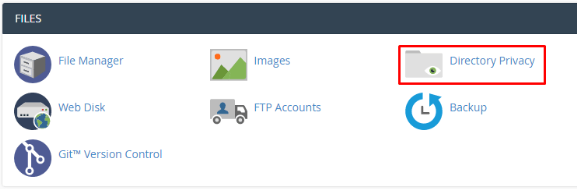
Your cPanel account’s directories will be displayed.
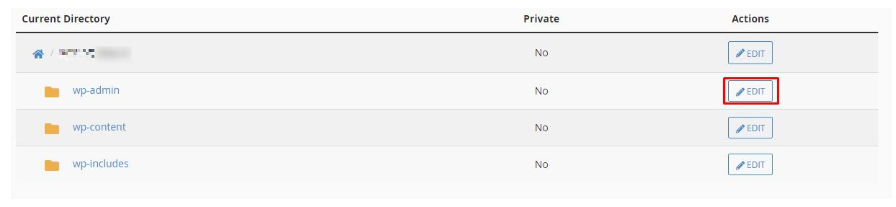
3. Locate the wp-admin folder. The folder with the name of your WordPress account contains it.
4. Select the wp-admin folder and click EDIT.
- In the Enter a name for the protected directory field, type a name.
- Click the Save button
- A message will appear saying that the protected directory has been created successfully.

6. Click Go Back.
Your login details will appear in the Create User section.
Login username: Enter your login username
Enter or generate a password
Confirm Password: Retype the password
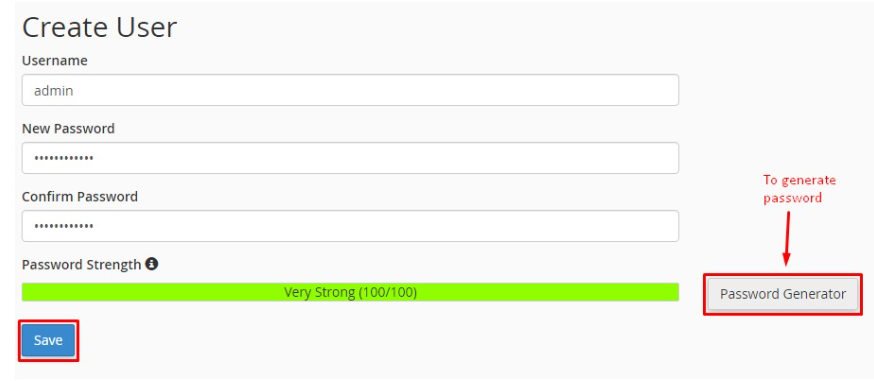
6. Finish by clicking the Save button after filling in all the details.
The following is how to add password protection to the wp-admin directory via cPanel. Next time you access your WordPress admin area, a login window will appear prompting you to log in.
It will open the WP-Admin Security Settings.
5. The following steps need to be carried out:
Make sure Password protection is selected.
