Storage is no longer a matter of the amount of space you can fit- it has a direct bearing on how quickly your system can boot, load applications, file transfers, and on high-demand workloads. Whenever you upgrade your laptop, assemble a gaming personal computer, or system-build a workstation, there is one question that naturally arises:
Should you choose an NVMe SSD or a SATA SSD?
They are both much faster than the old hard drives. They have however varied architecture, speed limit, real world performance, cost, compatibility and long term value. Any wrong choice will cost you more money to buy- or underpower your system.
This guide simplifies all you need to know in an easily understandable real-life context so that you make your decisions with confidence.
What Is a SATA SSD?
SATA (Serial Advanced Technology Attachment) is an interface used in storage, which was originally intended to be used with hard drives. As soon as the SSDs gained popularity they took up the SATA interface as it was popular.
Key Characteristics:
-
Uses SATA III interface
-
Maximum speed around 550 MB/s
-
Uses AHCI protocol (designed for mechanical drives)
-
Common in 2.5-inch form factor
-
Also available in M.2 SATA format
Compared with HDDs, SATA SSDs are enormous, with faster boot-up times, no sound, and durability. They can only be restricted by the SATA interface bandwidth though.
What Is an NVMe SSD?
NVMe (Non-Volatile Memory Express) is a flash storage specific protocol. NVMe drives are not connected via SATA but directly to the PCIe (Peripheral Component Interconnect Express) lanes on your motherboard.
Key Characteristics:
-
Uses PCIe interface (Gen 3, Gen 4, Gen 5)
-
Designed for high parallelism
-
Much lower latency
-
Dramatically higher bandwidth
NVMe bypasses the bottleneck of SATA since it connects the CPU to the peripherals via direct communication over PCIe lanes.
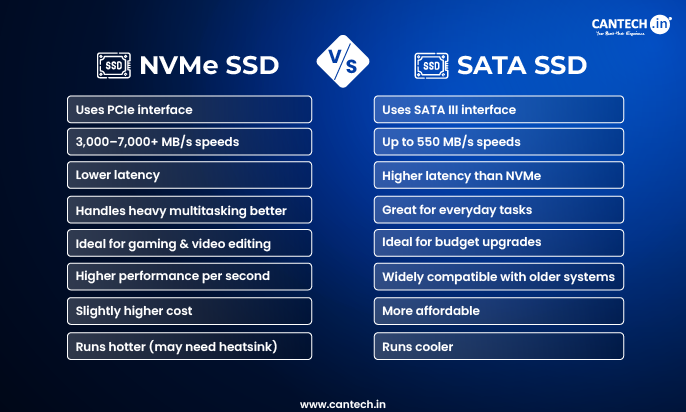
SATA SSD VS NVME SSD: Technical Comparison
| Feature | SATA SSD | NVMe SSD |
|---|---|---|
| Interface | SATA III | PCIe |
| Protocol | AHCI | NVMe |
| Max Speed | ~550 MB/s | Gen3: ~3,500 MB/s Gen4: ~7,000 MB/s Gen5: 10,000+ MB/s |
| Latency | Higher | Very Low |
| Command Queues | 32 commands | 65,535 queues × 65,536 commands |
| Heat Output | Lower | Higher |
| Power Consumption | Lower | Moderate |
| Typical Use | General computing | Gaming, editing, heavy workloads |
On paper, NVMe is several times faster. But what really matters is how that translates into everyday use.
Real-World Performance: NVMe VS SATA SSD, What Actually Feels Faster?
Boot Times
- SATA SSD: ~15-20 seconds
- NVMe SSD: ~8-12 seconds
NVMe will be a bit faster to boot, but both of them are much faster than HDD.
Large File Transfers (50GB file)
- SATA: ~1.5-2 minutes
- NVMe Gen 4: ~20-30 seconds
This is where NVMe shines.
Gaming Performance
- FPS difference: Minimal
- Load times: Faster on NVMe
- Texture streaming: Smoother on high-end NVMe.
When you expect NVMe to improve FPS – it does not normally do so. It does not make performance, but increases loading speed.
Video Editing & Creative Work
- Faster timeline scrubbing
- Increased playback of 4K/8K files.
- Quickening the rendering and exports.
NVMe is also significant in performance increments to creators.
PCIe Generations Explained
Not all NVMe drives are equal.
PCIe Gen 3
- Up to ~3,500 MB/s
- Very fast to the majority of users.
- Budget-friendly
PCIe Gen 4
- Up to ~7,000 MB/s
- Targeted at gaming and content creation.
- Superior performance balance.
PCIe Gen 5
- 10,000-14,000+ MB/s
- Premium pricing
- Currently overkill for most users
Gen 4 offers the best value-to-performance ratio to most builds today.
Important: Not All M.2 Drives Are NVMe
Many users assume M.2 automatically means NVMe. That’s incorrect.
M.2 refers to the form factor, not the protocol.
You can have:
-
M.2 SATA
-
M.2 NVMe
Always check:
-
Motherboard support
-
Slot key type (B-key vs M-key)
- PCIe generation compatibility
Thermal Considerations: Does NVMe Run Hot?
Yes -NVMe drives generate more heat due to higher speeds.
If temperatures rise too high, the drive may:
-
Throttle performance
-
Reduce sustained transfer speeds
Solutions:
-
Use motherboard heatsinks
-
Ensure good airflow
-
Avoid cramped laptop upgrades without cooling consideration
SATA drives typically run cooler.
Compatibility Checklist Before Buying
Before upgrading, confirm:
-
Does your motherboard support NVMe?
-
Which PCIe generation does it support?
-
Does your laptop accept NVMe or only SATA?
-
Is a BIOS update required?
-
Do you have available PCIe lanes?
-
Is there space for a heatsink?
Skipping compatibility checks is one of the most common upgrade mistakes.
Cost Comparison: Is NVMe Worth the Extra Price?
The price gap has narrowed significantly.
-
SATA: Slightly cheaper per GB
-
NVMe: Slight premium, but faster
For light users, SATA still offers great value.
For performance-focused users, NVMe offers better long-term investment.
In many cases today, the price difference is small enough that NVMe makes more sense.
Who Should Choose SATA?
Choose SATA if:
-
You’re upgrading an older system
-
Your motherboard doesn’t support NVMe
-
You’re on a tight budget
-
Your workload is basic (web, office, streaming)
-
You want cooler operation
SATA is far from obsolete- it remains practical for many users.
Who Should Choose NVMe?
Choose NVMe if:
-
You’re building a new PC
-
You’re a gamer
-
You work with large files
-
You edit video or 3D content
-
You want a future-ready setup
For modern builds, NVMe is generally the smarter choice.
Common Myths About SATA SSD VS NVME SSD
Myth 1: NVMe increases gaming FPS
False. It improves load times, not frame rates.
Myth 2: SATA is outdated
Not entirely. It’s still viable for many use cases.
Myth 3: All M.2 drives are NVMe
Incorrect. Always verify protocol.
Myth 4: NVMe always feels dramatically faster
Depends on workload. For light usage, the difference is subtle.
Future of SSD Storage
The storage market is clearly moving toward PCIe-based solutions.
Trends include:
-
PCIe 5.0 becoming mainstream
-
DirectStorage technology in gaming
-
Fewer SATA ports on new motherboards
-
Higher density NAND (QLC advancements)
While SATA won’t disappear immediately, NVMe is becoming the default in modern systems.
Conclusion:
If you’re upgrading an older machine or prioritizing budget, SATA remains a solid option.
If you’re building new, gaming, editing, or planning long-term performance- NVMe is the better choice.
The real decision isn’t just about speed. It’s about matching your storage to your workload, compatibility, and budget.
Make that decision carefully- and your system will feel fast for years.
FAQs
Is NVMe faster than SATA?
Yes, NVMe SSDs are significantly faster than SATA SSDs, offering up to 5–10x higher sequential speeds depending on the PCIe generation. SATA drives are limited to around 550 MB/s, while NVMe Gen 3 can reach 3,500 MB/s and Gen 4 up to 7,000 MB/s or more.
However, the noticeable difference depends on your workload. For basic browsing or office tasks, both feel fast. The performance gap becomes obvious during large file transfers, gaming load times, and creative workloads like video editing.
Is NVMe worth it for gaming?
NVMe is worth it for gaming if you want faster load times, but it does not increase FPS. Frame rates depend primarily on your GPU and CPU, not your storage drive.
Where NVMe helps is in reducing game launch time, loading screens, and asset streaming in large open-world titles. For competitive players focused on performance metrics like FPS, upgrading graphics hardware delivers more impact.
Is SATA SSD still good in 2026?
Yes, SATA SSDs are still reliable and practical for many users in 2026. They provide excellent performance for everyday computing, including web browsing, office work, streaming, and light gaming.
While NVMe has become the preferred choice for new systems, SATA remains a cost-effective option, especially for older PCs or secondary storage drives.
What is the difference between M.2 and NVMe?
M.2 is a form factor, while NVMe is a storage protocol. An M.2 drive can be either SATA-based or NVMe-based.
This means not all M.2 SSDs are NVMe. Before purchasing, check whether your motherboard supports M.2 SATA, M.2 NVMe, or both. Compatibility depends on the slot type and supported interface.
Can I use an NVMe SSD in a SATA slot?
No, an NVMe SSD cannot be used in a SATA-only slot because they use different communication protocols. Even if the physical connector looks similar, the underlying interface is not compatible.
NVMe drives require a PCIe-supported M.2 slot. Always verify your motherboard specifications before upgrading.
Which SSD is better for a Windows boot drive?
NVMe is generally better for a Windows boot drive because it offers faster boot times and quicker application launches. Systems equipped with NVMe typically start up several seconds faster than SATA-based systems.
That said, SATA SSDs still provide a major improvement over traditional hard drives and remain a solid choice for budget builds or older systems.