GPU Architecture describes the internal design of a GPU which dictates how thousands of processing cores, memory, cache and scheduling units cooperate to run parallel workloads. New generations of GPUs are using designs like NVIDIA Blackwell and Hopper, which are engineered for AI and machine learning, as well as for rendering and scientific computing.
Introduction to GPU Architecture
Graphics Processing Units (GPUs) have come a long way from their role in graphics rendering. Modern GPU architecture is used in AI, machine learning, gaming, scientific computing, and high-performance computing (HPC) today. While CPUs are designed with a few hundred cores, GPUs are based on a massively parallel design with thousands of cores that can handle multiple tasks at the same time, making them well suited for compute-intensive workloads.
A modern GPU architecture is made up of multiple layers of hardware, software and firmware. GPU systems are designed with various components, including Streaming Multiprocessors (SMs), CUDA Cores, Tensor Cores, RT Cores, memory subsystems, memory controllers, and high-speed interconnects, all of which contribute to their remarkable parallel processing capabilities.
This article discusses the principle behind NVIDIA GPU Architecture and its applications in AI, gaming, scientific computing, and enterprise workloads.
How Does GPU Architecture Works?
The first step in understanding GPU architecture is learning how the cores, memory hierarchy and control units work together to efficiently process parallel workloads.
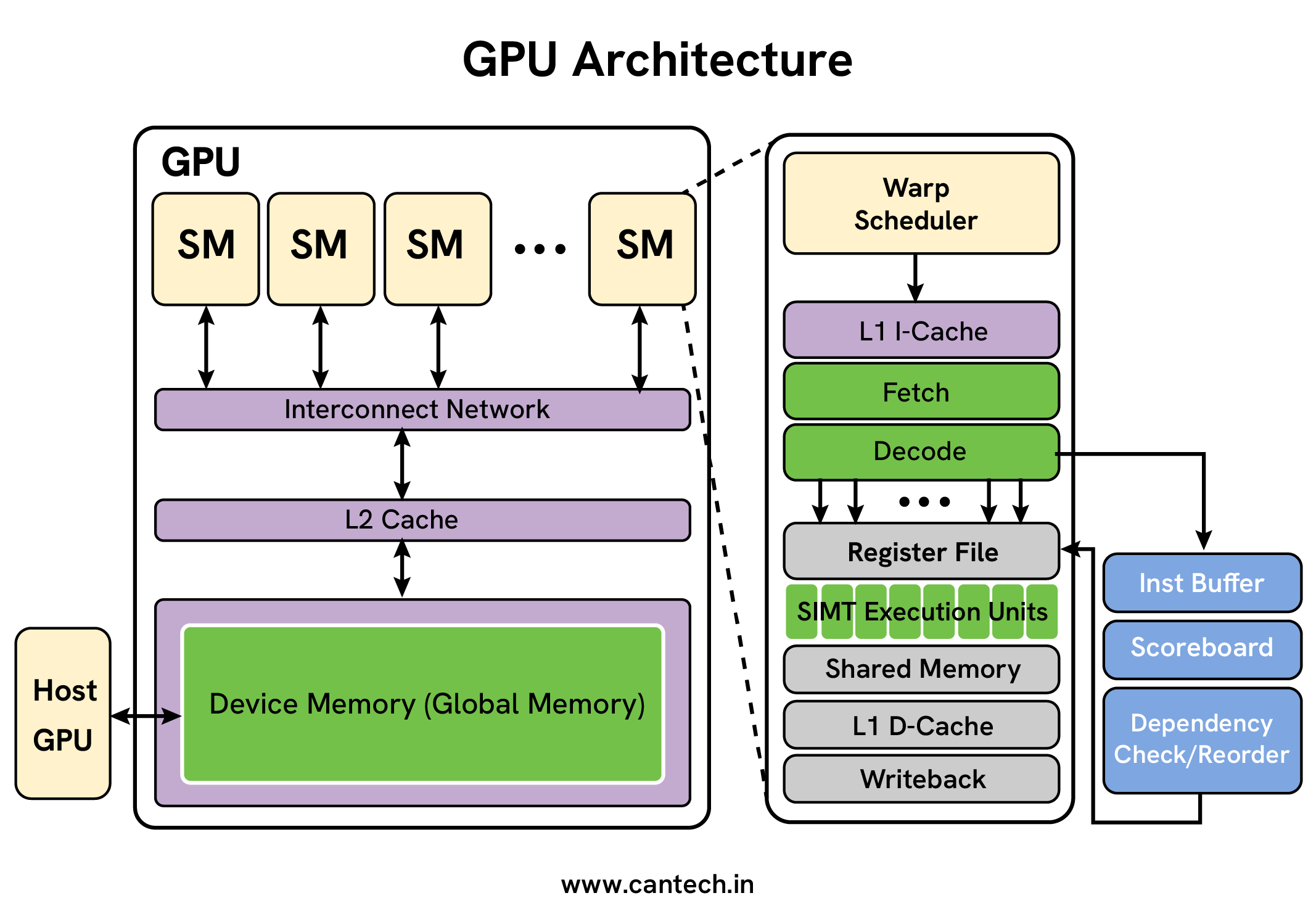
NVIDIA built their GPU architecture to achieve tremendous parallel computing and superior performance results. The Streaming Multiprocessor forms the foundation of the NVIDIA GPU structure. SM units contain multiple CUDA cores and built-in structure to fetch instructions while managing registers and shared data space. The GPU’s SMs serve as its main processing elements by managing thread parallel execution that defines the GPU’s programming structure. A GPU’s total processing speed depends on its number of Streaming Multiprocessors because more of these cores increase the parallel processing workload.
Each CUDA core shows great effectiveness at handling math operations and memory transfers. These processor cores run the same command across different data points all at once through SIMD capabilities. Having many CUDA cores allows faster speed in multiple parallel processing tasks. The design includes a shared memory feature that delivers fast access to data between threads operating inside an SM unit. Threads obtain memory data faster on shared memory because it runs significantly better than global memory which serves all Streaming Multiprocessors.
Don’t miss out on this essential guide on what is cuda.
Layers and Components of GPU Architecture
When observing modern GPUs, one shouldn’t view them as unified products. Instead, they can be seen as products of engineering that deliver startling graphical output and large-scale parallel processing.
Hardware Layer
This consists of the silicon and circuitry that makes up the GPU. The main component consists of Streaming multiprocessors (SM) or other similar processing units. Each Streaming Multiprocessor contains:
- Cores (CUDA Cores, Stream Processors): SMs are stacked with hundreds or thousands of simple, and extremely efficient cores.
- Specialized Units: These are units dedicated to unique tasks such as texture mapping and pixel rendering.
- Memory Subsystem: This contains the components such as the SRAM (Static Random Access Memory) caches (which can be Layer one and Layer two of the cache) and the high GDDR (Graphics Double Data Rate) or HBM (High Bandwidth Memory) VRAM (Video Random Access Memory) modules.
This design puts a large number of processing cores that can efficiently handle multiple calculations when compared to the small, advanced cores of a CPU, which performs complex processes.
Software Layer
This layer contains:
- APIs: This encompasses DirectX, Vulkan and OpenGL for GPU (Graphics Processing Unit) oriented tasks, and for general purpose computation (GPGPU) it includes CUDA and OpenCL.
- Drivers: These are the software components that interpret and translate standard API (Application Programming Interface) calls to the specific instructions of the GPU.
- Development Tools: This includes different libraries and frameworks which aid in specific tasks for example NVIDIA’s cuDNN which assists in Artificial Intelligence (AI) and OptiX which assists in Ray Tracing.
This layer abstracts intricate hardware components, enabling developers to code for various GPUs without requiring knowledge of specific hardware configurations.
Firmware Layer
With its position between hardware and software, firmware is a type of low-level software that is permanently written onto the GPU. It includes:
- Microcode that determines how the SMs schedule and execute particular threads.
- Initialization code that gets the GPU up and running when the system powers on.
- Power management routines that scale the clock speed and voltage adaptively.
It functions as the GPU’s internal conductor, allocating and guiding resources to ensure that the hardware follows the driver’s instructions promptly and correctly.
GPU Memory Architecture and Interconnect
GPU performance depends mostly on how well its memory system performs. NVIDIA GPUs have multiple memory levels with registers as the fastest local space per thread followed by shared memory which has faster access than global memory which offers large capacity yet slow speed across all Streaming Multiprocessors. Memory optimization plays a major role because it deals with the main performance limitation that affects complex computing operations.
NVIDIA keeps enhancing its memory technologies by introducing Unified Memory for smooth CPU-GPU memory sharing and HBM which transfers data faster than standard GDDR memory. The new memory solutions help both speed up data transfers and keep GPUs fully occupied.
The interconnect system ensures that different GPU components and multiple GPUs can easily share information. NVLink and NVSwitch technology from NVIDIA generates fast energy-efficient connections between GPU processing units and multiple GPUs with each other. The interconnected components help enhance GPU performance when handling complex HPC and AI training applications.
NVIDIA GPU Architecture Overview
NVIDIA has improved its GPU architecture gradually since its beginning. In the beginning of GPU development graphics rendering occupied most attention with simple design for Streaming Multiprocessors. The company intensified its effort to build better parallel computing features after the applications grew beyond their original display purposes. Graphics Processing Unit (GPU) technology made breakthrough changes through multiple product generations.
More CUDA cores appear in each product update to provide stronger processing for harder jobs. More CUDA cores at every generation helps NVIDIA handle bigger AI and HPC application demands.
The construction of the SM system has been modernized by adding better ways to schedule instructions while making the register file and shared memory work better. Enhanced operations allow the system to use resources better and make each core work faster.
NVIDIA keeps introducing better memory technologies to ensure faster performance through HBM and GDDR memory. The new memory solutions help GPUs process data faster to eliminate memory restrictions.
Unified Memory
his innovation simplifies memory management by allowing seamless data sharing between the CPU and GPU, reducing the overhead associated with data transfers and streamlining the programming model.
Curious how CPUs and GPUs share responsibilities? Explore our complete guide on CPU vs GPU difference.
High-Speed Interconnects
The introduction of NVLink and NVSwitch technologies has revolutionized inter-GPU communication, enabling efficient scaling of performance in multi-GPU systems. This is particularly important for large-scale AI training and HPC simulations.
The newest architecture designs feature Tensor Cores to speed up deep learning operations. The cores handle deep learning operations through detailed matrix multiplication work and achieve better AI computation results. Don’t miss out on this essential guide on best gpu for deep learning.
Today’s advanced processing hardware provides both Ray Tracing Processing Units that perform ray tracing better than software. These cores enable better graphics rendering of games and visual content which performs better than ray tracing done through regular software. New NVIDIA architectures integrate advanced programming language support for CUDA and Vulcan to let developers create optimal GPU execution programs. The programming models let programmers tap into every aspect of how the GPU handles parallel work.
GPU Architecture: Applications and Impact
The advancements in NVIDIA’s GPU architecture have had a profound impact across numerous fields:
High-Performance Computing (HPC)
GPUs are now indispensable tools in scientific simulations, enabling researchers to tackle complex problems in fields like climate modeling, drug discovery, and materials science. The massive parallel processing capabilities of GPUs significantly reduce the time required for these simulations, accelerating scientific breakthroughs. Explore the full article on what is high performance computing.
Artificial Intelligence (AI) and Machine Learning (ML)
The rise of deep learning has been inextricably linked to the advancements in GPU technology. GPUs excel at the matrix multiplications and other operations central to deep learning algorithms. The availability of specialized Tensor Cores further enhances the performance of AI and ML workloads, accelerating the training and inference of complex models. This has led to breakthroughs in areas like image recognition, natural language processing, and robotics. Explore the full article on machine learning vs ai.
Gaming
GPUs are the foundation of modern gaming, enabling high-fidelity graphics and immersive gameplay experiences. The advancements in ray tracing capabilities, powered by dedicated RT Cores, have brought unprecedented levels of realism to gaming visuals.
Data Centers
NVIDIA GPUs are increasingly deployed in data centers for accelerating various workloads, including AI inference, high-performance computing, and big data analytics. Their ability to handle massive datasets and perform complex computations efficiently makes them vital components in modern data center infrastructure.
Autonomous Vehicles
The processing power of NVIDIA GPUs is crucial for enabling the real-time processing of sensor data and decision-making required for autonomous driving. The ability to process vast amounts of data from cameras, lidar, and radar sensors at high speeds is critical for ensuring the safety and reliability of self-driving cars.
Why GPU Architecture Matters for GPU Servers?
Accelerated Parallel Processing
GPU servers excel in delivering massively parallel workloads, greatly reducing the time taken for completing the tasks which use a great amount of computation. This would help the implementation of several applications that are quite data intensive, the likes of which include deep learning, training AI models, scientific simulations, and big data analytics, as they need to work with huge volumes of data at once to achieve efficiency. The parallel architecture of the GPUs offers time savings during execution with respect to conventional CPU-based servers.
Capabilities for Superior Graphics Rendering
For applications needing high-quality graphics rendering, such as video editing, animation, and computer-aided design (CAD), GPU servers deliver unparalleled performance. Their custom architecture is specifically designed to render and create complex visual data, which delivers fast rendering times and higher visual fidelity. Essentially, these improved capabilities lead to greater productivity and enhancement of the workflow of professionals in the creative field.
Optimized Use of Resources
In some workloads, GPU servers offer much superior utilization of computing resources than their CPU counterparts. In addition, they achieve some degree of higher throughput and lower latencies for parallel tasks, which translates to substantially fewer CPUs needed to deliver similar performance levels. This, in turn, translates into considerable cost savings with regard to hardware acquisitions and energy consumption.
Seamless Scalability
GPU servers can seamlessly scale up with the growing computational requirements. Adding extra GPUs in a server cluster leads to a linear increase in processing power, providing a flexible and economical solution to the problem of expanding workloads and increasing amounts of data. Adaptability is particularly useful for businesses and research institutions with continuously evolving computational needs.
Reduced Time-to-Results
The faster processing power of GPU servers directly translates into faster time-to-results. This is a vital benefit given its wide applicability, from accelerating scientific research and drug discovery to speeding up the development and deployment of AI models. Shorter turnarounds allow faster iterations, higher productivity, and faster time to market for products and services.
Real-time Data Processing
This makes GPU servers ideal for applications where real-time data processing is expected, such as high-frequency trading, navigation of autonomous vehicles, and real-time video analytics. This very rapid data processing power means that GPU servers can be critical to systems that require immediate response and life-or-death decision-making. This immediacy can be the deciding factor in the case of delay discrimination in mission-critical applications.
Improved AI and Machine Learning Capabilities
In addition to general parallel processing, GPU servers bring additional specialized capabilities for AI and machine learning workloads. For instance, Tensor Cores in NVIDIA GPUs greatly speed up training and inference of deep learning models, shortening the time taken to develop and deploy models. Thereby, innovation becomes faster, and the AI solution is deployed much more efficiently and quickly.
Energy Efficiency for Excellent Performance
While GPU servers draw massive power, they are also built for energy efficiency. More modern power management strategies and architecture lessen energy consumption per compute unit, which reduces operational costs and the carbon footprint compared to a lesser-efficient server. This becomes a major consideration in bigger deployments and eco-friendly operations.
Easy Management and Administration
A lot of the GPU server solutions come with good management tools and easier administration interface. These aspects of simplicity in management help pave the way for alleviation of the overhead needed for managing a massive computing infrastructure, as the IT teams can use this time on tasks of greater urgency. Such streamlined management, in turn, means an increase in efficiency and less downtime.
Don’t miss out on this essential guide on what is a gpu.
GPU Architecture vs CPU Architecture
1. Generalist vs. Specialist Design
Processing units in computers, like the central processing unit (CPU), are often called the ‘brains’ of the computers because they are generalist processors. They have a small number of cores, typically 4 to 64, that are very powerful and good at complex tasks like logic and branching (if-then-else questions) and versatile in their management of the operating system.
On the other hand, processing units like the Graphical Processing Unit (GPU) are efficient, specialist processing units. They give up the complex ‘intelligence’ of the individual cores in a CPU for a huge collection of thousands of simple and smaller cores that are optimized for doing the same math operation at a time for a large data set.
2. Sequential vs. Parallel Processing
The main difference is in the way they process instructions. A CPU does sequential processing, concentrating on completing one complicated task at a time, as quickly as possible before going on to the next one. This is best for activities that need a high level of control and a quick response time, such as databases and word processors.
In contrast, a GPU is designed for extreme parallelism. It takes a large problem and divides it into many smaller sub-tasks that can be solved simultaneously. This “throughput-oriented architecture is what makes GPUs more efficient than CPUs when it comes to deep learning models, rendering 3D graphics, or any other activity that requires numerous matrix multiplications.
3. Memory and Hardware Allocation
Their specific goals influence how they’re configured physically. Most focus of a CPU is devoted to cache memory and control logic in order to reduce the downturns that occur with program switches.A GPU omits this type of management and directs the bulk of its transistors to its ALUs. While CPUs attempt to conceal memory latency with considerable cache, a GPU lacks this memory and initiates other parallel processes, thus working around the problem.
Conclusion
NVIDIA GPU architecture has changed a lot over the years. What started as graphics hardware is now used for AI, research, gaming, and heavy computing work. GPUs are built to handle many tasks together, which is why they perform so well.
As technology moves forward, GPU design will also keep improving. Knowing how NVIDIA GPUs work gives a clear idea of why they are so important in today’s computing world.
FAQs
What is GPU Architecture?
GPU architecture is just the way a GPU is designed. It shows how the GPU does many things at the same time. This is the reason GPUs are used for graphics, AI work, and heavy tasks.
What are GPU Servers, and How Do They Differ from Traditional Servers?
GPU servers leverage the parallel processing power of Graphics Processing Units (GPUs) alongside CPUs. Unlike traditional servers that primarily rely on CPUs for computation, GPU servers are designed to accelerate computationally intensive tasks. This makes them ideal for applications like AI, machine learning, and high-performance computing. The key difference lies in the architectural design, focusing on parallel processing capabilities for significantly faster results in specific workloads. GPUs handle many calculations simultaneously, whereas CPUs handle them sequentially. This parallel approach is what provides the speed advantage. As a result, GPU servers are substantially more efficient for specific tasks than CPU-only servers.
What Makes GPU Architecture Important for AI Workloads?
GPU architecture is built to handle parallel processes, enabling thousands of cores to perform thousands of operations in parallel. GPUs are much more efficient than CPUs for AI workloads due to its features like Tensor Cores, high memory bandwidth, optimized memory hierarchy, etc. which helps speed up the training of AI models, deep learning and inference.
What are the Benefits of using GPU Servers over CPU-Servers Only?
The most significant advantage is dramatically faster processing for specific applications. GPU servers deliver significantly reduced processing times for parallel tasks, leading to quicker results and increased productivity. They are more energy-efficient for certain workloads, resulting in lower operating costs. Scalability is another key benefit; adding more GPUs easily increases processing power. This makes them a cost-effective solution for growing computational needs. Specialized applications like AI and deep learning greatly benefit from the architecture optimized for those tasks.
What are the Typical Costs Associated with GPU Servers?
The cost of GPU servers varies greatly depending on several factors. The number and types of GPU significantly impact the price. High-end GPUs with more CUDA cores and faster memory are more expensive. The overall server specifications, including CPU, RAM, and storage, also contribute to the total cost. Maintenance and support contracts add to the ongoing expenses. The initial investment can be substantial, but the return on investment (ROI) can be significant due to the increased processing speed and efficiency. However, Cantech’s cheap GPU servers make it more affordable to access powerful GPU computing without heavy upfront investment.
How Does GPU Architecture Impact GPU Server Performance?
The architecture of GPU has a direct impact on the performance of the GPU servers as it defines the processing capacity, memory bandwidth and parallel computing power of the GPUs. By leveraging the capabilities of modern GPU architectures, the GPU server can process complex tasks in a more efficient manner, with reduced latency and increased throughput, while reducing processing time. The GPU server can complete complex tasks more efficiently, with lower latency and higher throughput, and reduce processing time due to the capabilities of modern GPU architectures.