How to Increase Max Upload Size of PHPMyAdmin via WHM/cPanel?
You may not be able to upload or import a huge sized database in cPanel. The problem continues despite size expansion of the php.ini directives like post max size, upload max filesize and memory limit. The solution to this issue is to increase the MySQL database upload limit in the PHPMyAdmin, or, to put it another way, to increase the upload limit of PHPMyAdmin.
Increasing the Max Upload Size of PHPMyAdmin
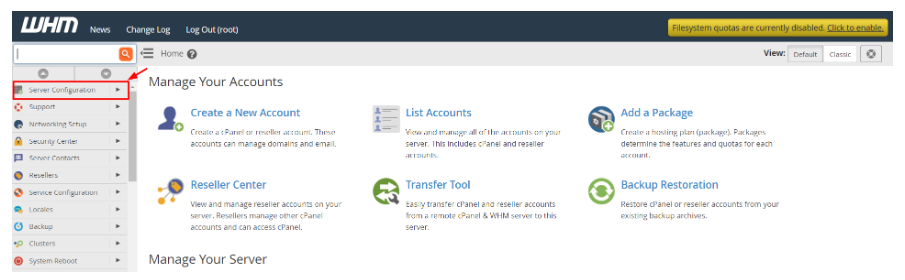
Enter into your root account of the WHM panel.
Click on the navigation menu, Server configuration.
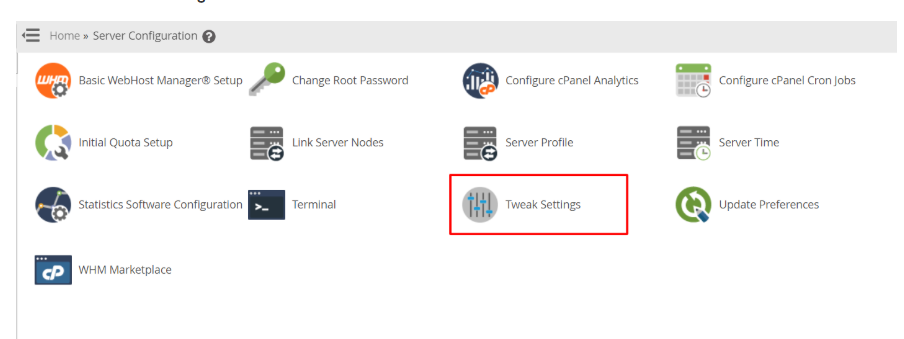
Click on “Tweak Settings.”
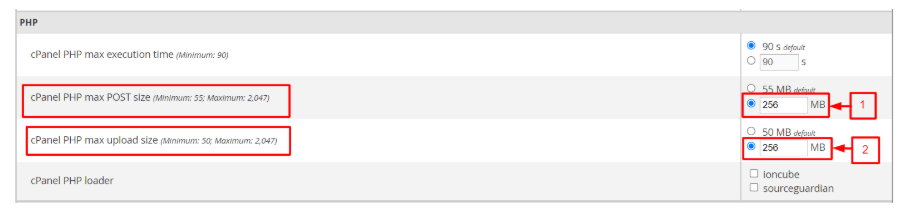
Go to the PHP section and find the item cPanel PHP Max POST size. Click the radio button next to the text box and fill in with the amount of value you would like to assign as your desired upload size.
Follow the same steps with the field of cPanel PHP Max upload size.
Remember to save the changes.
These changes will take time to be implemented within the system, based on the conditions of servers. You can make sure the changes have been implemented by logging in to your phpMyAdmin.
Now the database could be uploaded without any problem.
