Disable Email Notifications for SSL Expiration from cPanel
The cPanel automated email messages that are dispatched when the time to renew the SSL certificates is near are a fundamental form of safety measure since they remind you when the security of your web site expires. However, with those who have had their hosting company or even the AutoSSL functionality of cPanel to take charge of the renewal process, such persistent notices, especially the ones that are a premium renewal, are likely to clog an inbox very fast.
Contact Information therefore gives extensive control of these alerts through cPanel. You can simplify your communications by turning off the irrelevant emails that contain information about the expiration of the SSL, though you remain dependent on the AutoSSL service to ensure that your site is safe and up-to-date.
To Turn off SSL Expiry cPanel Notifications
Log in to your cPanel account.
Click the Contact Information option in the Preferences section.

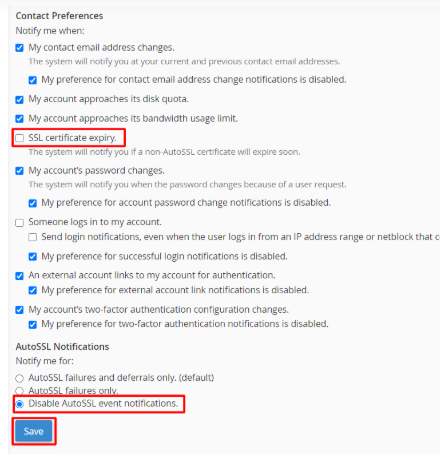
The next one is Uncheck SS certificate expiry and choose Disable AutoSSL event notifications and then below AutoSSL Notifications. Click the Save button.
cPanel displays a success message of the changes. You will find in the list that the notifications of the expiry of the SSL and a certificate whose expiry is approaching are turned off.
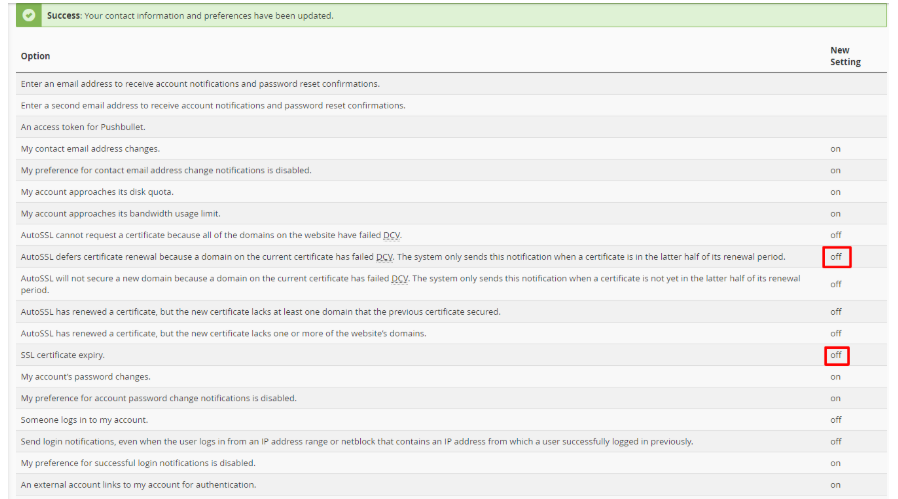
Now these notifications will no longer be sent by cPanel.
You can turn the flow of expiration and renewal emails off successfully by visiting the Contact Information area of your cPanel and just changing the AutoSSL Notification settings. It is highly advisable to do this to users who depend on cPanel auto certificate system that reduces clutter in your inbox and does not weaken the security of your site. This simple setting adjustment will make sure that you only get the necessary communications you need thus being able to have a more focused and effective administration of your web hosting account.
