How to Block Bots with robot.txt File via cPanel?
Non-user traffic, such as bots, can negatively affect your website’s performance. There are several ways to protect your website from abusive bot traffic. With this tutorial, you will learn to block bots using the robot.txt file with your cPanel account.
The robot.txt file is located in the root directory of your website and enables search engines to crawl and index it. According to its configuration, it also determines which files should be accessible to the bots. By using the robot.txt file, you can also prevent these bots from indexing your website in search engines.
To Block Bots Using Robot.txt File
1. Log in to your cPanel account.
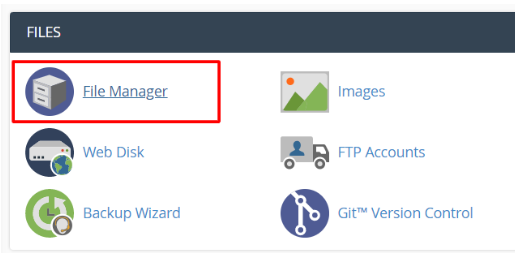
2. Click on File Manager in the FILES section.
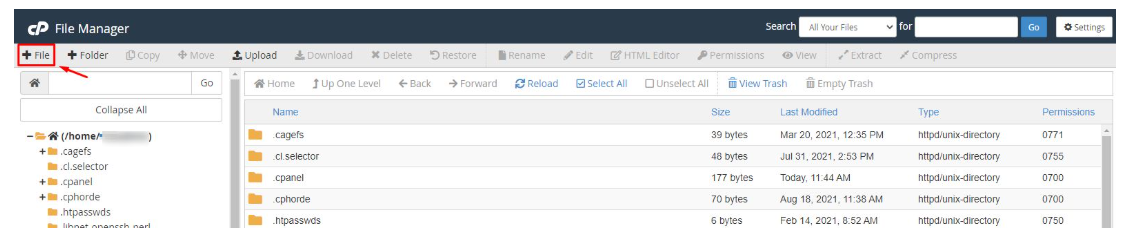
The File Manager interface will appear. The robot.txt file must be created.
3. Navigate to the top left corner of the interface and click the +File button.
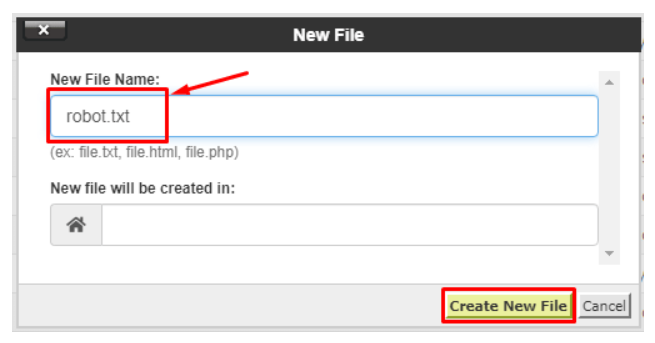
4. Click Create new file and name the file robot.txt.
5. Locate the robot.txt file and right-click it. Select the Edit option.
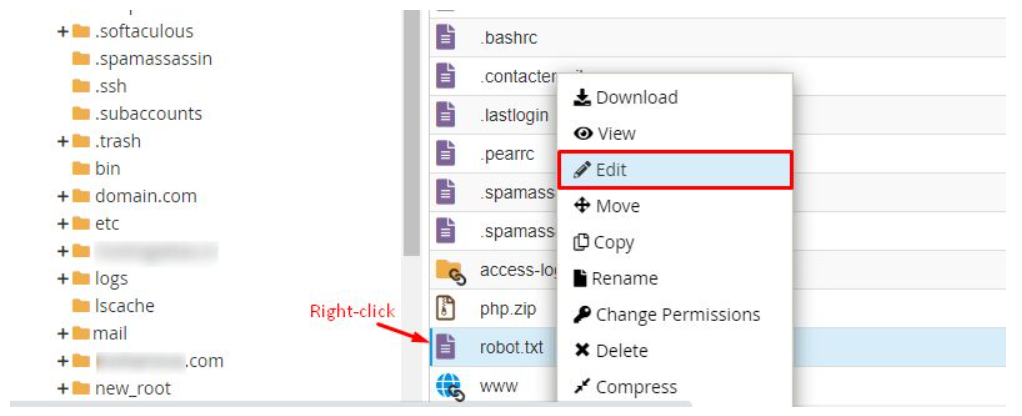
Your information will be entered/edited in the file.
6. Add this code to the file.
RewriteEngine On

RewriteCond %{HTTP_USER_AGENT} Baiduspider [NC]

RewriteRule .* – [F,L]
This code will stop the Baidu search engine bot.
7. Click the Save Changes button and Close the file.

With this robot.txt file, Baidu cannot use bots on your website.
In short, you can block bots from other search engines by editing the robot.txt file using cPanel File Manager.
