How to Block Bots from Apache with WHM/cPanel?
Bot crawlers play integral roles in web operations as they scan and index a site’s content for optimizing search engine results and online discoverability. While they assist in increasing a site’s visibility in search results, it’s important to remember that not all bot crawlers are useful.
Bots that excessively load your server, consume bandwidth, and disrupt your network are harmful. Setting aside the non-essential crawlers, the harmful ones definitely need to be identified and blocked from your site. Luckily, this can easily be accomplished using Apache on a WHM/cPanel server.
To Block Bots from Apache
Access WHM as root. This level of access is required to make the necessary changes to the server configuration at the global level.
After that, go to WHM’s left side navigation menu for the ‘Service Configuration’ which contains a set of configurable options for managing services on the server which includes Apache.

After this step, select ‘Apache Configuration’ which is in the ‘Service Configuration’ tab, so you can adjust the settings for the Apache web server in order to change how it processes and responds to requests.
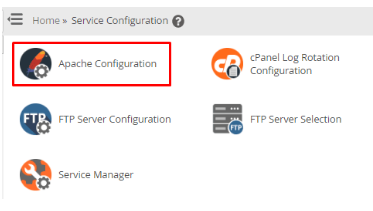
You’ll see various configuration choices for the Apache server featuring an extensive array of options that can be customized.
Click on ‘Include Editor’. The ability to add custom configuration directives to Apache means that you can add targeted customization to the server environment directly.
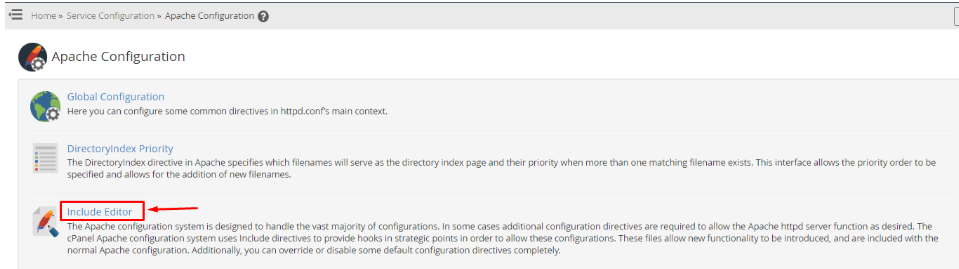
This is where you can set Apache configurations that control how the server interacts with visitors and bots at the site level and server level.
5. For the ‘Pre Main Include’ section, from the dropdown that says ‘I wish to edit the Pre Main configuration include file for:’, choose ‘All Versions’. This means that whatever version of Apache has been running will have your
configurations for consistency in managing bots across server versions.
In the ‘Pre Main Include’ section, a text box is provided to guide you in adding your unique configuration instructions.

6. Use the following code for the text box and then click the ‘Update’ button to save your changes:
<Directory "/example">
  SetEnvIfNoCase User-Agent "MJ12bot" bad_bots
  SetEnvIfNoCase User-Agent "AhrefsBot" bad_bots
  SetEnvIfNoCase User-Agent "SemrushBot" bad_bots
  SetEnvIfNoCase User-Agent "Baiduspider" bad_bots
 <RequireAll>
   Require all granted
   Require not env bad_bots
 </RequireAll>
</Directory>
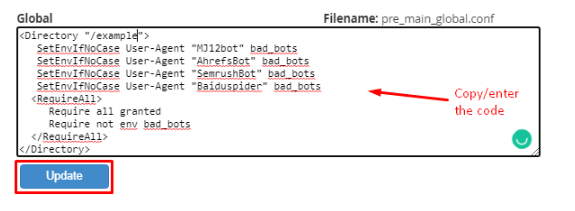
Note: In the first line, within the Directory section, where we set it as ‘/example’, it is essential to specify the directory path where your website’s files are hosted. For cPanel servers, this is ‘/home’ by default, but it may vary based on your server configuration. Moreover, you have the flexibility to block additional unwanted bots by appending more entries in the code following the provided syntax structure.
Here’s a non-exhaustive list of bots commonly recognized as detrimental:
Bad_Bots List
MJ12Bot
Baiduspider
AhrefsBot
SEMrushBot
DotBot
MauiBot
YandexBot
PetalBot or AspiegelBot
Edit
