Create Different Types Of Web Redirects Through cPanel.
Keeping the organization of your website proper and the user interface seamless is essential when it comes to managing the website structure of your website. For example, making sure users are redirected to the correct location of your website when entering in different URLs. A redirect is an automated message given to a search engine or a visitor´s web browser instructing them to a new location of the content they are searching for. If you do not understand how to implement a redirect, users will experience frustrating “404 Not Found” pages, and you will lose valuable SEO authority.
No coding knowledge is necessary to implement this. If your hosting uses cPanel, you have access to a powerful, user-friendly interface that allows the creation of different types of web site redirects in a few simple clicks. This guide is designed to help you continue the process of modern web site design by teaching you how to do the most frequently used and most important redirects.
To create a site redirect:
In cPanel, click on the redirects button in the domains section.
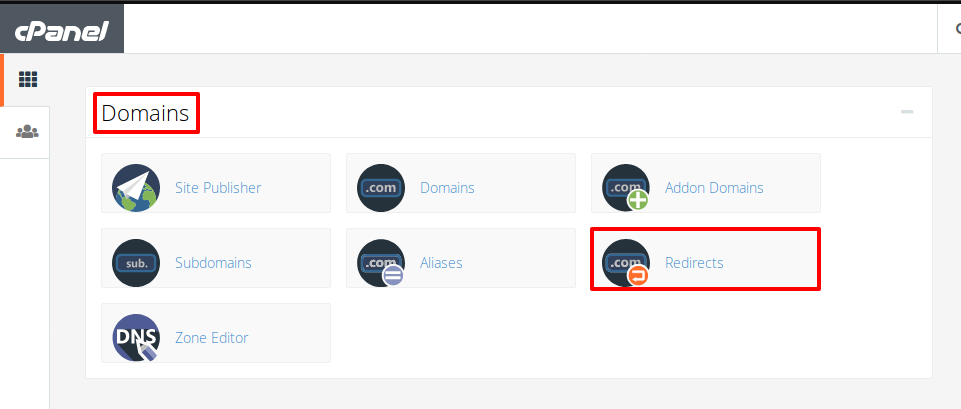
In this option, you can do temporary and permanent redirects.
From the perspective of the end-user, how a server responds to a redirect depends on the status code sent to the browser. In the case of a temporary redirect, the server responds with a status code of `302`, which tells the browser to not save this redirect in the cache. Unless you are sure that this redirect will not be changed in the future, temporary redirects are typically recommended.
A `301` status code, which states that a redirect is permanent. This means that the browser will save it in the cache. This tells the browser that the page has permanently moved, and the URL should be updated. It also asks all search engines and user agents visiting the page to update their URL for that page in their systems.
There are times that both temporary and permanent redirects lead to an error, and in these cases it is recommended to use a plain HTML, or PHP redirect.
Conclusion
Learning to master the use of the cPanel Redirects tool is a huge benefit in a valuable part of managing a website. If you need to make an SEO impacting permanent change to a redirect and then access this tool to make a 301 Moved Permanently change, you can. If your change is temporary and you access the same tool, you can make a 302 Found redirect.
When you implement 301 (for domain changes or relocating old pages) on a consistent basis, you avoid having users be exposed to broken links, and you also facilitate the movement of “link equity” or “SEO value” stored on your old URLs to new ones, in the process of which you are ensuring protection of the value on those URLs. Value of having serviceable, professional, and sortable websites to keep order in your site and prevent its chaotic nature from damaging your reputation, is just one of the numerous website optimization benefits.
